Premiere Pro Alternative for Low End PC: 5 Editors (2026)
Premiere Pro alternative for low end PC: Shotcut, Kdenlive and OpenShot publish hardware needs, Clipchamp and CapCut run online. Limits and proxy tips.
•6 min read•Video Editing & AI Video

Verdict:Shotcut and Kdenlive are the safest free picks for a weak PC because both publish exact CPU and RAM needs and both support proxy editing. OpenShot is simpler. Clipchamp and CapCut run in a browser. Neither publishes a hardware floor, and DaVinci Resolve is not a lighter option.
Quick comparison
| Tool | Price | Platforms | Best for | Tested |
|---|---|---|---|---|
| Shotcut | Free, open source | Windows, macOS, Linux | Low-end PC owners who want a free editor with published CPU and RAM needs plus preview scaling and proxies | Historical test report |
| Kdenlive | Free, open source (GPL-3.0) | Windows, Linux, macOS | Windows or Linux users who want a multitrack editor and are willing to use proxy clips on a weak CPU | Historical test report |
| OpenShot | Free (GPL v3 or later); the Microsoft Store version is paid | Windows, Linux, macOS (Intel) | Beginners on older machines, including a 32-bit Windows installer, who want a simple editor | Docs only |
| Clipchamp | Free to 1080p without a watermark; premium comes with Microsoft 365 Personal or Family | Web, Windows | Quick 1080p edits when you would rather not install a desktop editor | Docs only |
| CapCut | Free plan; Pro $19.99 per month or $179.99 per year | Web, Desktop, Mobile | Short social videos from templates, in the browser or on a phone | Docs only |
Independent comparison. Paid placements are labelled separately; editorial links earn no affiliate commissions. Learn more.
See the tools in action
Images from the linked documentation. Versions and features may differ from current plans.
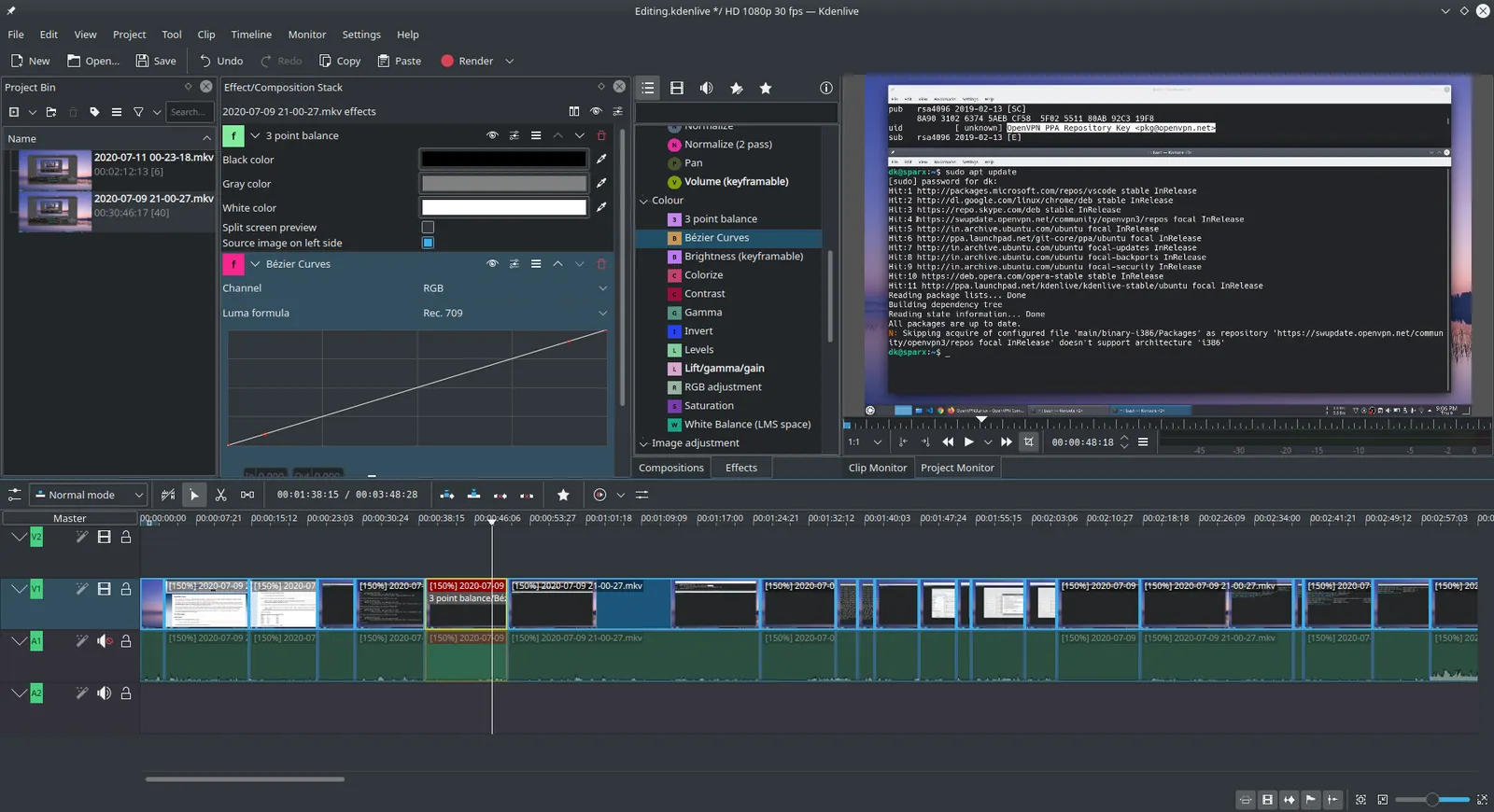
Kdenlive 20.04.1
Ddeepeshkumar · Source · CC BY-SA 4.0
Good fit if
- You edit on an older Windows PC or a laptop with about 8 GB of RAM
- You want a free editor with a published hardware requirement
- You can accept fewer effects than Premiere offers
Not ideal if
- You need Premiere's After Effects and Creative Cloud round trip
- You edit 4K footage and expect smooth playback without proxies
- Your PC is below the 2 GHz and 4 GB needed even for SD in Shotcut and Kdenlive
If your PC struggles with Premiere Pro, the best free alternatives are Shotcut and Kdenlive. Both publish what they need: one 2 GHz core and 4 GB of RAM for SD, four cores and 8 GB for HD, and both offer proxy editing to keep playback smooth. OpenShot is simpler, and Clipchamp and CapCut run online. For the wider list, see all Premiere Pro alternatives.
What matters on a low-end PC
- A published hardware floor. You can check it against your machine before installing.
- Proxy and preview-scaling tools. They are what make a weak PC usable.
- Cost and limits. Watermarks and export caps.
- Operating system. Old Windows, Linux or Mac.
- What you give up compared with Premiere.
Premiere is sold only as a subscription. According to Adobe's plans page, plans are annual billed monthly with a 7-day trial, and it mentions no one-time purchase. Adobe's technical requirements page sets the floor at Windows 11 v24H2 with 8 GB of RAM, a CPU with AVX2 support and a GPU with at least 4 GB of memory, so an older laptop with integrated graphics can fall below it. Vagon's low-end guide calls proxy files essential for slow systems, which is a clue that the same fix helps in any editor.
Shotcut
Shotcut is a free, open-source video editor for Windows, macOS and Linux. Its FAQ states the needs plainly: at least one 2 GHz core and 4 GB of RAM for SD, 4 cores and 8 GB for HD, and 8 cores and 16 GB for 4K. It asks for 64-bit Windows 10 (build 1809) or later and Direct3D 11 on Windows.
The FAQ also tells lower-end machines to use both Preview Scaling and Proxy. Two Shotcut forum threads show the sharp edges. In a November 2024 thread a Shotcut staff post said Preview Scaling should match the proxy resolution, otherwise each frame must be rescaled after it is decoded. In a December 2024 thread a laggy preview on a new PC returned to normal speed once the files had finished processing.
Who should not pick it: anyone who wants a polished effects library like Premiere's.
Kdenlive
Kdenlive is a free, open-source multitrack editor under the GPL-3.0. According to its manual, the minimums match Shotcut's: 2 GHz single core and 4 GB for SD, 4 cores and 8 GB for HD, 8 cores and 16 GB for 4K, with OpenGL 2.0. Windows needs 64-bit Windows 10 (1809) or later, and Linux is supported through AppImage and Flatpak.
The manual says timeline playback relies on the CPU, so a faster CPU helps most. On lower-end machines it recommends proxy clips, a lower Preview Resolution and Timeline Preview Rendering. It gives no hardware figures for proxies, so expect to experiment.
Who should not pick it: someone on an old Windows 7 or 8 PC. The manual points Windows 7 users to an old 23.08.5 release instead.
What we measured: Shotcut and Kdenlive exports
We installed Shotcut 26.9.28 (557 MB on disk) and Kdenlive 26.08.2 (618 MB) and exported the same generated 60-second 1080p30 clip to H.264 with the MLT renderer each app ships with. The test machine was an Apple M1 Max with 32 GB of memory, far faster than a low-end PC, so read the numbers as relative cost.
| Test | Shotcut | Kdenlive |
|---|---|---|
| 60-second 1080p export, first run | 20.3 s | 21.4 s |
| Same export, second run | 11.1 s | 12.0 s |
| CPU time used by the export | 71 s | 71 s |
| Peak memory during export | about 1.0 GB | about 1.0 GB |
Both editors use the MLT engine, and their export times were close for this clip and these settings on our M1 Max. Each export used about 71 seconds of combined CPU time on this machine. CPU time and elapsed time can differ across processors, workloads and export settings; we did not test a low-end Windows PC, so these results do not establish which editor would be faster there.
Proxies are what help on a slow machine. Converting the same clip to a 540p H.264 proxy with the ffmpeg bundled in Shotcut took 2.75 seconds and produced a 6.4 MB file, a tenth of the 64.8 MB original, with peak memory of 262 MB. That smaller file is what the editor decodes during playback, which is why both manuals recommend proxy clips on lower-end hardware.
OpenShot
OpenShot is a free editor aimed at beginners. Its download page offers a free Windows EXE installer with a 32-bit option, Linux AppImage and Snap builds, and a macOS installer for Intel Macs only. The Microsoft Store version is paid and funds development. It is licensed under the GPL v3 or later.
The page lists no RAM, storage or GPU requirements, so it is the least documented option here. That is the honest reason to trial it with a short project before committing a real edit.
Who should not pick it: Apple silicon Mac owners, since the page offers Intel builds only.
Clipchamp
Clipchamp is a browser-based editor from Microsoft. According to its pricing page, the free plan exports up to 1080p with no watermark and needs a personal Microsoft account. Premium features, including 4K exports, premium stock, filters and the brand kit, come with Microsoft 365 Personal and Family.
Nothing installs, but the page gives no hardware figures, so how it runs on your browser and connection is untested here. Our Clipchamp alternative for Mac guide covers the other direction.
Who should not pick it: anyone who needs 4K on the free plan or has an unreliable internet connection.
CapCut
CapCut is a template-driven editor with desktop, web and mobile versions. CapCut's pricing page lists a free plan with free templates and basic editing tools, and Pro at $19.99 a month or $179.99 a year, with a note that displayed prices are for reference. It does not state export or watermark limits for the free plan, so check these before relying on it.
Who should not pick it: anyone cutting long, multi-track projects. It is built for quick, short videos.
When a paid tool is the better answer
On a weak PC, none of the paid options read here fits the constraint. Neither Blackmagic's page nor Clipchamp's or CapCut's pricing pages state a hardware requirement, and Blackmagic says Studio includes over 100 GPU and CPU accelerated Resolve FX. Resolve Studio was on sale at $236 (down from $295) when checked on October 27, 2026, CapCut Pro at $19.99 a month, and Clipchamp's premium features come with Microsoft 365 Personal or Family. Those add features, not a stated low hardware floor.
Pay only if a specific feature sits behind it, such as Clipchamp's 4K exports. Otherwise stay free and fix the setup with proxies. Our DaVinci Resolve alternative for low end PC guide covers the same problem from the other side.
Comparison
| Tool | Hardware floor published | Proxy tools | Price | Platforms |
|---|---|---|---|---|
| Shotcut | Yes: 4 GB SD, 8 GB HD | Proxy and Preview Scaling | Free | Windows, macOS, Linux |
| Kdenlive | Yes: 4 GB SD, 8 GB HD | Proxy clips, preview resolution | Free | Windows, Linux, macOS |
| OpenShot | No RAM or GPU figure | Not stated | Free | Windows, Linux, Intel Mac |
| Clipchamp | No | Not applicable | Free to 1080p | Web, Windows |
| CapCut | No | Not stated | Free; Pro $19.99/month | Web, Desktop, Mobile |
How to choose
You edit HD on 8 GB of RAM. Pick Shotcut or Kdenlive, turn on proxies, and set Preview Scaling to match them. See the free Premiere Pro alternative page for more free options.
You are a beginner on an old Windows PC. Try OpenShot with a short project, or Clipchamp if you prefer a browser. Our best free video editor roundup compares more.
You want open source only. Shotcut, Kdenlive and OpenShot all qualify; see open-source video editors.
Limits of this review
Shotcut and Kdenlive were run on a fast Mac, not a low-end PC, and only their command-line exporter was timed; timeline playback and the in-app proxy feature were not tested, so the timings show relative cost rather than what a weak PC will do. OpenShot, Clipchamp and CapCut were not installed. OpenShot publishes no RAM or GPU figure. Browser editors depend on your browser and connection, which was not tested.
FAQ
What is the lightest free alternative to Premiere Pro?
None of the pages read publish a head-to-head speed test. Shotcut and Kdenlive both state a floor of one 2 GHz core and 4 GB of RAM for SD video, 4 cores and 8 GB for HD. OpenShot lists no RAM figure. For the least setup, a browser editor such as Clipchamp needs no install.
How much RAM do I need to edit video with Shotcut?
According to the Shotcut FAQ, at least 4 GB for SD, 8 GB for HD and 16 GB for 4K. It also asks for one 2 GHz core for SD, 4 cores for HD and 8 cores for 4K. On a lower-end CPU or RAM it advises using both Preview Scaling and Proxy to reduce preview lag.
Do proxies change my exported video quality?
Vagon's low-end guide says lowering playback resolution and editing with proxies leaves the final export unaffected. Shotcut's staff add that Preview Scaling should match the proxy resolution, or every decoded frame has to be rescaled. Check that setting first if playback stutters.
Is DaVinci Resolve a good Premiere Pro alternative for a low-end PC?
Probably not. Blackmagic's page says Studio includes over 100 GPU and CPU accelerated Resolve FX and that the Neural Engine uses GPU technology, and it lists no hardware requirements. The free version is capable, with 8-bit video up to 60 fps and Ultra HD, but weak hardware is better served by Shotcut or Kdenlive.
Does Clipchamp work for free without a watermark?
Per Clipchamp's pricing page, the free plan exports up to 1080p with no watermark. You need a personal Microsoft account. Premium features such as 4K exports, premium stock and filters come with Microsoft 365 Personal and Family, and the page shows no standalone price.
Can OpenShot run on an old Windows PC?
OpenShot's download page offers a free EXE installer for Windows with a 32-bit option, plus a Microsoft Store version that is paid and funds development. The page lists no RAM, storage or GPU requirements, so test it with a short project on your machine. macOS builds are for Intel Macs only.
Related guides
More in Video Editing & AI Video
All Video Editing & AI Video alternatives →Sources
- Adobe Premiere technical requirements
- Shotcut FAQ (system requirements)
- Shotcut
- Kdenlive manual: installation and requirements
- Kdenlive on GitHub
- OpenShot downloads
- Clipchamp pricing
- CapCut pricing
- DaVinci Resolve
- Vagon: running Premiere Pro on a low-end device
- Adobe Premiere plans
- Shotcut forum: lagging during playback (Dec 2024)
- Shotcut forum: edited proxy becomes laggy (Nov 2024)
Kevin Fan
Kevin Fan is a SaaS founder. He runs Free Instead Of, which tracks free and open-source alternatives to paid software and checks each price and free-plan limit against the vendor's own pages.
Methodology
Shotcut 26.9.28 and Kdenlive 26.08.2 were installed with Homebrew on an Apple M1 Max Mac (32 GB, macOS 26.5) on 2026-10-28, and a generated 60-second 1080p30 H.264 test clip was exported with the MLT renderer bundled in each app; timings and peak memory come from /usr/bin/time. Adobe's Premiere technical requirements page was read in a browser on 2026-10-27. The Shotcut FAQ, the Kdenlive manual, the OpenShot download page, Clipchamp's and CapCut's pricing pages, the DaVinci Resolve product page and Adobe's Premiere plans page were read on 2026-10-27. Two Shotcut forum threads (November and December 2024) were read for user pain points. Reddit threads were not used.