Clipchamp Alternative for Mac: 5 Free Editors in 2026
Clipchamp has no Mac app and runs only in a browser. Compare iMovie, DaVinci Resolve, Shotcut, Kdenlive and OpenShot on macOS support, limits and price.
•4 min read•Video Editing & AI Video
Verdict:On a Mac, iMovie is the simplest free replacement, DaVinci Resolve is the most capable, and Kdenlive or Shotcut are the open-source picks with current Apple silicon support.
Quick comparison
| Tool | Price | Platforms | Best for | Tested |
|---|---|---|---|---|
| iMovie | Free on the Mac App Store | macOS, iPhone, iPad | Mac users who want a free Apple-made editor that does not run in a browser | Docs only |
| DaVinci Resolve | Free version; Studio on sale at $236 (was $295) on October 28, 2026 | macOS, Windows, Linux | Mac users who want colour grading and Ultra HD export at no cost and will learn a pro tool | Docs only |
| Shotcut | Free (open source) | macOS 12 or later, Windows, Linux | Mac users who want an open-source editor that supports macOS 12 or later | Docs only |
| Kdenlive | Free (open source, donations welcome) | macOS 13 or later, Windows, Linux | Mac users who want an open-source editor with native Apple silicon and Intel builds | Docs only |
| OpenShot | Free (open source, donations welcome) | macOS (Intel installer), Windows, Linux | Simple timeline edits on an Intel Mac | Docs only |
Independent comparison. Paid placements are labelled separately; editorial links earn no affiliate commissions. Learn more.
See the tools in action
Images from the linked documentation. Versions and features may differ from current plans.
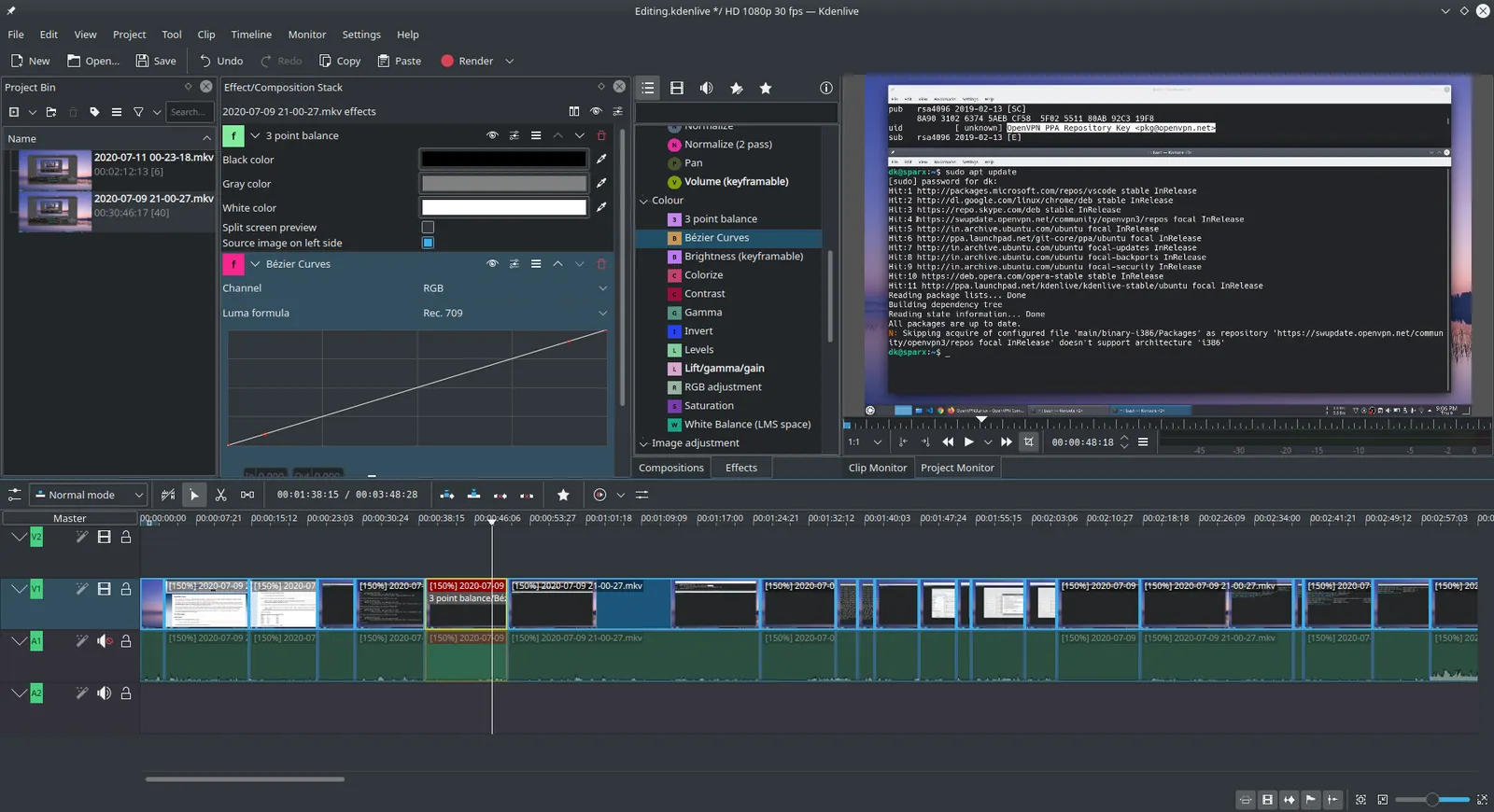
Kdenlive 20.04.1
Ddeepeshkumar · Source · CC BY-SA 4.0
Good fit if
- You want an editor installed on your Mac instead of one that runs in Chrome or Edge
- You need to export above Clipchamp's 1080p free limit
- You prefer free software with no Microsoft 365 subscription
Not ideal if
- You want Clipchamp's template and stock library as the main reason to edit
- You edit on a Windows PC where the Clipchamp desktop app exists
- You need a browser editor you can open on any machine
Short answer: if you want a free editor that installs on your Mac, start with iMovie for simple projects or DaVinci Resolve if you want more power. Pick Kdenlive or Shotcut if you prefer open source. The deciding fact is that Clipchamp is a browser editor on a Mac, so any of these gives you a normal app that lives on your machine.
What matters when you leave Clipchamp on a Mac
According to Microsoft's support page, the Clipchamp editor works on supported Windows, Mac or Linux computers, but Microsoft recommends Edge or Chrome and does not list Safari or Firefox. The only desktop app that page mentions is for Windows 10 and Windows 11. On a Mac, Clipchamp is a web page.
The free plan has limits too. Clipchamp's pricing page says free exports reach 1080p with no watermark, while 4K, premium stock, premium filters and effects, and the brand kit are premium. It adds that premium comes with Microsoft 365 Personal and Family subscriptions.
That gives five criteria for a Mac reader:
- Native on macOS: an app you install, with a stated macOS version and, ideally, an Apple silicon build.
- Free without a watermark: no subscription tied to another product.
- Learning curve: how far it sits from Clipchamp's simple timeline.
- Export ceiling: resolution and frame rate on the free version.
- Your existing work: Clipchamp projects live in the browser, so export finished videos before you switch.
iMovie
iMovie is Apple's own video editor for Mac, iPhone and iPad. According to its Mac App Store listing, it is free, supports editing up to 4K on compatible Macs, and lists 1080p HD at 60 frames per second.
It is the obvious first try for a simple timeline editor on a Mac. The listing requires a recent macOS release, so check your Mac's version before planning around it. iMovie is not open source and runs only on Apple devices. For other options in this lane, see our iMovie alternatives page.
DaVinci Resolve
DaVinci Resolve is a professional editing and colour application from Blackmagic Design. The product page lists Mac, Windows and Linux, and says the free version handles virtually all 8-bit video formats at up to 60fps in resolutions up to Ultra HD (3840 by 2160), with multi-user collaboration and HDR grading.
Studio was on sale at $236 (down from $295) when checked on October 28, 2026. Blackmagic's Studio feature guide lists activation keys, licence dongles and Blackmagic Cloud licensing, and Blackmagic Cloud also sells rental licences; the product page does not say how long a purchased key covers new versions. It adds 10-bit video up to 120 fps and resolutions beyond 4K. Check Blackmagic's support documents for the Mac system requirements before you download.
Kdenlive
Kdenlive is a free and open source video editor. Its home page says it works on Linux, Windows, macOS and BSD. The download page offers separate Apple silicon (arm64) and Intel (x86_64) macOS builds and says it requires macOS 13 (Ventura) or newer.
Kdenlive suits Mac users who want an open-source editor with native builds for both Apple silicon and Intel. It asks for donations but states no price.
Shotcut
Shotcut is a free, open source, cross-platform video editor. According to its download page, the current version needs macOS 12 or later and ships as a single macOS build. If your Mac runs macOS 11, the page names version 24.11.17 as the last supported release.
Choose Shotcut when you want a free, open source editor that runs on an older Mac than Kdenlive supports, since it needs macOS 12 where Kdenlive needs macOS 13. For more editors in the same category, see our open-source video editor roundup.
OpenShot
OpenShot is a free and open source editor. Its download page lists a 64-bit Intel installer for macOS (v4.0.1) and does not mention Apple silicon, so check that it runs on your Mac before committing a project to it. The only paid option on the page is the Windows Microsoft Store version, which funds development.
According to OpenShot's own site, it has no subscriptions, watermarks or project limits. Pick it on an Intel Mac, and look at Kdenlive or Shotcut first if you have an Apple silicon Mac.
Comparison for Mac users
| Editor | Price | macOS support | Open source | Best for |
|---|---|---|---|---|
| iMovie | Free | Recent macOS, Mac App Store | No | Easy edits, up to 4K on compatible Macs |
| DaVinci Resolve | Free; Studio $236 on sale (was $295) | Mac listed; check requirements | No | Colour grading, Ultra HD at 60fps |
| Kdenlive | Free | macOS 13+, Apple silicon and Intel builds | Yes | Open source with native builds |
| Shotcut | Free | macOS 12+ | Yes | Free, open source editing |
| OpenShot | Free | Intel installer listed | Yes | Basic cuts and titles |
How to choose
If you cut short clips for social posts and want it to feel simple, use iMovie. If you are editing a longer project and want colour tools, use DaVinci Resolve. If you want open-source software, use Kdenlive on a recent Mac or Shotcut on an older one.
Whatever you choose, export your finished videos from Clipchamp first, because projects live in the browser. For a wider list that includes mobile apps, see best free video editor and CapCut alternatives, which cover options beyond the Mac.
Limits of this review
None of the five editors was installed or run for this page. Macs with older macOS versions, hardware performance and real export times were not checked. Prices and system requirements come from vendor pages dated 2026-10-26.
FAQ
Is there a Clipchamp app for Mac?
According to Microsoft's support page, the Clipchamp editor runs in a browser on supported Windows, Mac or Linux computers, and the only desktop app it mentions is for Windows 10 and Windows 11. Edge or Chrome is recommended, and Safari and Firefox are not listed as supported.
What is a good free Clipchamp alternative for Mac?
iMovie is free on the Mac App Store and edits up to 4K on compatible Macs. DaVinci Resolve has a free version that handles Ultra HD at up to 60fps. Shotcut and Kdenlive are free, open-source editors with macOS downloads.
Is there an open-source Clipchamp alternative for Mac?
Yes. Shotcut, Kdenlive and OpenShot are all free and open source with macOS downloads. Kdenlive offers separate Apple silicon and Intel builds, Shotcut lists one macOS build for macOS 12 or later, and OpenShot's download page lists an Intel installer.
Is there a Clipchamp alternative that exports above 1080p?
Clipchamp's pricing page limits free exports to 1080p and puts 4K behind its premium features. On the Mac side, DaVinci Resolve's free version supports Ultra HD, which is 3840 by 2160, and iMovie lists editing up to 4K on compatible Macs.
Is there a Clipchamp alternative that exports at 60fps?
DaVinci Resolve's product page says the free version handles virtually all 8-bit video formats at up to 60fps. iMovie's App Store listing mentions 1080p HD at 60 frames per second. Frame-rate ceilings for Shotcut, Kdenlive and OpenShot are not covered here, so test their export settings yourself if 60fps matters.
Is there a Clipchamp alternative for Android?
Microsoft's support page says the Clipchamp desktop editor is not supported in Android or iOS mobile browsers. The tools on this page are Mac-focused, and only iMovie also lists iPhone and iPad. For an Android editor, look at a mobile-first app instead.
More in Video Editing & AI Video
All Video Editing & AI Video alternatives →Sources
Kevin Fan
Kevin Fan is a SaaS founder. He runs Free Instead Of, which tracks free and open-source alternatives to paid software and checks each price and free-plan limit against the vendor's own pages.
Methodology
Official pages for Clipchamp, iMovie, DaVinci Resolve, Shotcut, Kdenlive and OpenShot were reviewed on 2026-10-26, and Blackmagic's DaVinci Resolve page was read again on 2026-10-27 and 2026-10-28. Reddit threads could not be opened in this review, so no community sentiment is reported.