DaVinci Resolve Alternative for Low-End PC: 4 Options
DaVinci Resolve alternative for a low-end PC: Shotcut, Kdenlive, OpenShot and Clipchamp compared on published RAM and CPU needs, plus proxy tips.
•4 min read•Video Editing & AI Video

Verdict:Shotcut and Kdenlive publish clear hardware needs (8 GB of RAM for HD) and ship proxy tools, so they are the first lighter editors to try. Clipchamp needs no install. OpenShot is free but lists no hardware needs.
Quick comparison
| Tool | Price | Platforms | Best for | Tested |
|---|---|---|---|---|
| Shotcut | Free, open source | Windows, macOS, Linux | A weak computer where you want published hardware needs and built-in proxy and preview scaling | Docs only |
| Kdenlive | Free, open source (GPL-3.0) | Windows, macOS, Linux | Multi-track editing on Windows 10 or Linux with a stated 8 GB RAM target for HD | Docs only |
| OpenShot | Free downloads (GPL v3 or later); the Microsoft Store version is paid | Windows, macOS, Linux | A free editor with a Windows EXE, Linux AppImage, Snap or PPA, if you do not need to check hardware targets first | Docs only |
| Clipchamp | Free, export up to 1080p with no watermark | Web browser, Windows | Quick 1080p edits with no install, if you have a Microsoft account | Docs only |
Independent comparison. Paid placements are labelled separately; editorial links earn no affiliate commissions. Learn more.
See the tools in action
Images from the linked documentation. Versions and features may differ from current plans.
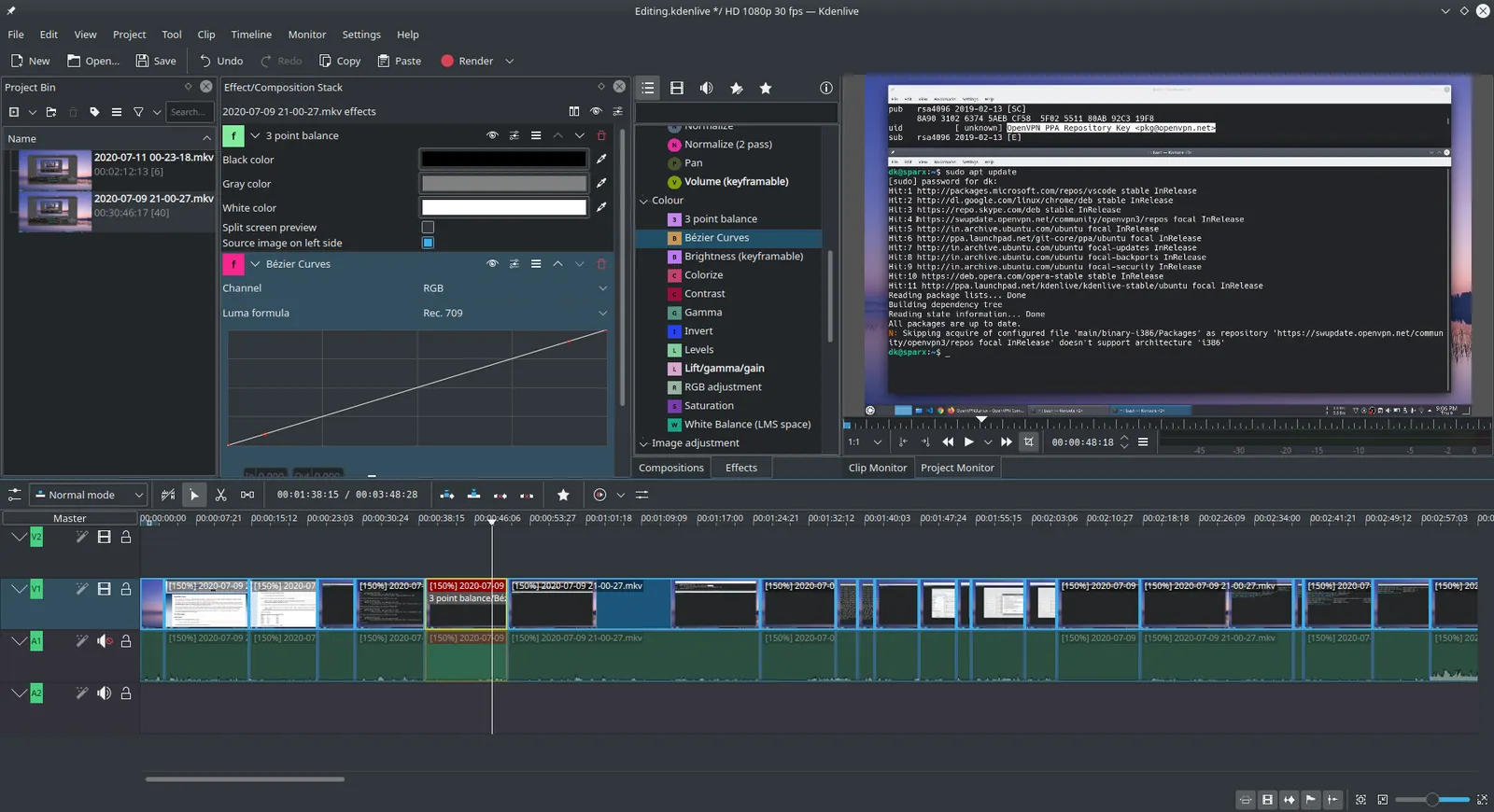
Kdenlive 20.04.1
Ddeepeshkumar · Source · CC BY-SA 4.0
Good fit if
- Resolve stutters or will not start on your current computer
- You edit 1080p footage, not heavy 4K or effects-heavy projects
- You can accept fewer colour and effects tools than Resolve
Not ideal if
- You need Resolve's colour grading and Fusion effects in your pipeline
- You need to open Resolve project files from a client
- Your computer is below the minimum for any editor
For an older computer, try Shotcut or Kdenlive first. Both publish the same hardware targets: according to Shotcut's FAQ, at least 4 GB of RAM for SD video, 8 GB for HD and 16 GB for 4K. Clipchamp runs in a browser, and OpenShot is free but lists no hardware needs. If you like Resolve and only need smoother playback, proxy editing may fix it without switching.
What matters on a low-end PC
Five checks decide this for you:
- Published hardware needs. An editor that states its RAM and CPU targets lets you check them before you download.
- Proxy and preview tools. These make playback smooth on weak hardware.
- Cost and limits. According to the DaVinci Resolve product page, the free version handles 8-bit video up to Ultra HD at 60 fps and Studio was on sale at $236 (down from $295) when checked on October 27, 2026, so Resolve's price is not the problem.
- Your operating system. Old Windows, Linux or Mac decide which tools install at all.
- What you give up. Lighter editors have fewer colour, effects and audio tools.
The Resolve product page does not list RAM or graphics-memory minimums, so check Blackmagic's support site for your version before you rule it out.
Stay on Resolve first: proxies and a smaller timeline
If your footage is the problem, not Resolve, a smaller timeline may solve it. According to a January 2026 guide from Vagon on running Resolve on weak hardware, very weak machines can edit on a 720p timeline and modest ones on 1080p, with export at the original resolution. The guide recommends proxies for 4K, HEVC, phone footage and screen recordings, and advises against using proxies and optimized media together.
Vagon sells cloud computers, and its advice is not backed by benchmarks. Treat it as a first thing to try. If Resolve still struggles after proxies, or will not start at all, switch to one of the editors below.
Shotcut
Shotcut is a free, open-source video editor. According to Shotcut's site, it runs on Windows, Mac and Linux and supports resolutions up to 4K. Its FAQ is the most useful page for this search: it states "at least one 2 GHz core for SD, 4 cores for HD, and 8 cores for 4K," with RAM at 4 GB, 8 GB and 16 GB for the same three.
The FAQ also tells people on the lower end of the CPU and RAM requirements to use both Preview Scaling and Proxy to reduce preview lag. That is the same idea as Resolve's proxy workflow, built into a lighter program.
Pick Shotcut if your PC is old and you want a straight answer on what it needs.
Kdenlive
Kdenlive is a free, open-source multi-track editor, GPL-3.0. Its installation page gives the same targets as Shotcut: 2 GHz for SD, 4 cores for HD, 8 cores for 4K, with 4 GB, 8 GB and 16 GB of RAM. It needs a GPU with working OpenGL 2.0, and it says timeline playback relies on the CPU, so a faster CPU improves playback.
The page lists 64-bit Windows 10 (1809 or later) and 64-bit Linux, with AppImage and Flatpak as the officially maintained Linux packages.
Choose Kdenlive if you edit on Linux or Windows 10 and want a multi-track timeline closer to Resolve's edit page.
OpenShot
OpenShot is a free, open-source video editor. According to OpenShot's download page, the downloads are free and licensed GPL v3 or later, with a free Windows 64-bit EXE, Linux builds as AppImage, Snap and apt PPA, and a macOS installer for Intel only. The Microsoft Store version is paid, and the page says it funds development.
The page does not list RAM or CPU needs, so you cannot check it against your machine the way you can with Shotcut and Kdenlive. Its draw is the range of free downloads, so it is easy to try; check it on your machine before a real project.
Do not pick OpenShot if you have an Apple Silicon Mac, since the macOS download is Intel only, or if you want to compare its limits before installing.
Clipchamp
Clipchamp is a browser-based editor from Microsoft. According to Clipchamp's pricing page, the free plan exports up to 1080p with no watermark, and you sign in with a personal Microsoft account. Premium features, including 4K export, come with Microsoft 365 Personal and Family.
Because it runs in a browser, there is nothing to install, which suits a locked-down or very old computer, provided it handles a modern browser. The 1080p cap is the trade-off: Resolve's free version goes up to Ultra HD.
Use Clipchamp for short, simple edits. It is not the tool for long multi-track projects.
Comparison
| Editor | Cost | Stated hardware targets for HD | Platforms | Proxy or preview tools |
|---|---|---|---|---|
| Shotcut | Free, open source | 4 cores, 8 GB RAM | Windows, Mac, Linux | Preview Scaling and Proxy |
| Kdenlive | Free, GPL-3.0 | 4 cores, 8 GB RAM | Windows 10+, Linux | Not covered here |
| OpenShot | Free downloads | Not listed | Windows, Linux, macOS Intel | Not covered here |
| Clipchamp | Free, 1080p max | Browser | Web, Windows | Not covered here |
How to choose
You have 8 GB of RAM and edit 1080p. Try proxies and a 1080p timeline in Resolve, then switch to Shotcut or Kdenlive if it still stutters. Both name 8 GB as the target for HD.
You are on a very old PC or a school machine. Open Clipchamp in the browser. For more options, see our free video editor and open-source video editor pages.
You want to try a third free editor. OpenShot has free downloads for Windows, Linux and Intel Macs, but lists no hardware needs, so test it on a short clip first. To compare Resolve with phone-first CapCut, read CapCut vs DaVinci Resolve.
Limits of this review
No editor was installed or timed on real hardware, so no speed comparison is made. Blackmagic's pages that were readable list no RAM or graphics-memory minimums for Resolve, so none are stated. Community opinion from Reddit was not collected. Olive, Lightworks and Vegas were not covered.
FAQ
What is the best DaVinci Resolve alternative for a low-end PC?
Start with Shotcut or Kdenlive. Both publish the same targets: 4 GB of RAM for SD, 8 GB for HD and 16 GB for 4K. Shotcut's FAQ also tells users on the low end of those specs to use Preview Scaling and Proxy together to reduce preview lag.
Is there a DaVinci Resolve alternative for Linux?
Yes. Kdenlive's documentation lists 64-bit Linux with AppImage and Flatpak as the officially maintained packages. Shotcut lists Linux as a supported platform, and OpenShot offers an AppImage, a Snap and an apt PPA. Resolve itself also runs on Linux per Blackmagic.
Is there a free open-source alternative to DaVinci Resolve?
Shotcut, Kdenlive and OpenShot are all free and open source. Kdenlive is GPL-3.0, and OpenShot is GPL v3 or later. DaVinci Resolve is also free in its basic version, but it is proprietary, so it does not count as open source.
Is there a DaVinci Resolve alternative for Android or iPhone?
Not among the four editors here, which are desktop or browser tools. CapCut lists mobile, desktop and web versions, with a free plan and Pro at $19.99 a month on its pricing page. For phone editing, it is the one covered elsewhere on this site.
Can I just make DaVinci Resolve run better instead?
Often. A January 2026 Vagon guide for weak hardware advises editing on a 720p timeline for very weak machines or 1080p for modest ones, using proxies for 4K, HEVC, phone and screen-recording footage, and keeping projects and cache on an SSD. Vagon sells cloud computers and gives no benchmarks.
Does DaVinci Resolve have a free version?
Yes. According to the DaVinci Resolve product page, the free version handles 8-bit video up to Ultra HD at 60 fps, while Studio was on sale at $236 (down from $295) when checked on October 27, 2026 and adds the Neural Engine and extra Resolve FX. Price is not the problem on a weak PC, which is why the first fix is a smaller timeline and proxies.
Related guides
More in Video Editing & AI Video
All Video Editing & AI Video alternatives →Sources
Kevin Fan
Kevin Fan is a SaaS founder. He runs Free Instead Of, which tracks free and open-source alternatives to paid software and checks each price and free-plan limit against the vendor's own pages.
Methodology
Based on the official pages of Blackmagic Design, Kdenlive, Shotcut, OpenShot and Clipchamp as of 2026-10-26, plus a published guide on running Resolve on weak hardware. No Reddit or forum threads were used.