Kapwing Alternatives 2026: 6 Free Options
Kapwing alternatives: Clipchamp, CapCut, Kdenlive, Shotcut and 2 more. Prices and licenses checked October 28, 2026.
•4 min read•Video Editing & AI Video
Verdict:Leave Kapwing when its free plan's limits, which are watermarked exports at 720p, 4 minutes per video and 30 minutes of export a month, start to bite and the Pro price is $16, with a monthly or annual billing toggle. Business is $50. The easiest free move is Clipchamp, which exports 1080p without a watermark. CapCut covers social-video templates and has a Pro plan at $19.99 a month. If you are happy to install software, Kdenlive, Shotcut and OpenShot are free open-source editors that carry no credits, watermarks or length caps in their stated terms, and DaVinci Resolve's free version handles up to Ultra HD at 60fps for people who want professional grading. The trade-off is where the work happens. Kapwing is online with shared projects and credits for AI features; the desktop editors need local storage and a capable machine and give you no browser collaboration. Pick a desktop editor if you edit often and want no meter running. Stay on Kapwing if you edit on shared or low-power machines and use its AI tools. For quick one-off cuts, Clipchamp's free tier is the lowest-friction choice.
Quick comparison
| Tool | Price | Platforms | Best for | Tested |
|---|---|---|---|---|
| Clipchamp | Free (Free: export up to 1080p with no watermark; premium stock assets, premium filters and effects, and brand kit not included) | Web, Windows | Browser-style editing without a watermark | Docs only |
| CapCut | Free (Free plan includes free templates and basic editing tools; the page gives no numeric limits); paid from $19.99 per month (Pro, monthly; $179.99 billed yearly) | Desktop, Mobile, Web | Social-video templates | Docs only |
| Kdenlive | Free | Linux, Windows, macOS | Serious editing for free | Docs only |
| Shotcut | Free | Desktop | Straightforward offline editing | Docs only |
| OpenShot | Free | Windows, macOS, Linux | Beginners wanting a simple free editor | Docs only |
| DaVinci Resolve | Free (Free version: 8-bit video up to Ultra HD 3840x2160 and 60fps, per the product page); paid from $236 per Studio licence (sale price on the product page; was $295) | Mac, Windows, Linux | Professional editing and color grading | Docs only |
| VEED | Free (Free plan available; see the pricing page for its limits) | Web | Video editing | Docs only |
| Descript | Free (60 media minutes a month, 720p export with a watermark, 100 one-time AI credits); paid from $16 per person/month, billed annually (Hobbyist; $24 billed monthly) | Web, Windows, macOS | Video and audio editing | Docs only |
| Riverside | Paid from $24 per month, billed yearly (Pro; $35 billed monthly) | Web | Recording | Docs only |
Independent comparison. Paid placements are labelled separately; editorial links earn no affiliate commissions. Learn more.
See the tools in action
Images from the linked documentation. Versions and features may differ from current plans.
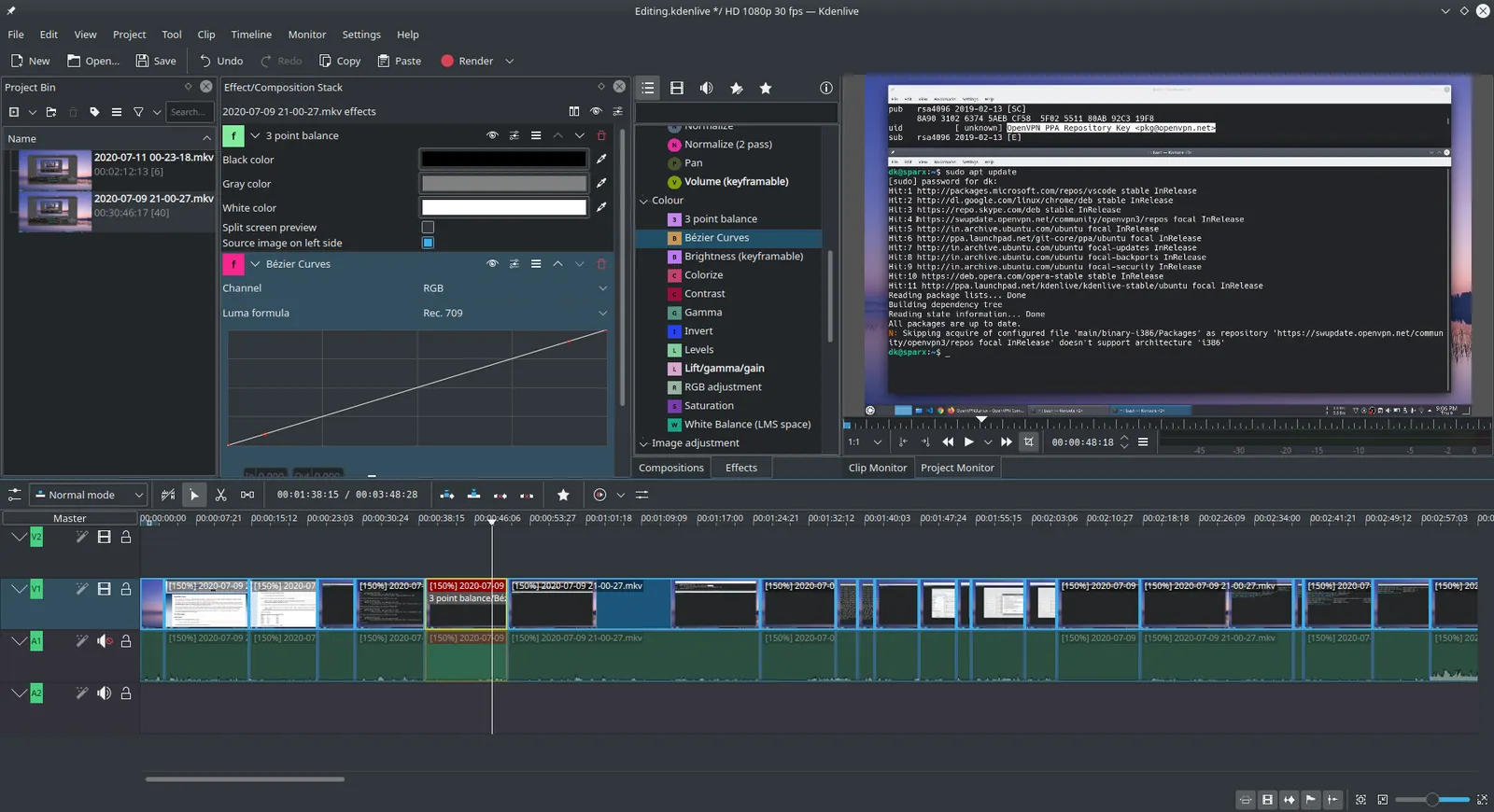
Kdenlive 20.04.1
Ddeepeshkumar · Source · CC BY-SA 4.0
Good fit if
- You want a free export with no watermark in a browser (Clipchamp is the pick)
- You want social templates (CapCut is the pick)
- You want a free desktop editor with no limits (Kdenlive is the pick)
- You are a beginner who wants simplicity (OpenShot is the pick)
- You want professional grading for free (DaVinci Resolve is the pick)
Not ideal if
- You rely on Kapwing features or integrations that these tools do not replicate
Kapwing today: Free (Free: 10 credits, watermarked exports, 720p, up to 4 minutes per video, 30 minutes of export a month, 2 GB uploads, 5 GB storage kept for 3 days); paid from $16 per month (Pro, 1,000 credits; the page has a monthly/annual toggle with 33% off annual but does not state which the $16 is) (Kapwing pricing, checked 2026-10-24).
Why people look for Kapwing alternatives
Kapwing's free plan puts a watermark on every export, caps resolution at 720p, allows 30 minutes of export a month and keeps files for only 3 days, with 5 GB of storage and 10 one-time credits. Pro at $16 removes the watermark and lifts resolution to 4K, but AI features are metered monthly: 1,000 credits, 1,000 minutes of auto-subtitling and 50 minutes of dubbing. Whether $16 is the monthly or annual rate is unclear (annual billing is described as 33% off), and paid plans have no free trial.
Clipchamp
Compared with Kapwing: Free export up to 1080p with no watermark, against Kapwing's free plan at watermarked 720p and 4 minutes per video. Premium stock and effects need Microsoft 365.
Price: Free (Free: export up to 1080p with no watermark; premium stock assets, premium filters and effects, and brand kit not included) (Clipchamp pricing, checked 2026-10-23).
Platforms and license: Web, Windows. Proprietary.
Best for: Browser-style editing without a watermark.
CapCut
Compared with Kapwing: Free plan with templates and basic editing tools; Pro is $19.99 a month versus Kapwing Pro at $16. Desktop, mobile and web editors, with template-led workflows.
Price: Free (Free plan includes free templates and basic editing tools; the page gives no numeric limits); paid from $19.99 per month (Pro, monthly; $179.99 billed yearly) (CapCut pricing, checked 2026-10-22).
Platforms and license: Desktop, Mobile, Web. Proprietary.
Best for: Social-video templates.
Kdenlive
Compared with Kapwing: Free GPL-3.0 desktop editor with no watermark, credit or length limits. You install it and learn a timeline, whereas Kapwing runs in the browser.
Price: Free (Kdenlive pricing, checked 2026-10-23).
Platforms and license: Linux, Windows, macOS. GPL-3.0 (open source).
Project activity: 6k GitHub stars · last commit Oct 27, 2026
Best for: Serious editing for free.
Shotcut
Compared with Kapwing: Free, open-source GPL-3.0 desktop editor. It has no cloud collaboration like Kapwing and no credits; you work on local files.
Price: Free (Shotcut pricing, checked 2026-10-23).
Platforms and license: Desktop. GPL-3.0 (open source).
Project activity: 15.5k GitHub stars · latest release v26.9.27 (Sep 28, 2026) · last commit Oct 27, 2026
Best for: Straightforward offline editing.
OpenShot
Compared with Kapwing: Free GPL-3.0-or-later editor; its site states no subscriptions, watermarks or project limits. Simpler than Kdenlive, and a local app where Kapwing is online.
Price: Free (OpenShot pricing, checked 2026-10-23).
Platforms and license: Windows, macOS, Linux. GPL-3.0-or-later (open source).
Project activity: 6.7k GitHub stars · latest release v4.0.1 (Sep 27, 2026) · last commit Oct 27, 2026
Best for: Beginners wanting a simple free editor.
Worth knowing: Stated on its site as free and open source with no subscriptions, watermarks or project limits; no paid version mentioned.
DaVinci Resolve
Compared with Kapwing: Free version up to Ultra HD 3840x2160 at 60fps in 8-bit, per the product page; Studio was on sale at $236 when checked. Much heavier than Kapwing and a steeper learning curve.
Price: Free (Free version: 8-bit video up to Ultra HD 3840x2160 and 60fps, per the product page); paid from $236 per Studio licence (sale price on the product page; was $295) (DaVinci Resolve pricing, checked 2026-10-28).
Platforms and license: Mac, Windows, Linux. Proprietary (free version and Studio).
Best for: Professional editing and color grading.
Other popular options (paid)
VEED
Compared with Kapwing: Browser editor with auto-subtitles and a free plan, billed per seat instead of Kapwing's flat monthly workspace price. Paid prices are not listed here, so confirm the cost on its pricing page before switching.
Price: Free (Free plan available; see the pricing page for its limits) (VEED pricing, checked 2026-10-23).
Descript
Compared with Kapwing: Edits video by editing the transcript. Free plan gives 60 media minutes a month at 720p with a watermark; Hobbyist is $16 per person monthly billed annually, the same figure as Kapwing Pro.
Price: Free (60 media minutes a month, 720p export with a watermark, 100 one-time AI credits); paid from $16 per person/month, billed annually (Hobbyist; $24 billed monthly) (Descript pricing, checked 2026-10-22).
Riverside
Compared with Kapwing: Records remote interviews and podcasts at studio quality, then edits them. No free plan, only a 14-day trial, and Pro is $24 a month billed yearly, above Kapwing Pro's $16.
Price: Paid from $24 per month, billed yearly (Pro; $35 billed monthly) (Riverside pricing, checked 2026-10-22).
Which one to pick
- You want a free export with no watermark in a browser: Clipchamp
- You want social templates: CapCut
- You want a free desktop editor with no limits: Kdenlive
- You are a beginner who wants simplicity: OpenShot
- You want professional grading for free: DaVinci Resolve
Limits of this review
Docs-only for Clipchamp, CapCut, Kdenlive, Shotcut, OpenShot, DaVinci Resolve: we did not install or run them, so feature claims come from vendor pages and we did not test import from Kapwing. Vendor prices and free limits change; confirm on the linked pricing page before you buy or migrate.
Related guides
More in Video Editing & AI Video
All Video Editing & AI Video alternatives →Sources
Kevin Fan
Kevin Fan is a SaaS founder. He runs Free Instead Of, which tracks free and open-source alternatives to paid software and checks each price and free-plan limit against the vendor's own pages.
Methodology
Based on official pricing and product pages checked between 2026-10-22 and 2026-10-28: Kapwing, Clipchamp, CapCut, Kdenlive, Shotcut, OpenShot, DaVinci Resolve, VEED, Descript, Riverside. Prices, free limits and licenses are the figures shown on those pages on those dates. No tool on this page was installed or run. No accounts were created.