Let's Animate - Krita: Rocket Mechanic (10 days)
By Ed Tadeo ·
Playing loads YouTube. YouTube will receive your IP address and device information.
Best free Painting Software compared: Krita, MyPaint, FireAlpaca, MediBang Paint and 4 more, with free-plan limits, platforms and prices from official pages checked October 23, 2026.
•3 min read•Graphic Design & Diagramming
| Tool | Price | Platforms | Best for | Tested |
|---|---|---|---|---|
| Krita | Free (Free and open source; optional donations, no paid tier) | Windows, macOS, Linux, Android | Illustration and concept art | Docs only |
| MyPaint | Free (Free to download; the page lists no price and offers a donate option) | Linux, macOS, Windows | Sketching and brush feel | Docs only |
| FireAlpaca | Free (The site calls it a free paint tool; it also lists FireAlpaca SE, whose price is not stated) | Windows, macOS | Comics and manga | Docs only |
| MediBang Paint | Free (Download is free; cloud features exist; a premium service adds exclusive brushes and materials with no price shown) | Windows, macOS, iOS, Android | Comics with cloud sharing | Docs only |
| Paint.NET | Free (Free download; the Microsoft Store version is a paid way to support the project (price not shown)) | Windows | Simple digital art on Windows | Docs only |
| Pinta | Free (Free, open-source program for drawing and image editing; no price listed) | Linux, macOS, Windows, BSD | Light drawing on any platform | Docs only |
| Tux Paint | Free (Free of cost and free of advertisements; open source under the GNU GPL) | Windows, macOS, Linux, Android | Young children | Docs only |
| GIMP | Free (Free; source tarballs offered, donation link only, no paid tier. Store packages are third-party and not from the GIMP team) | Linux, macOS, Windows | Painting plus photo editing | Docs only |
Independent comparison. Paid placements are labelled separately; editorial links earn no affiliate commissions. Learn more.
Images from the linked documentation. Versions and features may differ from current plans.
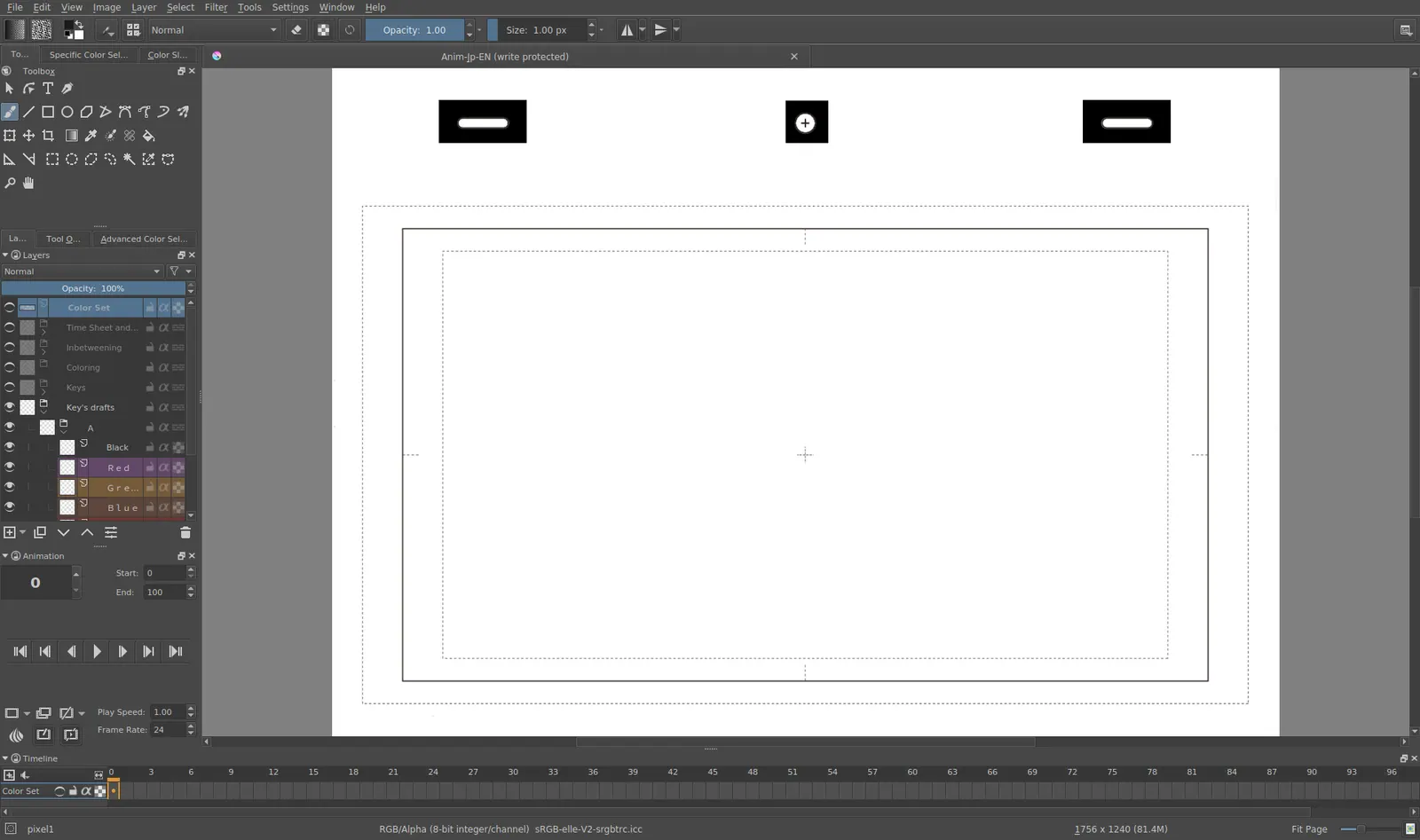
Krita 4.0 animation interface
Tyson Tan · Source · CC BY-SA 4.0
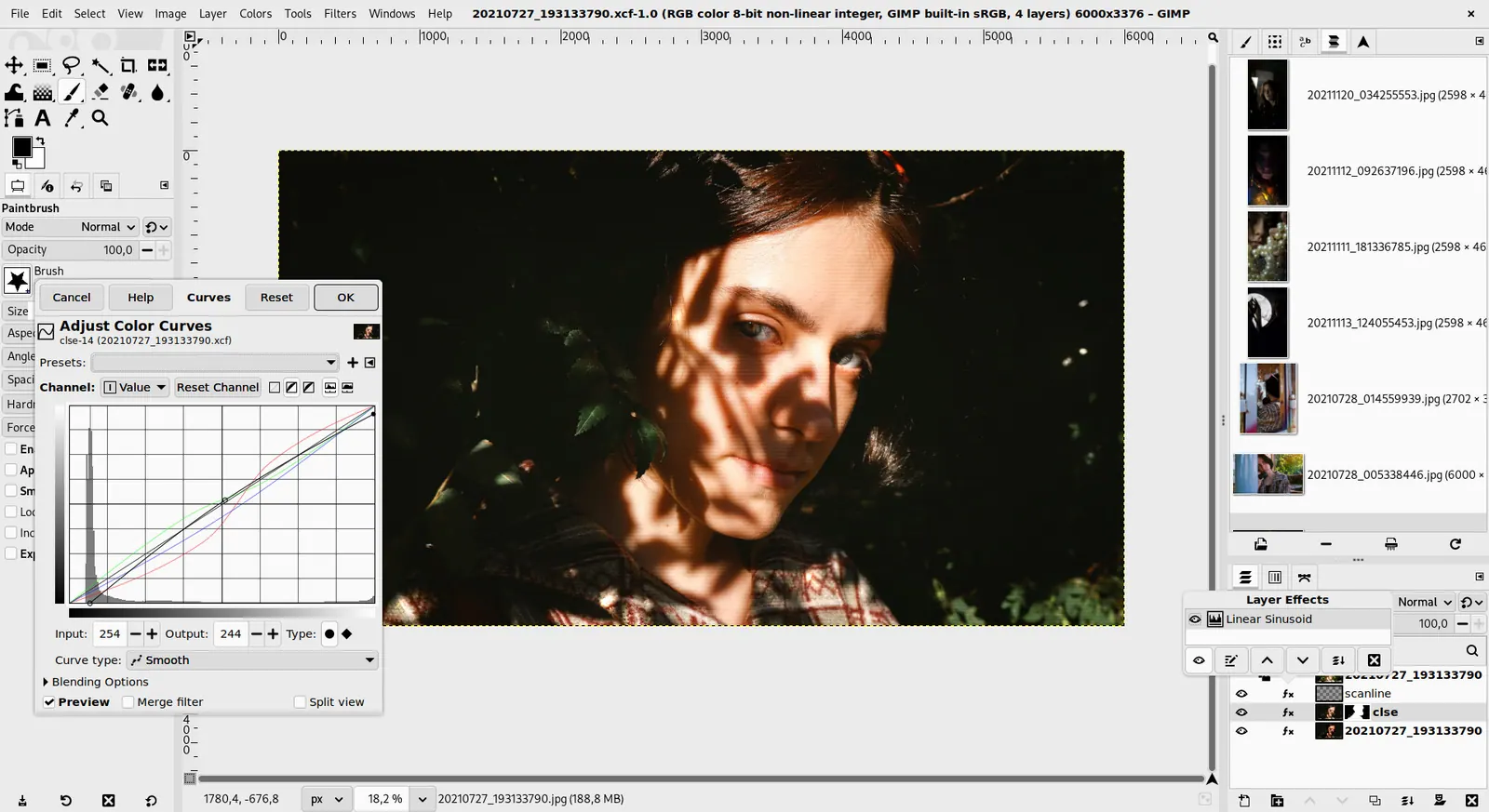
GIMP 3.0 — non-destructive filter workflow
GIMP team / gimp.org · Source · CC BY-SA 4.0
By Ed Tadeo ·
Playing loads YouTube. YouTube will receive your IP address and device information.
Free painting software has improved to the point that the choice is about workflow, not about paying. Krita is the strongest all-round answer: a free, GPL-licensed painting program with a deep brush engine on Windows, macOS, Linux and Android. MyPaint is lighter, with an endless canvas and a focus on brush feel. FireAlpaca and MediBang Paint cover comics and manga with panel and screentone tools; MediBang's PC version is free, while Premium removes ads and adds extras. Paint.NET is a simple Windows editor with layers and effects, Pinta is its open-source MIT-licensed cousin, and Tux Paint is a free, ad-free, GPL program for children aged 3 to 12. GIMP can paint but is first a photo editor. Hardware matters more than software here: a drawing tablet with pressure sensitivity lets Krita and MyPaint shine, while a mouse limits any of them. Think about your goal. Illustration and concept art favor Krita, comics favor MediBang or FireAlpaca, and young children are best served by Tux Paint. The trade-off is depth against simplicity: Krita has many panels to learn, while Paint.NET and Tux Paint are usable in minutes but limited. Eight options follow.
Free, open-source GPL painting program for Windows, macOS, Linux and Android with a deep brush engine. The best default; expect a busy interface at first.
Price: Free (Free and open source; optional donations, no paid tier) (Krita pricing, checked 2026-10-22).
Platforms and license: Windows, macOS, Linux, Android. GPL (open source).
Best for: Illustration and concept art.
Free to download with an infinite canvas and a focus on natural brushes. Lighter than Krita and with fewer features for layers and effects.
Price: Free (Free to download; the page lists no price and offers a donate option) (MyPaint pricing, checked 2026-10-23).
Platforms and license: Linux, macOS, Windows. GPL-2.0 (open source).
Project activity: 3k GitHub stars · latest release v2.0.1 (May 29, 2020) · last commit Oct 20, 2026
Best for: Sketching and brush feel.
Free paint tool for Windows and macOS with comic-friendly features. The home page also lists FireAlpaca SE; its price is not stated.
Price: Free (The site calls it a free paint tool; it also lists FireAlpaca SE, whose price is not stated) (FireAlpaca pricing, checked 2026-10-23).
Platforms and license: Windows, macOS. Proprietary.
Best for: Comics and manga.
PC version stays free per MediBang; Premium removes ads and adds extras like brushes and cloud storage. Free tier includes ads.
Price: Free (Download is free; cloud features exist; a premium service adds exclusive brushes and materials with no price shown) (MediBang Paint pricing, checked 2026-10-23).
Platforms and license: Windows, macOS, iOS, Android. Proprietary.
Best for: Comics with cloud sharing.
Free Windows editor with layers and effects, easy to learn. Windows only; better for retouching and simple art than for natural brushes.
Price: Free (Free download; the Microsoft Store version is a paid way to support the project (price not shown)) (Paint.NET pricing, checked 2026-10-23).
Platforms and license: Windows. Freeware.
Best for: Simple digital art on Windows.
MIT-licensed open-source drawing program for Linux, macOS, Windows and BSD. Basic painting and editing without the depth of Krita.
Price: Free (Free, open-source program for drawing and image editing; no price listed) (Pinta pricing, checked 2026-10-23).
Platforms and license: Linux, macOS, Windows, BSD. MIT (open source).
Project activity: 4.1k GitHub stars · latest release 3.1.2 (Apr 2, 2026) · last commit Oct 26, 2026
Best for: Light drawing on any platform.
Worth knowing: Site does not name the license; MIT comes from license-mit.txt in the GitHub repository.
Free, ad-free, GPL program for children aged 3 to 12 on Windows, macOS, Linux and Android. Very simple by design.
Price: Free (Free of cost and free of advertisements; open source under the GNU GPL) (Tux Paint pricing, checked 2026-10-23).
Platforms and license: Windows, macOS, Linux, Android. GPL (open source).
Best for: Young children.
Free GPL-style open-source editor with painting tools. Primarily a photo editor; its brush engine is less natural than Krita's.
Price: Free (Free; source tarballs offered, donation link only, no paid tier. Store packages are third-party and not from the GIMP team) (GIMP pricing, checked 2026-10-22).
Platforms and license: Linux, macOS, Windows. Open source (license not named on gimp.org/downloads) (open source).
Best for: Painting plus photo editing.
Worth knowing: Raster image editor for photo retouching and compositing.
Docs-only for Krita, MyPaint, FireAlpaca, MediBang Paint, Paint.NET, Pinta, Tux Paint, GIMP: we did not install or run them, so feature claims come from vendor pages. Vendor prices and free limits change; confirm on the linked pricing page before you commit.
Kevin Fan is a SaaS founder. He runs Free Instead Of, which tracks free and open-source alternatives to paid software and checks each price and free-plan limit against the vendor's own pages.
Based on official pricing, license and product pages checked between 2026-10-22 and 2026-10-23: Krita, MyPaint, FireAlpaca, MediBang Paint, Paint.NET, Pinta, Tux Paint, GIMP. Prices, free limits and licenses are the figures shown on those pages on those dates. No tool on this page was installed or run. No accounts were created.