Let's Animate - Krita: Rocket Mechanic (10 days)
By Ed Tadeo ·
Playing loads YouTube. YouTube will receive your IP address and device information.
Clip Studio Paint alternatives: Krita, MyPaint, GIMP, Photopea and 1 more. Prices and licenses checked October 23, 2026.
•3 min read•Graphic Design & Diagramming
Verdict:Leave Clip Studio Paint when you want a zero-cost tool for painting, or when your work is photo retouching more than comic pages. Clip Studio Paint is priced on its page from $0.99 a month on the subscription plan, with a free trial of up to six months and a one-time purchase from US$63.00 on Windows and macOS. A permanent free tier is not shown. Krita is GPL licensed and free with no paid tier. It paints and animates well and it is the strongest free alternative for drawing, but it lacks Clip Studio's comic panel and page tools, so manga creators lose the most here. MyPaint is free and simpler, with brushes and a donate link, which suits sketching rather than full comic production. GIMP is free and open source, and it is the pick when editing matters more than painting. Photopea runs in the browser and reads PSD files, which helps when you open a file on a machine with no install, but it does not offer pressure-sensitive brush work. Affinity Photo is a photo editor with layers, and affinity.studio says it is free for individuals on Mac and Windows. The concrete trade-off is the comic toolset. If your pages need panels, speech balloons and frame layouts, test Krita on one real page before you cancel Clip Studio.
| Tool | Price | Platforms | Best for | Tested |
|---|---|---|---|---|
| Krita | Free (Free and open source; optional donations, no paid tier) | Windows, macOS, Linux, Android | Free digital painting with no subscription | Docs only |
| MyPaint | Free (Free to download; the page lists no price and offers a donate option) | Linux, macOS, Windows | Light sketching and brush work | Docs only |
| GIMP | Free (Free; source tarballs offered, donation link only, no paid tier. Store packages are third-party and not from the GIMP team) | Linux, macOS, Windows | Free editing alongside painting | Docs only |
| Photopea | Free (Free in the browser; the homepage says premium features are free and mentions no paid plan or ad-free option) | Web | Opening and tweaking PSD files anywhere | Docs only |
| Affinity Photo | Free (Free for individuals per affinity.studio; an iPad version is listed as coming soon; optional AI tools need a Canva premium plan) | Windows, macOS | Layered photo and paint editing | Docs only |
| Adobe Photoshop | Paid from $22.99 per month, annual plan billed monthly (Photoshop single app) | Windows, macOS, iPad, Web | Image editing | Docs only |
Independent comparison. Paid placements are labelled separately; editorial links earn no affiliate commissions. Learn more.
Images from the linked documentation. Versions and features may differ from current plans.
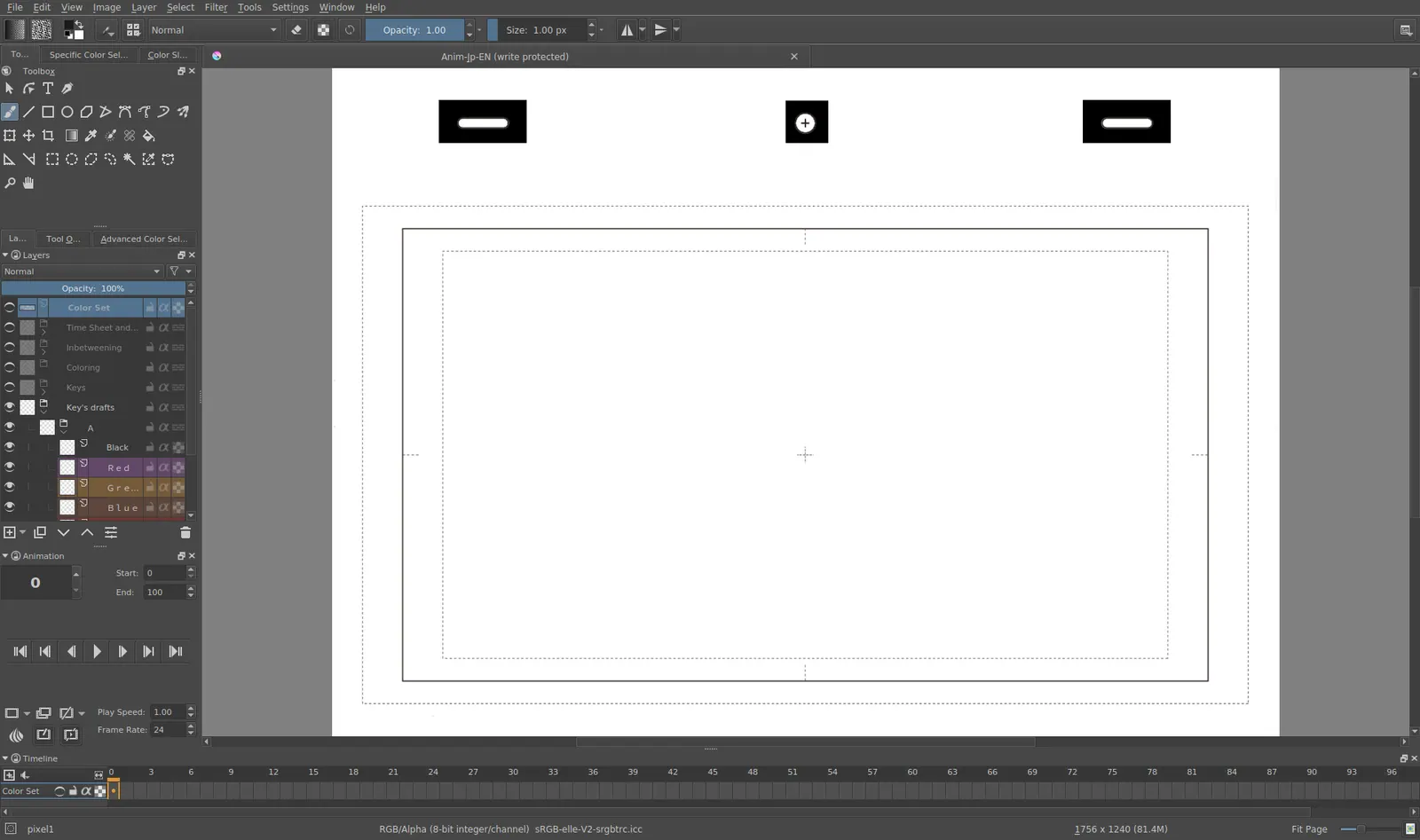
Krita 4.0 animation interface
Tyson Tan · Source · CC BY-SA 4.0
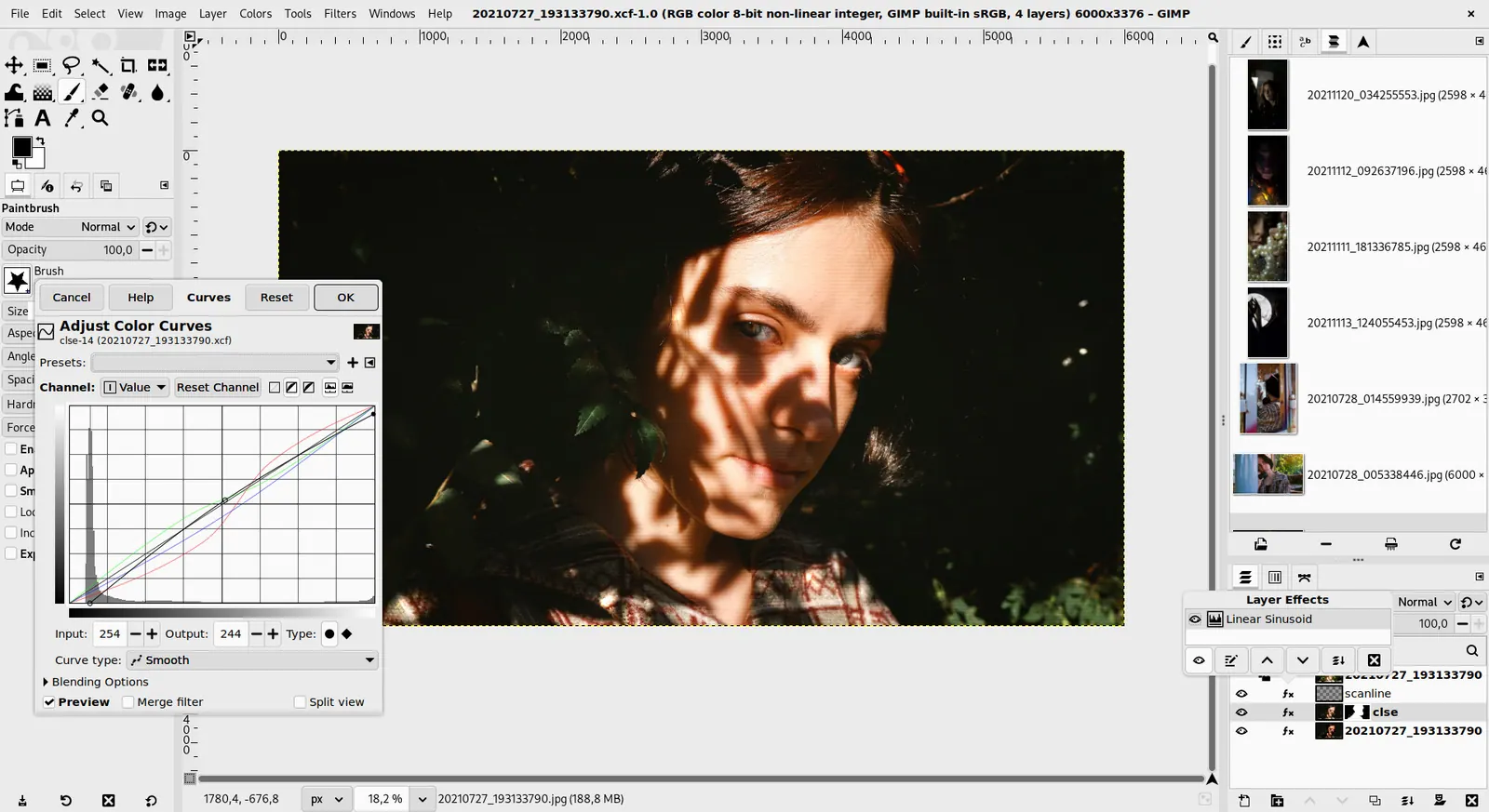
GIMP 3.0 — non-destructive filter workflow
GIMP team / gimp.org · Source · CC BY-SA 4.0
By Ed Tadeo ·
Playing loads YouTube. YouTube will receive your IP address and device information.
Clip Studio Paint today: Paid from $0.99 per per month, Annual/Monthly plans (lowest plan price on the page); the lowest one-time purchase on the page is from US$63.00 for Windows and macOS (Clip Studio Paint pricing, checked 2026-10-23).
Clip Studio Paint sells subscriptions from $0.99 per month and perpetual PRO and EX licenses. Perpetual owners need the separate Update Pass for feature updates from Ver. 5.0, which renews automatically every year. EX is the tier that adds animation and comic features. The 12-month single-device license is currently unavailable for purchase.
Compared with Clip Studio Paint: Free GPL painting program with brushes and animation. It has no paid tier and no subscription, so you lose Clip Studio's comic panel and manga tools, which Krita does not match out of the box.
Price: Free (Free and open source; optional donations, no paid tier) (Krita pricing, checked 2026-10-22).
Platforms and license: Windows, macOS, Linux, Android. GPL (open source).
Best for: Free digital painting with no subscription.
Compared with Clip Studio Paint: Free painting app for Linux, macOS and Windows, with a donate link and no paid tier. It is a simpler brush tool, so you give up Clip Studio's comic, frame and page-layout features.
Price: Free (Free to download; the page lists no price and offers a donate option) (MyPaint pricing, checked 2026-10-23).
Platforms and license: Linux, macOS, Windows. GPL-2.0 (open source).
Project activity: 3k GitHub stars · latest release v2.0.1 (May 29, 2020) · last commit Oct 20, 2026
Best for: Light sketching and brush work.
Compared with Clip Studio Paint: Free editor with no paid tier. It handles photo retouching and compositing better than it handles drawing, so you lose Clip Studio's brush engine and frame-based comic layout.
Price: Free (Free; source tarballs offered, donation link only, no paid tier. Store packages are third-party and not from the GIMP team) (GIMP pricing, checked 2026-10-22).
Platforms and license: Linux, macOS, Windows. Open source (license not named on gimp.org/downloads) (open source).
Best for: Free editing alongside painting.
Worth knowing: Raster image editor for photo retouching and compositing.
Compared with Clip Studio Paint: Free browser editor that reads PSD files, so you can open Clip Studio art on any machine. It is not a painting app, so you lose pressure-sensitive brush control and comic tools.
Price: Free (Free in the browser; the homepage says premium features are free and mentions no paid plan or ad-free option) (Photopea pricing, checked 2026-10-23).
Platforms and license: Web. Proprietary.
Best for: Opening and tweaking PSD files anywhere.
Worth knowing: Browser-based editor that reads PSD files. Runs with no download.
Compared with Clip Studio Paint: Free for individuals on Mac and Windows per affinity.studio, with AI tools needing a Canva premium plan. It is a photo editor with layers rather than a comic studio, so you trade Clip Studio's frame tools for photo-grade adjustments.
Price: Free (Free for individuals per affinity.studio; an iPad version is listed as coming soon; optional AI tools need a Canva premium plan) (Affinity Photo pricing, checked 2026-10-23).
Platforms and license: Windows, macOS. Proprietary.
Best for: Layered photo and paint editing.
Worth knowing: affinity.studio states Affinity is free for individuals, Mac and Windows downloads, with a Canva premium plan only needed for optional AI tools.
Compared with Clip Studio Paint: Costs $22.99 per month on the annual plan billed monthly, with a free trial. A general photo editor with layers and brushes rather than comic-specific tools such as multi-page projects.
Price: Paid from $22.99 per month, annual plan billed monthly (Photoshop single app) (Adobe Photoshop pricing, checked 2026-10-23).
Docs-only for Krita, MyPaint, GIMP, Photopea, Affinity Photo: we did not install or run them, so feature claims come from vendor pages and we did not test import from Clip Studio Paint. Vendor prices and free limits change; confirm on the linked pricing page before you buy or migrate.
Kevin Fan is a SaaS founder. He runs Free Instead Of, which tracks free and open-source alternatives to paid software and checks each price and free-plan limit against the vendor's own pages.
Based on official pricing and product pages checked between 2026-10-22 and 2026-10-23: Clip Studio Paint, Krita, MyPaint, GIMP, Photopea, Affinity Photo, Adobe Photoshop. Prices, free limits and licenses are the figures shown on those pages on those dates. No tool on this page was installed or run. No accounts were created.