Let's Animate - Krita: Rocket Mechanic (10 days)
By Ed Tadeo ·
Playing loads YouTube. YouTube will receive your IP address and device information.
Procreate only runs on iPad and iPhone. Compare Krita, MediBang Paint, Concepts and Clip Studio Paint on Windows by price, pen support and brush engine.
•5 min read•Graphic Design & Diagramming
Verdict:Procreate has no Windows version, so pick a different app. Krita is the free, open-source answer for painting; Clip Studio Paint is the paid one worth buying if you draw comics or need a fuller toolset.
| Tool | Price | Platforms | Best for | Tested |
|---|---|---|---|---|
| Krita | Free and open source (GPL v3); optional donation or paid Microsoft Store copy | Windows, macOS, Linux, Android | Windows artists who want a full painting app with no cost and no subscription | Docs only |
| Clip Studio Paint | One-time purchase from US$63.00 (Windows and macOS); plans from US$0.99/month | Windows, macOS, iPad, iPhone, Android | Illustrators and comic artists who will pay for a fuller toolset and want to buy once | Docs only |
| MediBang Paint | Free download; premium plan price not shown | Windows, macOS, iOS, Android | Beginners who want a free app that also runs on a phone or tablet | Docs only |
| Concepts | Free Basic tier; Pro $4.99/month or $29.99/year; one-time purchases $1.99 to $39.99 each | Windows, iOS, Android | Sketching and ideation on a Windows touchscreen rather than finished paintings | Docs only |
Independent comparison. Paid placements are labelled separately; editorial links earn no affiliate commissions. Learn more.
Images from the linked documentation. Versions and features may differ from current plans.
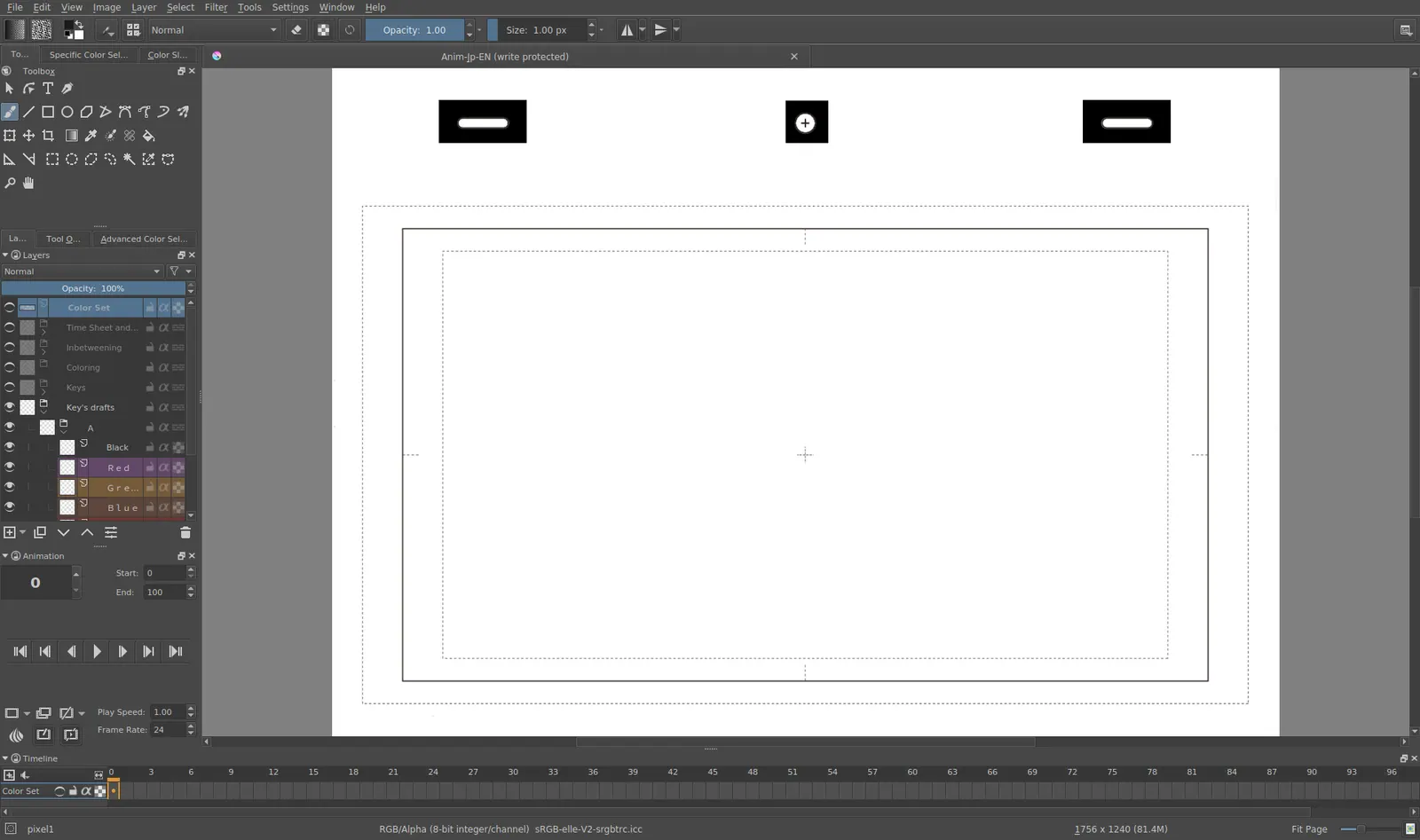
Krita 4.0 animation interface
Tyson Tan · Source · CC BY-SA 4.0
By Ed Tadeo ·
Playing loads YouTube. YouTube will receive your IP address and device information.
Procreate has no Windows version, so the question is which Windows app comes closest. For painting with no cost, Krita is the pick: it is free, open source and runs on Windows. If you draw comics or want a fuller toolset and prefer to buy once, Clip Studio Paint has a one-time license. MediBang Paint and Concepts cover free, lighter use. For a wider list, see our guide to Clip Studio Paint alternatives.
According to Procreate's product page, the app is Procreate for iPad plus Procreate Pocket for iPhone, with "no subscriptions" and sold only through the App Store. That is why every Windows option is a different app, not a port. One poster in a February 2026 Krita Artists thread describes Procreate as strong on brush feel but limited in features such as clipping masks on groups, which is one reason some artists look elsewhere anyway.
Krita is a free, open-source painting program with animation support. According to its download page, it is licensed under GNU GPL v3, runs on Windows 8.1 or higher, macOS and Linux, and accepts any tablet your operating system supports. The Microsoft Store copy is paid and the money supports development, but the page shows no price, so download from the site if you want it free.
Krita's features page lists over 100 preloaded brushes, three ways to smooth and stabilize strokes, animation with thousands of frames on a timeline, PSD loading and saving, and "no subscriptions." For a Procreate user, the stabilizers and brush engine are the parts that matter most.
Moving over has one catch. A July 2025 Krita Artists thread says Procreate and Krita brushes do not normally work in each other's app. A conversion project for .brush, .abr and .sut files exists, but the poster had not tested it, and one reply suggests finding or lightly adjusting a similar Krita brush instead.
A Hacker News thread from May 2024 adds a hardware note: one commenter says a pen display such as a Wacom Cintiq may feel very similar to Procreate, while learning hand-eye coordination on a normal tablet and separate screen usually took them about six months.
Who should not pick it: anyone who wants to stay on an iPad. Krita is not available there.
Clip Studio Paint is a drawing and comics app from CELSYS that runs on Windows, macOS, iPad, iPhone and Android. According to its home page, one-time purchases start at US$63.00 for Windows and macOS, monthly or annual plans start at US$0.99 a month, and the free trial runs up to six months. The page shows no separate prices for the PRO and EX tiers.
The purchase page describes the perpetual Ver. 5.0 license as one payment with no expiration for Windows or macOS. Feature updates need a separate Update Pass, which renews each year. The home page lists the one-time purchase for Windows and macOS only; iPad, iPhone and Android use the subscription plans.
Who should not pick it: someone who only sketches casually and wants to pay nothing. Krita covers that.
MediBang Paint is a free painting and comics app. According to its app page, the download is free and it is listed for Desktop (Windows and Mac), iPad, iPhone and Android, with a premium service adding exclusive brushes and materials. The page shows no premium price and says nothing about pen support, so check that in the app before relying on it.
It suits a beginner who wants the same app on a PC and a phone. Its cloud features and premium plan mean some content sits behind a paid tier.
Who should not pick it: artists who want a deep, documented brush engine. Krita publishes more detail.
Concepts is a sketching app built around an infinite canvas. According to the Concepts site, it runs on Windows through the Microsoft Store, and the free Basic tier gives an infinite canvas, unlimited drawings, five layers and basic JPG export. Pro costs $4.99 a month or $29.99 a year, and one-time purchases range from $1.99 to $39.99 each, tied to the platform where you buy them.
The same page marks some features, such as custom brushes, as iOS only, so a Windows copy may not match the iPad one. It fits ideation and rough design work on a touchscreen better than finished paintings.
Who should not pick it: anyone who needs many layers or custom brushes on Windows.
Pay if the free tools stop you, not before. Clip Studio Paint is the clearest case: a one-time desktop license from US$63.00, a trial of up to six months to test it, and a perpetual Ver. 5.0 license that keeps working without an update plan. It makes sense if you draw comics, work in long layered files, or want the same app on a tablet, which needs a subscription plan.
Stay free if you paint or sketch occasionally. Krita costs nothing and has no subscription. Concepts is cheaper to try, but it is a sketchbook first. Compare features rather than price alone, since the paid license does not give you Procreate's brushes either.
| App | Windows | Price | Open source | Best for |
|---|---|---|---|---|
| Krita | Yes (8.1 or higher) | Free; GPL v3 | Yes | Painting and animation |
| Clip Studio Paint | Yes | One-time from US$63.00 or from US$0.99/month | No | Comics and illustration |
| MediBang Paint | Yes | Free; premium price not shown | No | Beginners, PC plus mobile |
| Concepts | Yes (Microsoft Store) | Free Basic; Pro $4.99/month | No | Sketching on a touchscreen |
You paint and want it free. Install Krita from its site and give the brushes a week before judging it. Read our free painting software guide for other free options.
You draw comics or illustration and will pay once. Try Clip Studio Paint's trial and weigh the one-time license against subscription plans. Our free drawing app list covers lighter tools.
You mostly sketch ideas on a touchscreen. Concepts' free tier is enough to start. If you need photo editing too, see Photoshop alternatives.
No app was installed or tested on Windows. Krita's Microsoft Store price, MediBang's premium price and the split between Clip Studio Paint PRO and EX prices are left out because the vendors' pages do not show them. Pen pressure was not checked app by app.
No. Procreate's own product page describes Procreate for iPad and Procreate Pocket for iPhone, sold only through the App Store. The listed products are iPad and iPhone apps, so a Windows user needs a different drawing app, not a port.
Krita. Its download page says it is free, open-source software under GPL v3, and it runs on Windows 8.1 or higher. Its features page lists over 100 preloaded brushes, three ways to stabilize strokes, frame-by-frame animation support and PSD loading and saving, with no subscriptions.
Usually not. A July 2025 Krita Artists thread says brushes do not normally work across the two apps, though a work-in-progress conversion project for .brush, .abr and .sut files exists and was untested by the poster. One reply suggests finding or lightly adjusting a similar Krita brush.
A pen tablet or pen display makes them far more comfortable. In a May 2024 Hacker News thread, one commenter said a pen display may feel very similar to Procreate, and that learning hand-eye coordination on a normal tablet with a separate screen took them about six months. Plan for a learning period.
Yes on desktop. Its purchase page describes a perpetual Ver. 5.0 license with no expiration, with feature updates needing a separate Update Pass. The home page shows one-time purchases from US$63.00 for Windows and macOS, and subscription plans from US$0.99 a month.
Yes. The Concepts site says it is available in the Microsoft Store, with a free Basic tier that includes five layers and basic JPG export. Pro is $4.99 a month or $29.99 a year. It lists some features, such as custom brushes, as iOS only.
Kevin Fan is a SaaS founder. He runs Free Instead Of, which tracks free and open-source alternatives to paid software and checks each price and free-plan limit against the vendor's own pages.
Procreate's product page, the Krita download and features pages, Clip Studio Paint's home and purchase pages, MediBang Paint's app page, the Concepts site and the Affinity site were read on 2026-10-27. Two Krita Artists forum threads (July 2025 and February 2026) and one Hacker News thread (May 2024) were read for user pain points. Reddit threads were not used.