Flex and Grid layouts in Penpot in under 5 minutes
By Penpot ·
Playing loads YouTube. YouTube will receive your IP address and device information.
Best free Logo Makers compared: Canva, Adobe Express, FreeLogoDesign, Inkscape and 4 more, with free-plan limits, platforms and prices from official pages checked October 23, 2026.
•4 min read•Graphic Design & Diagramming
| Tool | Price | Platforms | Best for | Tested |
|---|---|---|---|---|
| Canva | Free (Free plan available; see the pricing page for its current limits) | Web, Windows, macOS, iOS, Android | Fast template logos | Docs only |
| Adobe Express | Free (Free plan: free daily generations for images and text effects, 5 lifetime presentation generations, basic editing tools, 5 GB storage); paid from $9.99 per month, Premium, billed monthly, 30-day free trial | Web, iOS, Android | Social-ready logos | Docs only |
| FreeLogoDesign | Free (Free low-resolution logo download (about 200 by 200 px PNG per the vendor blog); transparent background and high resolution are paid) | Web | Trying ideas for free | Docs only |
| Inkscape | Free (Free software under GPLv3; the site asks for donations and lists no paid tier) | Linux, macOS, Windows | Vector logos you own | Docs only |
| Penpot | Free (Professional plan at $0: up to 8 team members plus unlimited viewers, 10GB storage, 7 days of version history); paid from $7 per per editor/month (Unlimited), capped at $175/month; 14-day free trial | Web | Collaborative vector work | Docs only |
| Figma | Free (Starter at $0: limited access to Figma products, unlimited drafts, 150 AI credits a day (500 a month)); paid from $16 per per full seat/month (Professional); annual rate not shown in the extracted text | Web, macOS, Windows | Designers already in Figma | Docs only |
| Lunacy | Free (Free for personal and commercial use per Icons8 docs; built-in Icons8 assets need a link back or a paid subscription; cloud documents need a subscription) | Windows, macOS, Linux | Offline vector design | Docs only |
| GIMP | Free (Free; source tarballs offered, donation link only, no paid tier. Store packages are third-party and not from the GIMP team) | Linux, macOS, Windows | Raster-based logos | Docs only |
Independent comparison. Paid placements are labelled separately; editorial links earn no affiliate commissions. Learn more.
Images from the linked documentation. Versions and features may differ from current plans.
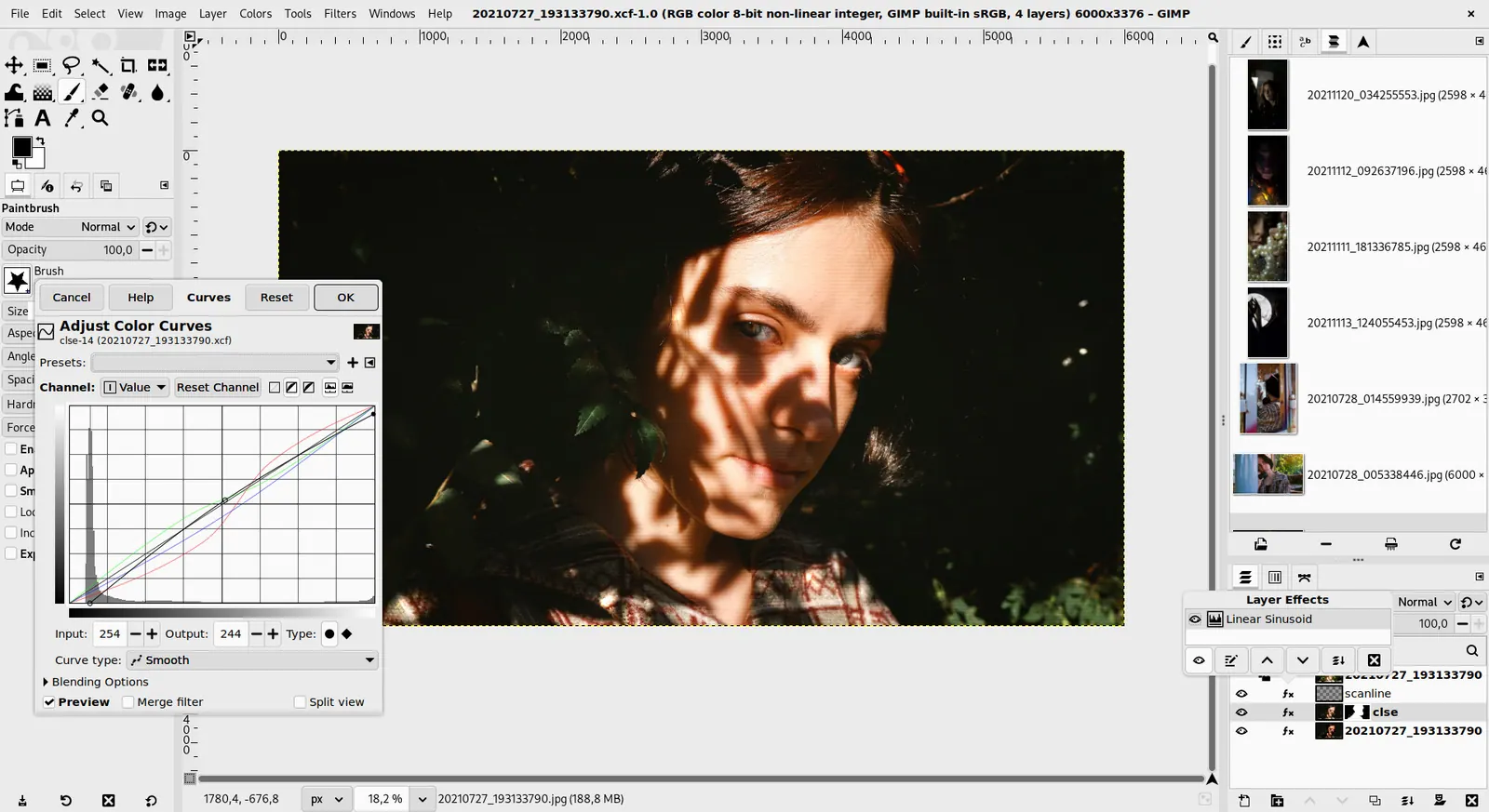
GIMP 3.0 — non-destructive filter workflow
GIMP team / gimp.org · Source · CC BY-SA 4.0
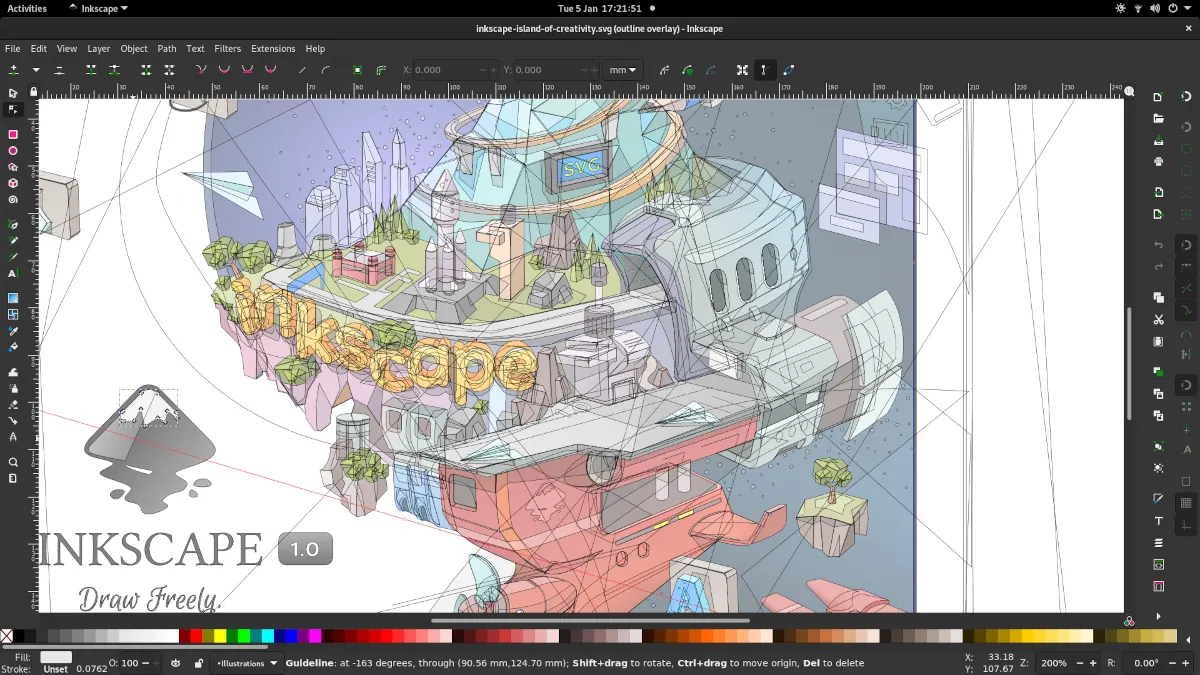
Inkscape 1.1 — outline overlay preview
Moini · Source · CC BY-SA 4.0
By Penpot ·
Playing loads YouTube. YouTube will receive your IP address and device information.
Most logo makers are free to design and paid to download, so the useful question is what you can actually take away at no cost. Canva and Adobe Express let you design a logo from templates and export it on the free plan, though some elements are locked to paid plans. FreeLogoDesign lets you download a low-resolution file, about 200 by 200 pixels as a PNG, and charges for high resolution and a transparent background. If you want true ownership of the artwork, draw it yourself in a free editor: Inkscape and Penpot produce vector logos in SVG, Figma has a free Starter plan, Lunacy is free for personal and commercial use, and GIMP covers raster work. Whatever you pick, keep a vector master, because a logo that exists only as a small PNG will blur on a banner or a van. Check the license on any clip art or font inside the logo, since template assets can carry usage limits. The trade-off is speed against control: a template maker gives you something presentable in ten minutes, while a vector editor takes longer but leaves you with an editable file nobody can paywall. Eight options follow, with the free limit that applies.
Design a logo from templates and export on the free plan; some elements need Pro. Confirm the export format before finishing.
Price: Free (Free plan available; see the pricing page for its current limits) (Canva pricing, checked 2026-10-22).
Platforms and license: Web, Windows, macOS, iOS, Android. Proprietary.
Best for: Fast template logos.
Compare: Canva alternatives
Free plan with templates and 4,000+ fonts, no card needed. Premium assets are locked behind $9.99 a month.
Price: Free (Free plan: free daily generations for images and text effects, 5 lifetime presentation generations, basic editing tools, 5 GB storage); paid from $9.99 per month, Premium, billed monthly, 30-day free trial (Adobe Express pricing, checked 2026-10-23).
Platforms and license: Web, iOS, Android. Proprietary SaaS.
Best for: Social-ready logos.
Free low-resolution download (about 200 by 200 px PNG per the vendor). Transparent background and high resolution cost extra; account creation is optional.
Price: Free (Free low-resolution logo download (about 200 by 200 px PNG per the vendor blog); transparent background and high resolution are paid) (FreeLogoDesign pricing, checked 2026-10-23).
Platforms and license: Web. Proprietary.
Best for: Trying ideas for free.
Free GPLv3 vector editor that exports SVG, so the logo scales to any size. You draw everything yourself; there are no templates.
Price: Free (Free software under GPLv3; the site asks for donations and lists no paid tier) (Inkscape pricing, checked 2026-10-22).
Platforms and license: Linux, macOS, Windows. GPL-3.0 (open source).
Project activity: 4.1k GitHub stars · No commits since Mar 3, 2022
Best for: Vector logos you own.
Worth knowing: SVG vector editor. The site links to the GPLv3 guide; the GPLv3 license name is taken from that link.
Open-source design tool that exports SVG. Professional plan is $0 for up to 8 team members; paid plans start at $7.
Price: Free (Professional plan at $0: up to 8 team members plus unlimited viewers, 10GB storage, 7 days of version history); paid from $7 per per editor/month (Unlimited), capped at $175/month; 14-day free trial (Penpot pricing, checked 2026-10-23).
Platforms and license: Web. MPL-2.0 (open source).
Project activity: 61.8k GitHub stars · latest release 2.18.5 (Oct 26, 2026) · last commit Oct 27, 2026
Best for: Collaborative vector work.
Starter plan is $0 with unlimited drafts. Draw logos with vector tools and export SVG; paid step starts at $16.
Price: Free (Starter at $0: limited access to Figma products, unlimited drafts, 150 AI credits a day (500 a month)); paid from $16 per per full seat/month (Professional); annual rate not shown in the extracted text (Figma pricing, checked 2026-10-23).
Platforms and license: Web, macOS, Windows. Proprietary.
Best for: Designers already in Figma.
Compare: Figma alternatives
Free design tool for Windows, macOS and Linux, free for personal and commercial use. Built-in Icons8 assets need a link back or a subscription.
Price: Free (Free for personal and commercial use per Icons8 docs; built-in Icons8 assets need a link back or a paid subscription; cloud documents need a subscription) (Lunacy pricing, checked 2026-10-23).
Platforms and license: Windows, macOS, Linux. Proprietary.
Best for: Offline vector design.
Free raster editor for logos that live as bitmaps or textures. Not a vector tool, so keep a vector master elsewhere.
Price: Free (Free; source tarballs offered, donation link only, no paid tier. Store packages are third-party and not from the GIMP team) (GIMP pricing, checked 2026-10-22).
Platforms and license: Linux, macOS, Windows. Open source (license not named on gimp.org/downloads) (open source).
Best for: Raster-based logos.
Worth knowing: Raster image editor for photo retouching and compositing.
Docs-only for Canva, Adobe Express, FreeLogoDesign, Inkscape, Penpot, Figma, Lunacy, GIMP: we did not install or run them, so feature claims come from vendor pages. Vendor prices and free limits change; confirm on the linked pricing page before you commit.
Kevin Fan is a SaaS founder. He runs Free Instead Of, which tracks free and open-source alternatives to paid software and checks each price and free-plan limit against the vendor's own pages.
Based on official pricing, license and product pages checked between 2026-10-22 and 2026-10-23: Canva, Adobe Express, FreeLogoDesign, Inkscape, Penpot, Figma, Lunacy, GIMP. Prices, free limits and licenses are the figures shown on those pages on those dates. No tool on this page was installed or run. No accounts were created.