Best Free GIF Makers 2026: 6 Options Compared
Best free GIF Makers compared: ScreenToGif, Kapwing, VEED, Clipchamp and 2 more, with free-plan limits, platforms and prices from official pages checked October 24, 2026.
•3 min read•Video Editing & AI Video
Try one now
Quick comparison
| Tool | Price | Platforms | Best for | Tested |
|---|---|---|---|---|
| ScreenToGif | Free | Windows | Recording your screen as a GIF | Docs only |
| Kapwing | Free (Free: 10 credits, watermarked exports, 720p, up to 4 minutes per video, 30 minutes of export a month, 2 GB uploads, 5 GB storage kept for 3 days); paid from $16 per month (Pro, 1,000 credits; the page has a monthly/annual toggle with 33% off annual but does not state which the $16 is) | Web | Clips turned into GIFs | Docs only |
| VEED | Free (Free plan available; see the pricing page for its limits) | Web | Browser video editing | Docs only |
| Clipchamp | Free (Free: export up to 1080p with no watermark; premium stock assets, premium filters and effects, and brand kit not included) | Web, Windows | Clean exports without a logo | Docs only |
| Photopea | Free (Free in the browser; the homepage says premium features are free and mentions no paid plan or ad-free option) | Web | Frame-by-frame GIFs from layers | Docs only |
| GIMP | Free (Free; source tarballs offered, donation link only, no paid tier. Store packages are third-party and not from the GIMP team) | Linux, macOS, Windows | Offline GIF editing | Docs only |
Independent comparison. Paid placements are labelled separately; editorial links earn no affiliate commissions. Learn more.
See the tools in action
Images from the linked documentation. Versions and features may differ from current plans.
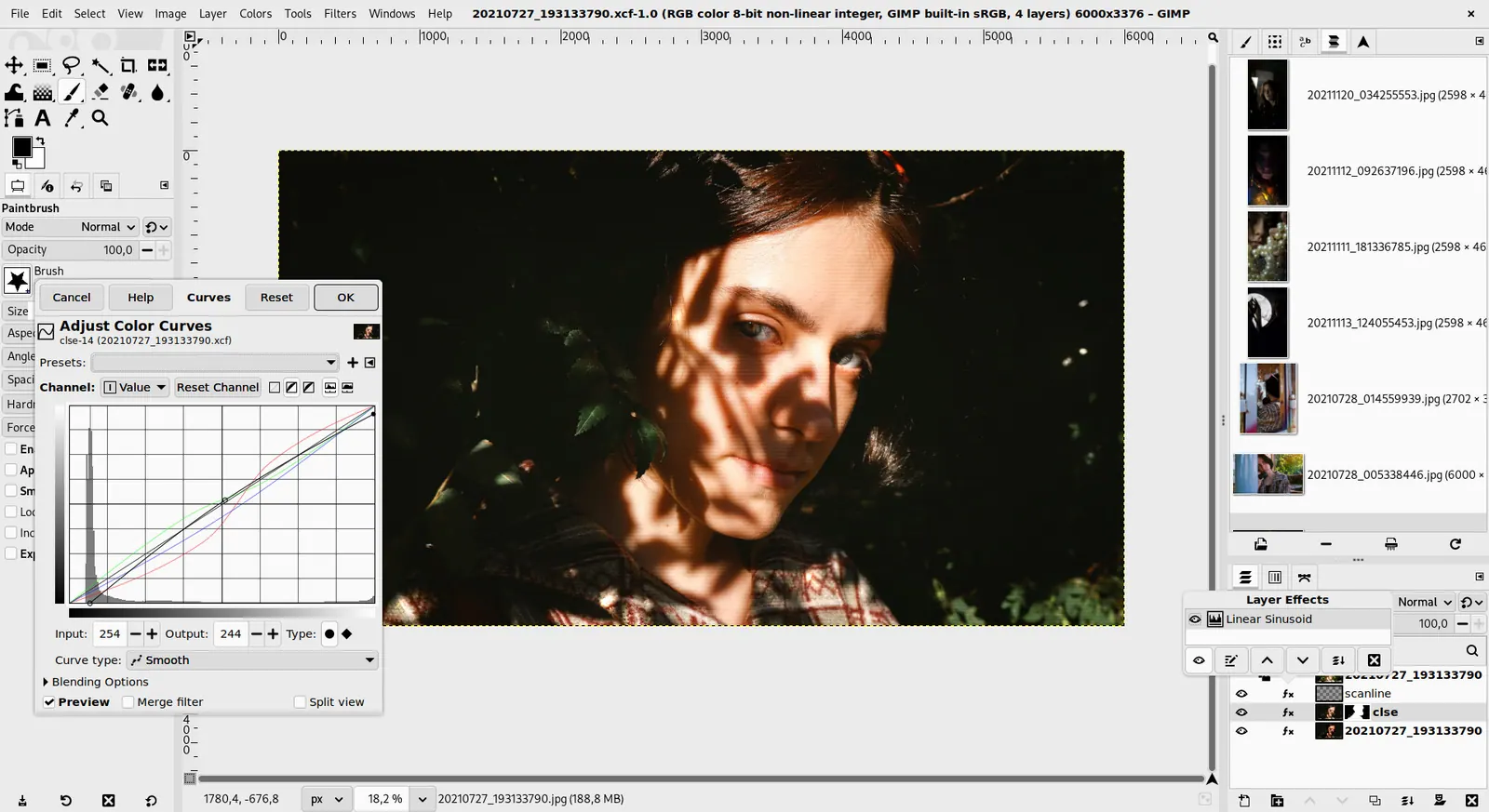
GIMP 3.0 — non-destructive filter workflow
GIMP team / gimp.org · Source · CC BY-SA 4.0
Good fit if
- You want to record a bug or tutorial on screen (ScreenToGif is the pick)
- You have a video clip to convert (Kapwing is the pick)
- You need no watermark and good quality (Clipchamp is the pick)
- You build GIFs from layered art (Photopea is the pick)
- You prefer working offline (GIMP is the pick)
Not ideal if
- You need paid-tier features, uptime guarantees or support that these free plans leave out
The right free GIF maker depends on where your frames come from. If you want to capture something on your screen, ScreenToGif records a selected area and saves a GIF or video, though it appears to be Windows only. If you are starting from a video clip, Kapwing and VEED are web editors with free plans; Kapwing's free plan watermarks exports and limits exports to 4 minutes, and VEED has a free plan too, though third-party listings cite a watermark and 720p export. If you want to build a GIF from layered artwork, GIMP and Photopea work frame by frame, which takes longer but leaves no watermark. Clipchamp gives free 1080p export without a watermark per its pricing page, but it is a video editor rather than a GIF tool. GIFs are large for what they show, so trim the length and reduce dimensions before exporting, because most chat and email services reject big files. The main trade-off is convenience against output quality: one-click web tools stamp their logo on the file, while the free local programs take more setup but leave you with a clean result you can publish anywhere.
ScreenToGif
MS-PL recorder that captures a selected area and saves a GIF or video, with an editor. Appears Windows only, needing the .NET 9 Desktop Runtime.
Price: Free (ScreenToGif pricing, checked 2026-10-23).
Platforms and license: Windows. MS-PL (open source).
Project activity: 27.9k GitHub stars · latest release 2.43.2 (Jul 28, 2026) · last commit Oct 14, 2026
Best for: Recording your screen as a GIF.
Kapwing
Free plan: 10 credits, watermarked exports, 720p, up to 1 minute per video, 2 GB uploads. Handy for turning a clip into a GIF in the browser.
Price: Free (Free: 10 credits, watermarked exports, 720p, up to 4 minutes per video, 30 minutes of export a month, 2 GB uploads, 5 GB storage kept for 3 days); paid from $16 per month (Pro, 1,000 credits; the page has a monthly/annual toggle with 33% off annual but does not state which the $16 is) (Kapwing pricing, checked 2026-10-24).
Platforms and license: Web. Proprietary.
Best for: Clips turned into GIFs.
Compare: Kapwing alternatives
VEED
Free plan exists; the pricing page lists no limits, and third-party listings cite a watermark and 720p export. Check the export screen before relying on it.
Price: Free (Free plan available; see the pricing page for its limits) (VEED pricing, checked 2026-10-23).
Platforms and license: Web. Proprietary.
Best for: Browser video editing.
Compare: VEED alternatives
Clipchamp
Free export up to 1080p with no watermark for Web and Windows; premium assets and effects need Microsoft 365. A video editor first, so confirm it exports the format you need.
Price: Free (Free: export up to 1080p with no watermark; premium stock assets, premium filters and effects, and brand kit not included) (Clipchamp pricing, checked 2026-10-23).
Platforms and license: Web, Windows. Proprietary.
Best for: Clean exports without a logo.
Compare: Clipchamp alternatives
Photopea
Free in the browser, no paid plan mentioned on its homepage; reads PSD files. Build a GIF from layered frames by hand.
Price: Free (Free in the browser; the homepage says premium features are free and mentions no paid plan or ad-free option) (Photopea pricing, checked 2026-10-23).
Platforms and license: Web. Proprietary.
Best for: Frame-by-frame GIFs from layers.
Worth knowing: Browser-based editor that reads PSD files. Runs with no download.
Compare: Photopea alternatives
GIMP
Free open-source editor for Linux, macOS and Windows with no paid tier. Handles animated GIFs from layers, with more steps than a web tool.
Price: Free (Free; source tarballs offered, donation link only, no paid tier. Store packages are third-party and not from the GIMP team) (GIMP pricing, checked 2026-10-22).
Platforms and license: Linux, macOS, Windows. Open source (license not named on gimp.org/downloads) (open source).
Best for: Offline GIF editing.
Worth knowing: Raster image editor for photo retouching and compositing.
Which one to pick
- You want to record a bug or tutorial on screen: ScreenToGif
- You have a video clip to convert: Kapwing
- You need no watermark and good quality: Clipchamp
- You build GIFs from layered art: Photopea
- You prefer working offline: GIMP
Limits of this review
Docs-only for ScreenToGif, Kapwing, VEED, Clipchamp, Photopea, GIMP: we did not install or run them, so feature claims come from vendor pages. Vendor prices and free limits change; confirm on the linked pricing page before you commit.
Related guides
More in Video Editing & AI Video
All Video Editing & AI Video alternatives →Sources
Kevin Fan
Kevin Fan is a SaaS founder. He runs Free Instead Of, which tracks free and open-source alternatives to paid software and checks each price and free-plan limit against the vendor's own pages.
Methodology
Based on official pricing, license and product pages checked between 2026-10-22 and 2026-10-24: ScreenToGif, Kapwing, VEED, Clipchamp, Photopea, GIMP. Prices, free limits and licenses are the figures shown on those pages on those dates. No tool on this page was installed or run. No accounts were created.