Best Free Collage Makers 2026: 7 Options Compared
Best free Collage Makers compared: Canva, Adobe Express, Picsart, Pixlr and 3 more, with free-plan limits, platforms and prices from official pages checked October 23, 2026.
•3 min read•Photo Editing & AI Images
Try one now
Quick comparison
| Tool | Price | Platforms | Best for | Tested |
|---|---|---|---|---|
| Canva | Free (Free plan available; see the pricing page for its current limits) | Web, Windows, macOS, iOS, Android | Quick grids from templates | Docs only |
| Adobe Express | Free (Free plan: free daily generations for images and text effects, 5 lifetime presentation generations, basic editing tools, 5 GB storage); paid from $9.99 per month, Premium, billed monthly, 30-day free trial | Web, iOS, Android | Collages with many fonts and stickers | Docs only |
| Picsart | Free; paid from $10.5 per month, Pro, billed yearly | Web, iOS, Android, Windows | Phone collages | Docs only |
| Pixlr | Free (Free tier is ad-supported with limited AI credits per search coverage) | Web | Browser collages with editing | Docs only |
| Google Photos | Free (15 GB per Google account, shared with Drive and Gmail); paid from $1.99 per month (Basic, 100 GB, billed monthly; 2 TB is $9.99) | Web, Android, iOS | Collages from your own library | Docs only |
| Photopea | Free (Free in the browser; the homepage says premium features are free and mentions no paid plan or ad-free option) | Web | Custom layouts | Docs only |
| GIMP | Free (Free; source tarballs offered, donation link only, no paid tier. Store packages are third-party and not from the GIMP team) | Linux, macOS, Windows | Large offline collages | Docs only |
Independent comparison. Paid placements are labelled separately; editorial links earn no affiliate commissions. Learn more.
See the tools in action
Images from the linked documentation. Versions and features may differ from current plans.
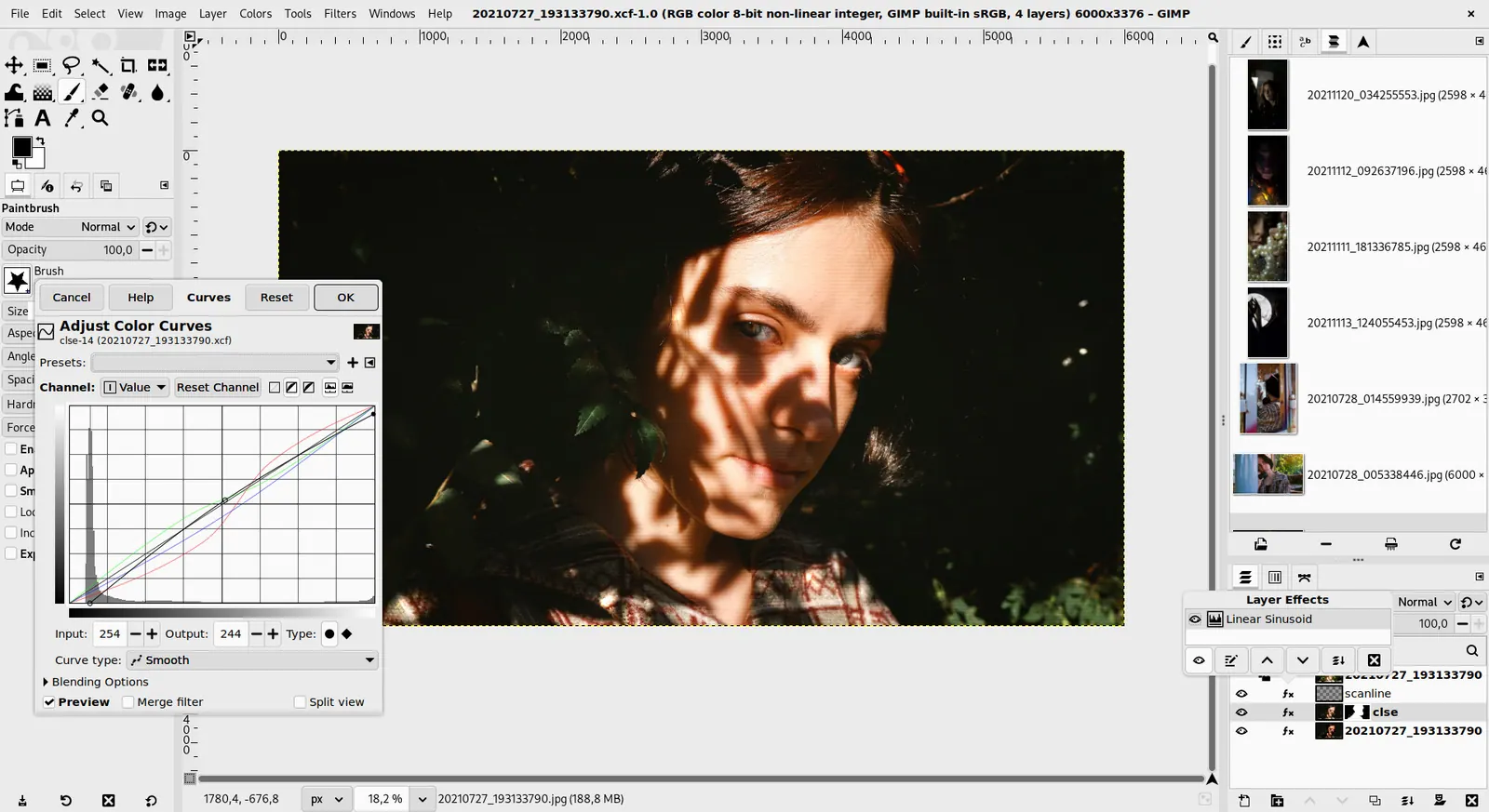
GIMP 3.0 — non-destructive filter workflow
GIMP team / gimp.org · Source · CC BY-SA 4.0
Good fit if
- You want a grid in a minute (Canva is the pick)
- Your photos are already in Google Photos (Google Photos is the pick)
- You edit on your phone (Picsart is the pick)
- You need a custom layout (Photopea is the pick)
- You work offline on big prints (GIMP is the pick)
Not ideal if
- You need paid-tier features, uptime guarantees or support that these free plans leave out
A collage tool should let you drop photos into a grid, adjust spacing and export without a logo across the corner. Free collage makers vary mainly by where you do the work. Canva and Adobe Express are template apps with free plans and photo grids ready to fill. Picsart and Pixlr combine collage layouts with photo editing, and both have free tiers, so check each pricing page for current limits. Google Photos has a collage feature inside the app you probably already use for backups, with 15 GB of free storage shared across your Google account. GIMP and Photopea are editors rather than collage apps, so you arrange layers yourself, which suits non-standard layouts. If you are making a quick grid for social media, use a template tool on your phone. If you need a large print or a precise layout, use a layer editor on a desktop. The trade-off is time against freedom. Template makers finish in a minute but constrain cell shapes. Layer editors let you do anything and need practice. Before exporting, check the final resolution so a print does not come out soft, and look for any watermark on the preview.
Canva
Free plan exists; check its pricing page for current limits. Large library of grid templates.
Price: Free (Free plan available; see the pricing page for its current limits) (Canva pricing, checked 2026-10-22).
Platforms and license: Web, Windows, macOS, iOS, Android. Proprietary.
Best for: Quick grids from templates.
Compare: Canva alternatives
Adobe Express
Free plan at $0 with over 100,000 templates and 5 GB storage; Premium is $9.99 a month.
Price: Free (Free plan: free daily generations for images and text effects, 5 lifetime presentation generations, basic editing tools, 5 GB storage); paid from $9.99 per month, Premium, billed monthly, 30-day free trial (Adobe Express pricing, checked 2026-10-23).
Platforms and license: Web, iOS, Android. Proprietary SaaS.
Best for: Collages with many fonts and stickers.
Picsart
Web, iOS, Android and Windows app; Pro costs $10.50 a month billed yearly. Free-tier limits are described only by third-party reviews.
Price: Free; paid from $10.5 per month, Pro, billed yearly (Picsart pricing, checked 2026-10-23).
Platforms and license: Web, iOS, Android, Windows. Proprietary.
Best for: Phone collages.
Compare: Picsart alternatives
Pixlr
Browser editor with an ad-supported free tier and limited AI credits; paid prices disagreed across sources so none is quoted.
Price: Free (Free tier is ad-supported with limited AI credits per search coverage) (Pixlr pricing, checked 2026-10-23).
Platforms and license: Web. Proprietary.
Best for: Browser collages with editing.
Google Photos
15 GB free per Google account shared with Drive and Gmail; 100 GB costs $1.99 a month. Convenient if your photos already live there.
Price: Free (15 GB per Google account, shared with Drive and Gmail); paid from $1.99 per month (Basic, 100 GB, billed monthly; 2 TB is $9.99) (Google Photos pricing, checked 2026-10-23).
Platforms and license: Web, Android, iOS. Proprietary.
Best for: Collages from your own library.
Compare: Google Photos alternatives
Photopea
Free in the browser with no paid plan on its homepage; reads PSD files. Arrange photos on layers with no templates.
Price: Free (Free in the browser; the homepage says premium features are free and mentions no paid plan or ad-free option) (Photopea pricing, checked 2026-10-23).
Platforms and license: Web. Proprietary.
Best for: Custom layouts.
Worth knowing: Browser-based editor that reads PSD files. Runs with no download.
Compare: Photopea alternatives
GIMP
Free open-source editor for Linux, macOS and Windows with no paid tier. Offline and unlimited, but manual layout work.
Price: Free (Free; source tarballs offered, donation link only, no paid tier. Store packages are third-party and not from the GIMP team) (GIMP pricing, checked 2026-10-22).
Platforms and license: Linux, macOS, Windows. Open source (license not named on gimp.org/downloads) (open source).
Best for: Large offline collages.
Worth knowing: Raster image editor for photo retouching and compositing.
Which one to pick
- You want a grid in a minute: Canva
- Your photos are already in Google Photos: Google Photos
- You edit on your phone: Picsart
- You need a custom layout: Photopea
- You work offline on big prints: GIMP
Limits of this review
Docs-only for Canva, Adobe Express, Picsart, Pixlr, Google Photos, Photopea, GIMP: we did not install or run them, so feature claims come from vendor pages. Vendor prices and free limits change; confirm on the linked pricing page before you commit.
Related guides
More in Photo Editing & AI Images
All Photo Editing & AI Images alternatives →Sources
Kevin Fan
Kevin Fan is a SaaS founder. He runs Free Instead Of, which tracks free and open-source alternatives to paid software and checks each price and free-plan limit against the vendor's own pages.
Methodology
Based on official pricing, license and product pages checked between 2026-10-22 and 2026-10-23: Canva, Adobe Express, Picsart, Pixlr, Google Photos, Photopea, GIMP. Prices, free limits and licenses are the figures shown on those pages on those dates. No tool on this page was installed or run. No accounts were created.