Facetune Alternatives 2026: 5 Free Options
Facetune alternatives: Snapseed, GIMP, Photopea, Pixlr and 1 more. Prices and licenses checked October 25, 2026.
•3 min read•Photo Editing & AI Images
Verdict:Leave Facetune if you pay for a handful of portrait fixes a month. Its pricing lists yearly at $77.99 and a 7-day trial, with monthly plans starting around $25. Snapseed is the closest free swap on a phone: it is made by Google, free, and has healing and brush tools, but it will not smooth a face in one tap, so you spend more time per photo. If you edit on a laptop, GIMP gives you deeper healing and clone tools for free, at the cost of a steep learning curve. Photopea gives a similar layer-based workflow in the browser with no install and reads PSD files. Pixlr suits quick browser edits with AI helpers, though you should check its pricing page for paid plans. Canva is the pick when the photo goes straight into a post or ad. The trade-off is guidance: Facetune detects faces and applies fixes in a tap, and every alternative here asks you to do the retouching yourself. If you edit a few selfies a week, the manual work is easy to accept. If you retouch client portraits all day, keep a paid tool and look at desktop software with face-aware features.
Quick comparison
| Tool | Price | Platforms | Best for | Tested |
|---|---|---|---|---|
| Snapseed | Free (Free to download; the App Store listing says no ads) | iOS, Android | Free mobile photo edits | Docs only |
| GIMP | Free (Free; source tarballs offered, donation link only, no paid tier. Store packages are third-party and not from the GIMP team) | Linux, macOS, Windows | Detailed retouching on a computer | Docs only |
| Photopea | Free (Free in the browser; the homepage says premium features are free and mentions no paid plan or ad-free option) | Web | Quick retouching in a browser | Docs only |
| Pixlr | Free (Free tier is ad-supported with limited AI credits per search coverage) | Web | Casual edits without installing anything | Docs only |
| Canva | Free (Free plan available; see the pricing page for its current limits) | Web, Windows, macOS, iOS, Android | Social posts that need edits and layout | Docs only |
| Luminar | Paid from $139 per one-time (Luminar on Desktop, Mobile and Web lifetime bundle; AI tools included for 365 days) | Desktop, Mobile, Web | Photo editing | Docs only |
Independent comparison. Paid placements are labelled separately; editorial links earn no affiliate commissions. Learn more.
See the tools in action
Images from the linked documentation. Versions and features may differ from current plans.
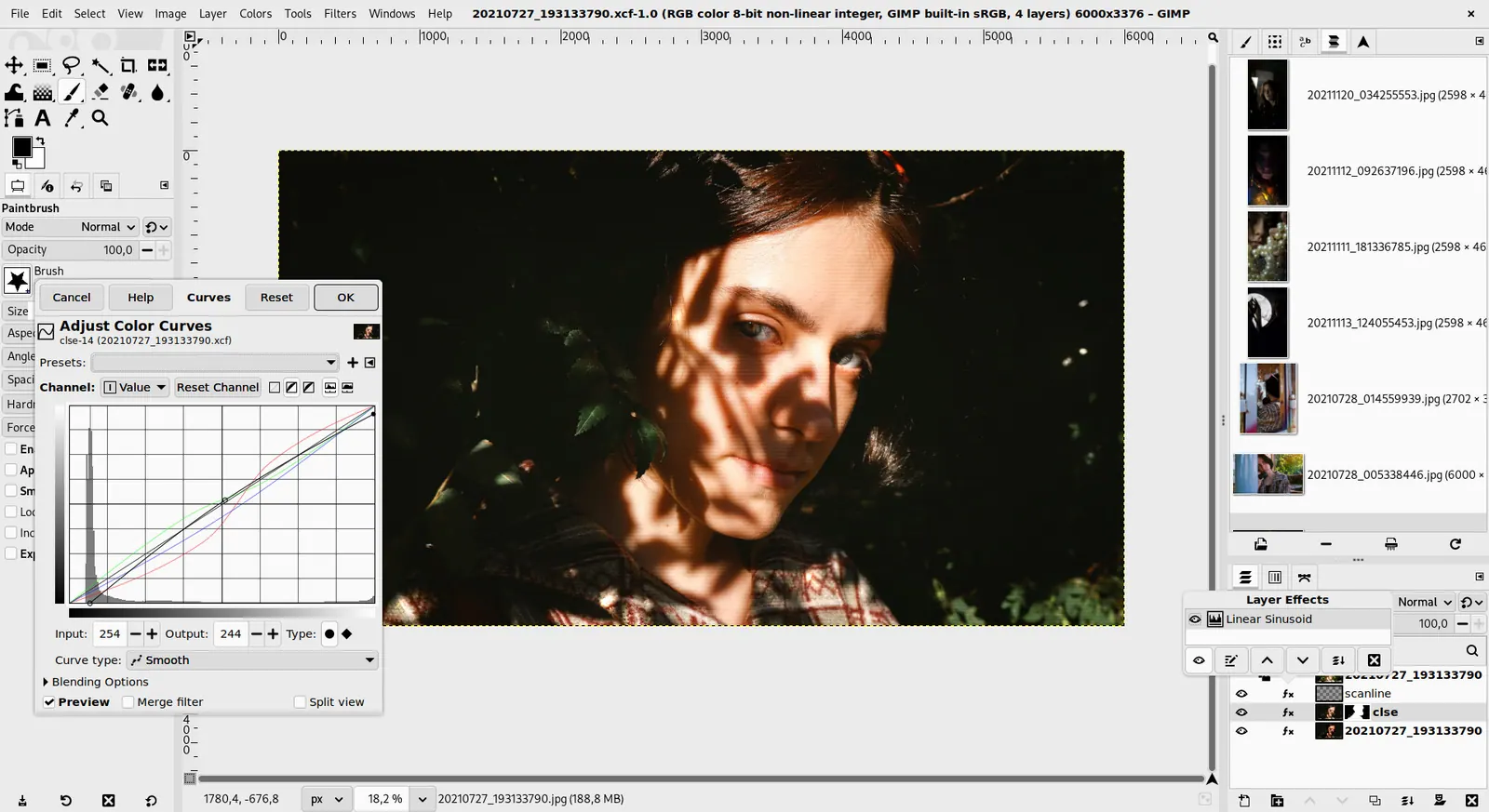
GIMP 3.0 — non-destructive filter workflow
GIMP team / gimp.org · Source · CC BY-SA 4.0
Good fit if
- You edit photos on your phone and want it free (Snapseed is the pick)
- You retouch on a computer and want depth (GIMP is the pick)
- You want a browser editor that reads PSD files (Photopea is the pick)
- You edit photos then drop them into social posts (Canva is the pick)
Not ideal if
- You rely on Facetune features or integrations that these tools do not replicate
Facetune today: Paid from $77.99 per year (yearly plan) (Facetune pricing, checked 2026-10-23).
Why people look for Facetune alternatives
Facetune has no permanent free plan: the pricing page offers a 7-day free trial, after which every tool needs a subscription at $25 a month, $40 every three months or $77.99 a year. You cannot switch plans mid-cycle; you cancel and re-subscribe once the billing period ends. Cancelling must happen at least 48 hours before renewal to avoid the next charge, and the 14-day refund covers only purchases made on facetuneapp.com, while app store buyers have to ask Apple or Google.
Snapseed
Compared with Facetune: Free Google editor with healing, brush, perspective and over 25 tools, no ads per its App Store page. It lacks Facetune's one-tap face and body retouching, so portrait smoothing is manual, but it costs nothing.
Price: Free (Free to download; the App Store listing says no ads) (Snapseed pricing, checked 2026-10-23).
Platforms and license: iOS, Android. Proprietary.
Best for: Free mobile photo edits.
GIMP
Compared with Facetune: Free desktop editor with healing and clone tools for blemish and skin retouching. It is far less guided than Facetune and has a learning curve, but it works with no subscription on Windows, macOS and Linux.
Price: Free (Free; source tarballs offered, donation link only, no paid tier. Store packages are third-party and not from the GIMP team) (GIMP pricing, checked 2026-10-22).
Platforms and license: Linux, macOS, Windows. Open source (license not named on gimp.org/downloads) (open source).
Best for: Detailed retouching on a computer.
Worth knowing: Raster image editor for photo retouching and compositing.
Photopea
Compared with Facetune: Free browser editor that reads PSD files and handles layers and retouching. No face-detection presets like Facetune, so you retouch manually, but it needs no install and no payment.
Price: Free (Free in the browser; the homepage says premium features are free and mentions no paid plan or ad-free option) (Photopea pricing, checked 2026-10-23).
Platforms and license: Web. Proprietary.
Best for: Quick retouching in a browser.
Worth knowing: Browser-based editor that reads PSD files. Runs with no download.
Pixlr
Compared with Facetune: Browser editor with a free ad-supported tier and AI tools. Paid price figures conflicted across sources, so check its pricing page; you lose Facetune's polished mobile selfie tools.
Price: Free (Free tier is ad-supported with limited AI credits per search coverage) (Pixlr pricing, checked 2026-10-23).
Platforms and license: Web. Proprietary.
Best for: Casual edits without installing anything.
Canva
Compared with Facetune: Free plan with photo editing and background tools alongside design templates. Not a portrait retoucher: it does not match Facetune's face-specific adjustments, but it covers cropping, filters and layout for social posts.
Price: Free (Free plan available; see the pricing page for its current limits) (Canva pricing, checked 2026-10-22).
Platforms and license: Web, Windows, macOS, iOS, Android. Proprietary.
Best for: Social posts that need edits and layout.
Other popular options (paid)
Luminar
Compared with Facetune: Skylum sells Luminar as a $139 one-time bundle for desktop, mobile and web, with AI tools included for 365 days and a yearly renewal after that, against Facetune's $77.99 per year subscription. It is aimed at desktop photo editing.
Price: Paid from $139 per one-time (Luminar on Desktop, Mobile and Web lifetime bundle; AI tools included for 365 days) (Luminar pricing, checked 2026-10-25).
Which one to pick
- You edit photos on your phone and want it free: Snapseed
- You retouch on a computer and want depth: GIMP
- You want a browser editor that reads PSD files: Photopea
- You edit photos then drop them into social posts: Canva
Limits of this review
Docs-only for Snapseed, GIMP, Photopea, Pixlr, Canva: we did not install or run them, so feature claims come from vendor pages and we did not test import from Facetune. Vendor prices and free limits change; confirm on the linked pricing page before you buy or migrate.
Related guides
More in Photo Editing & AI Images
All Photo Editing & AI Images alternatives →Sources
Kevin Fan
Kevin Fan is a SaaS founder. He runs Free Instead Of, which tracks free and open-source alternatives to paid software and checks each price and free-plan limit against the vendor's own pages.
Methodology
Based on official pricing and product pages checked between 2026-10-22 and 2026-10-25: Facetune, Snapseed, GIMP, Photopea, Pixlr, Canva, Luminar. Prices, free limits and licenses are the figures shown on those pages on those dates. No tool on this page was installed or run. No accounts were created.