Picsart Alternatives 2026: 7 Free Options
Picsart alternatives: Photopea, GIMP, Canva, Pixlr and 3 more. Prices and licenses checked October 23, 2026.
•4 min read•Photo Editing & AI Images
Verdict:Picsart is a mobile-first editor that mixes photo retouching, collage, stickers and AI generation, and its Pro plan costs $10.50 per month billed yearly. Whether that is worth paying depends on how often you use the AI tools rather than the basic editing, because the basic editing is available for free elsewhere. If you mostly crop, retouch and add text, Photopea in the browser or GIMP on the desktop do that without a subscription, and Snapseed handles quick fixes on a phone. If what you actually want is templates for social posts, Canva is the better fit, though you should check its current free limits first. Pixlr sits between the two for fast browser edits, but its free tier is ad-supported and AI credits are limited, so heavy users will hit a paywall there too. The real trade-off is workflow. Picsart packs stickers, backgrounds and AI cutouts into one phone app, while the free replacements split those jobs across two or three tools and ask more of you on the desktop. Leave Picsart if the subscription is only buying you filters and layers; stay if you rely on its AI generation and template library daily and would rather pay than assemble a toolkit.
Quick comparison
| Tool | Price | Platforms | Best for | Tested |
|---|---|---|---|---|
| Photopea | Free (Free in the browser; the homepage says premium features are free and mentions no paid plan or ad-free option) | Web | Layer-based editing in a browser | Docs only |
| GIMP | Free (Free; source tarballs offered, donation link only, no paid tier. Store packages are third-party and not from the GIMP team) | Linux, macOS, Windows | Free desktop photo editing | Docs only |
| Canva | Free (Free plan available; see the pricing page for its current limits) | Web, Windows, macOS, iOS, Android | Templates and social posts | Docs only |
| Pixlr | Free (Free tier is ad-supported with limited AI credits per search coverage) | Web | Quick browser edits with AI | Docs only |
| Snapseed | Free (Free to download; the App Store listing says no ads) | iOS, Android | Mobile photo retouching | Docs only |
| Affinity Photo | Free (Free for individuals per affinity.studio; an iPad version is listed as coming soon; optional AI tools need a Canva premium plan) | Windows, macOS | Pro-grade desktop editing | Docs only |
| CapCut | Free (Free plan includes free templates and basic editing tools; the page gives no numeric limits); paid from $19.99 per month (Pro, monthly; $179.99 billed yearly) | Desktop, Mobile, Web | Short video editing | Docs only |
| Adobe Photoshop | Paid from $22.99 per month, annual plan billed monthly (Photoshop single app) | Windows, macOS, iPad, Web | Image editing | Docs only |
| Adobe Express | Free (Free plan: free daily generations for images and text effects, 5 lifetime presentation generations, basic editing tools, 5 GB storage); paid from $9.99 per month, Premium, billed monthly, 30-day free trial | Web, iOS, Android | Design | Docs only |
Independent comparison. Paid placements are labelled separately; editorial links earn no affiliate commissions. Learn more.
See the tools in action
Images from the linked documentation. Versions and features may differ from current plans.
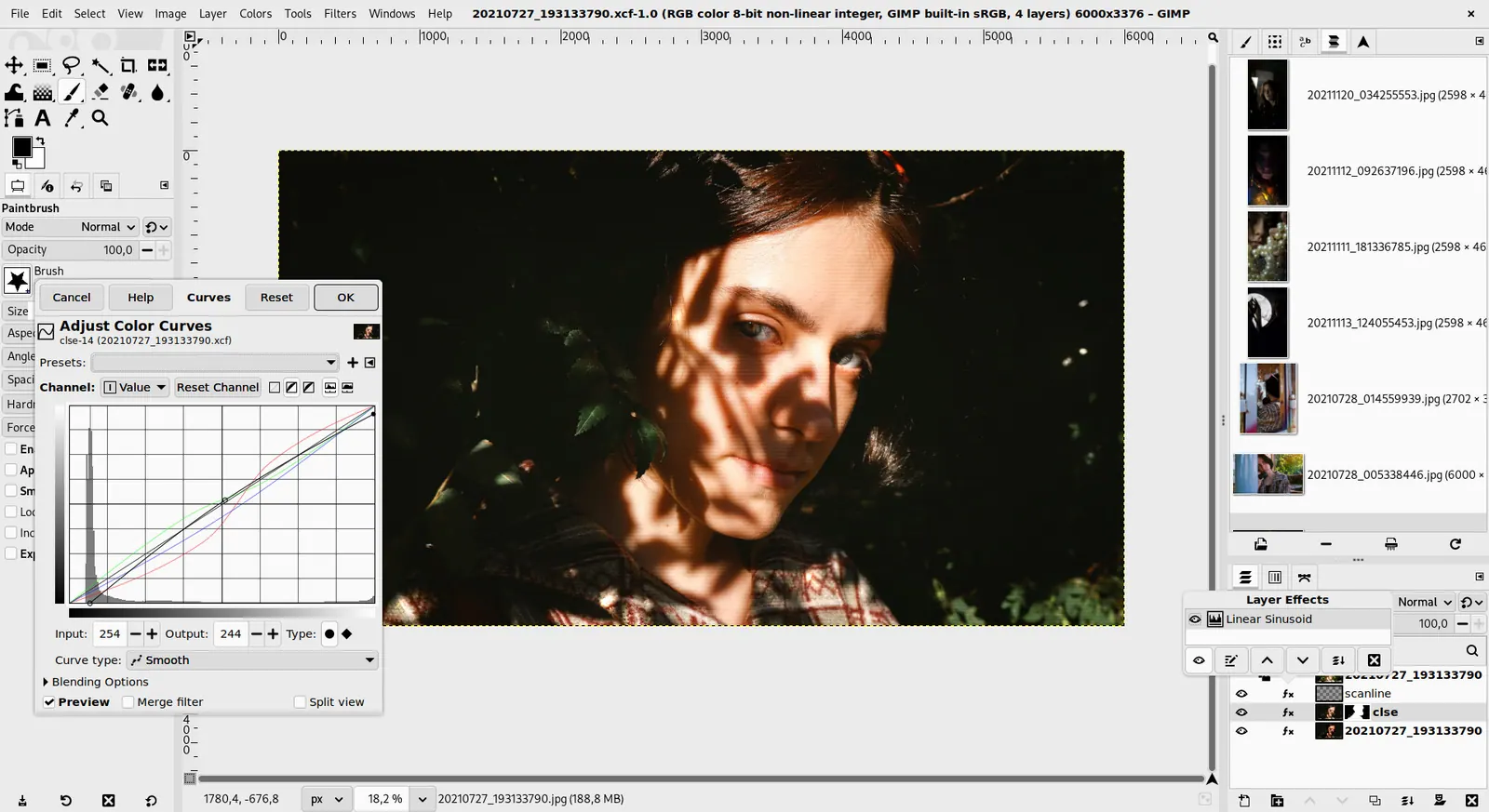
GIMP 3.0 — non-destructive filter workflow
GIMP team / gimp.org · Source · CC BY-SA 4.0
Good fit if
- I want layers and masks like Photoshop but in a browser (Photopea is the pick)
- I need a free desktop editor with no subscription (GIMP is the pick)
- I make social posts from templates (Canva is the pick)
- I only retouch photos on my phone (Snapseed is the pick)
- I also cut short videos (CapCut is the pick)
Not ideal if
- You rely on Picsart features or integrations that these tools do not replicate
Picsart today: Free; paid from $10.5 per month, Pro, billed yearly (Picsart pricing, checked 2026-10-23).
Why people look for Picsart alternatives
Picsart's pricing page lists only paid plans: Pro at $10.50 a month billed yearly (struck through from $15) and Ultra at $60 per seat monthly billed yearly. AI features run on monthly credits, and Ultra sells credit tiers from 1,500 up to 10,000 and beyond. The page shows no free column, so check what stays free before relying on it.
Photopea
Compared with Picsart: Photopea runs in the browser with a layers-and-masks workflow that is closer to Photoshop than Picsart's template-first editor. You lose Picsart's mobile app and one-tap stickers; you gain precise layer control without paying, per its homepage.
Price: Free (Free in the browser; the homepage says premium features are free and mentions no paid plan or ad-free option) (Photopea pricing, checked 2026-10-23).
Platforms and license: Web. Proprietary.
Best for: Layer-based editing in a browser.
Worth knowing: Browser-based editor that reads PSD files. Runs with no download.
GIMP
Compared with Picsart: GIMP is a free desktop editor with real layers, curves and scripting. It has no social templates, stickers or AI cutout shortcuts like Picsart, and the interface takes longer to learn, but there is no subscription at all.
Price: Free (Free; source tarballs offered, donation link only, no paid tier. Store packages are third-party and not from the GIMP team) (GIMP pricing, checked 2026-10-22).
Platforms and license: Linux, macOS, Windows. Open source (license not named on gimp.org/downloads) (open source).
Best for: Free desktop photo editing.
Worth knowing: Raster image editor for photo retouching and compositing.
Canva
Compared with Picsart: Canva covers the template, collage and social-post side of Picsart with a larger library of layouts. It is weaker for hands-on photo retouching, and its free plan limits were not captured, so check them before relying on premium assets.
Price: Free (Free plan available; see the pricing page for its current limits) (Canva pricing, checked 2026-10-22).
Platforms and license: Web, Windows, macOS, iOS, Android. Proprietary.
Best for: Templates and social posts.
Pixlr
Compared with Picsart: Pixlr is the closest browser equivalent: quick filters, cutouts and AI tools in a lighter interface. The free tier is ad-supported with limited AI credits, so heavy AI use pushes you to a paid plan much as Picsart does.
Price: Free (Free tier is ad-supported with limited AI credits per search coverage) (Pixlr pricing, checked 2026-10-23).
Platforms and license: Web. Proprietary.
Best for: Quick browser edits with AI.
Snapseed
Compared with Picsart: Snapseed is a free phone editor with selective adjustments, healing and curves, and the App Store listing says no ads. It lacks Picsart's stickers, collage maker and templates, but edits are cleaner and cost nothing.
Price: Free (Free to download; the App Store listing says no ads) (Snapseed pricing, checked 2026-10-23).
Platforms and license: iOS, Android. Proprietary.
Best for: Mobile photo retouching.
Affinity Photo
Compared with Picsart: Affinity Photo is free for individuals per affinity.studio and offers professional layers, RAW and retouching on the desktop. It is a bigger install than Picsart and has no social templates, and its optional AI tools need a Canva premium plan.
Price: Free (Free for individuals per affinity.studio; an iPad version is listed as coming soon; optional AI tools need a Canva premium plan) (Affinity Photo pricing, checked 2026-10-23).
Platforms and license: Windows, macOS. Proprietary.
Best for: Pro-grade desktop editing.
Worth knowing: affinity.studio states Affinity is free for individuals, Mac and Windows downloads, with a Canva premium plan only needed for optional AI tools.
CapCut
Compared with Picsart: CapCut matches Picsart's video side with a free plan covering templates and basic editing. It is built for short video rather than photo design, so use it next to a photo editor instead of as a full replacement.
Price: Free (Free plan includes free templates and basic editing tools; the page gives no numeric limits); paid from $19.99 per month (Pro, monthly; $179.99 billed yearly) (CapCut pricing, checked 2026-10-22).
Platforms and license: Desktop, Mobile, Web. Proprietary.
Best for: Short video editing.
Other popular options (paid)
Adobe Photoshop
Compared with Picsart: Single app is $22.99 a month on the annual plan billed monthly; the Photography plan is $19.99 and includes Lightroom. Full layer-based editing, with a steeper learning curve than Picsart's quick tools.
Price: Paid from $22.99 per month, annual plan billed monthly (Photoshop single app) (Adobe Photoshop pricing, checked 2026-10-23).
Adobe Express
Compared with Picsart: Free plan includes basic editing, daily image generations and 5 GB storage; Premium is $9.99 a month billed monthly with a 30-day trial. A template-led editor priced near Picsart Pro's $10.50.
Price: Free (Free plan: free daily generations for images and text effects, 5 lifetime presentation generations, basic editing tools, 5 GB storage); paid from $9.99 per month, Premium, billed monthly, 30-day free trial (Adobe Express pricing, checked 2026-10-23).
Which one to pick
- I want layers and masks like Photoshop but in a browser: Photopea
- I need a free desktop editor with no subscription: GIMP
- I make social posts from templates: Canva
- I only retouch photos on my phone: Snapseed
- I also cut short videos: CapCut
Limits of this review
Docs-only for Photopea, GIMP, Canva, Pixlr, Snapseed, Affinity Photo, CapCut: we did not install or run them, so feature claims come from vendor pages and we did not test import from Picsart. Vendor prices and free limits change; confirm on the linked pricing page before you buy or migrate.
More in Photo Editing & AI Images
All Photo Editing & AI Images alternatives →Sources
Kevin Fan
Kevin Fan is a SaaS founder. He runs Free Instead Of, which tracks free and open-source alternatives to paid software and checks each price and free-plan limit against the vendor's own pages.
Methodology
Based on official pricing and product pages checked between 2026-10-22 and 2026-10-23: Picsart, Photopea, GIMP, Canva, Pixlr, Snapseed, Affinity Photo, CapCut, Adobe Photoshop, Adobe Express. Prices, free limits and licenses are the figures shown on those pages on those dates. No tool on this page was installed or run. No accounts were created.