Let's Animate - Krita: Rocket Mechanic (10 days)
By Ed Tadeo ·
Playing loads YouTube. YouTube will receive your IP address and device information.
Adobe Photoshop alternatives: GIMP, Krita, Photopea, darktable and 2 more. Prices and licenses checked October 28, 2026.
•4 min read•Photo Editing & AI Images
Verdict:Photoshop is worth leaving if you pay for it mainly for cropping, retouching and layered edits. Adobe's page shows US$22.99 a month for the annual, billed-monthly plan, and $19.99 for the Photography plan, so a year of Photoshop costs roughly $276. GIMP is the straightforward free choice for photo work, with layers and masks but a steeper learning curve than Photoshop. Photopea is the fastest to try because it opens in a browser and reads Photoshop documents, though heavy files are slower than on desktop. Krita fits people who draw or paint rather than retouch photos. Darktable covers RAW development if your Photoshop use really sits in the Lightroom workflow. Affinity Photo is the option that feels closest, and affinity.studio says it is free for individuals on Mac and Windows. The trade-off is ecosystem. Photoshop's generative tools, plug-ins and the way agencies share files are not matched by any free option. If a client sends you layered PSDs daily, test Photopea with those files first. If you edit your own photos, GIMP plus darktable costs nothing.
| Tool | Price | Platforms | Best for | Tested |
|---|---|---|---|---|
| GIMP | Free (Free; source tarballs offered, donation link only, no paid tier. Store packages are third-party and not from the GIMP team) | Linux, macOS, Windows | General photo editing for free | Docs only |
| Krita | Free (Free and open source; optional donations, no paid tier) | Windows, macOS, Linux, Android | Digital painting and illustration | Docs only |
| Photopea | Free (Free in the browser; the homepage says premium features are free and mentions no paid plan or ad-free option) | Web | Quick edits in a browser tab | Docs only |
| darktable | Free (Free and open source under GPLv3; no paid tier on the site) | Linux, macOS, Windows | RAW photo processing | Docs only |
| Affinity Photo | Free (Free for individuals per affinity.studio; an iPad version is listed as coming soon; optional AI tools need a Canva premium plan) | Windows, macOS | A polished layered editor | Docs only |
| PhotoCraft | Free (Free and open source; the README calls it early alpha and not yet a Photoshop replacement for daily professional work) | macOS, Windows, Linux, FreeBSD, Web | Trying an open source Photoshop-style editor (alpha) | Docs only |
| Pixelmator Pro | Paid from $49.99 per one-time, Mac only, App Store (subscription via Apple Creator Studio is $12.99/month or $129/year) | macOS, iPadOS | Image editor | Docs only |
| Canva | Free (Free plan available; see the pricing page for its current limits) | Web, Windows, macOS, iOS, Android | Graphic design | Docs only |
Independent comparison. Paid placements are labelled separately; editorial links earn no affiliate commissions. Learn more.
Images from the linked documentation. Versions and features may differ from current plans.
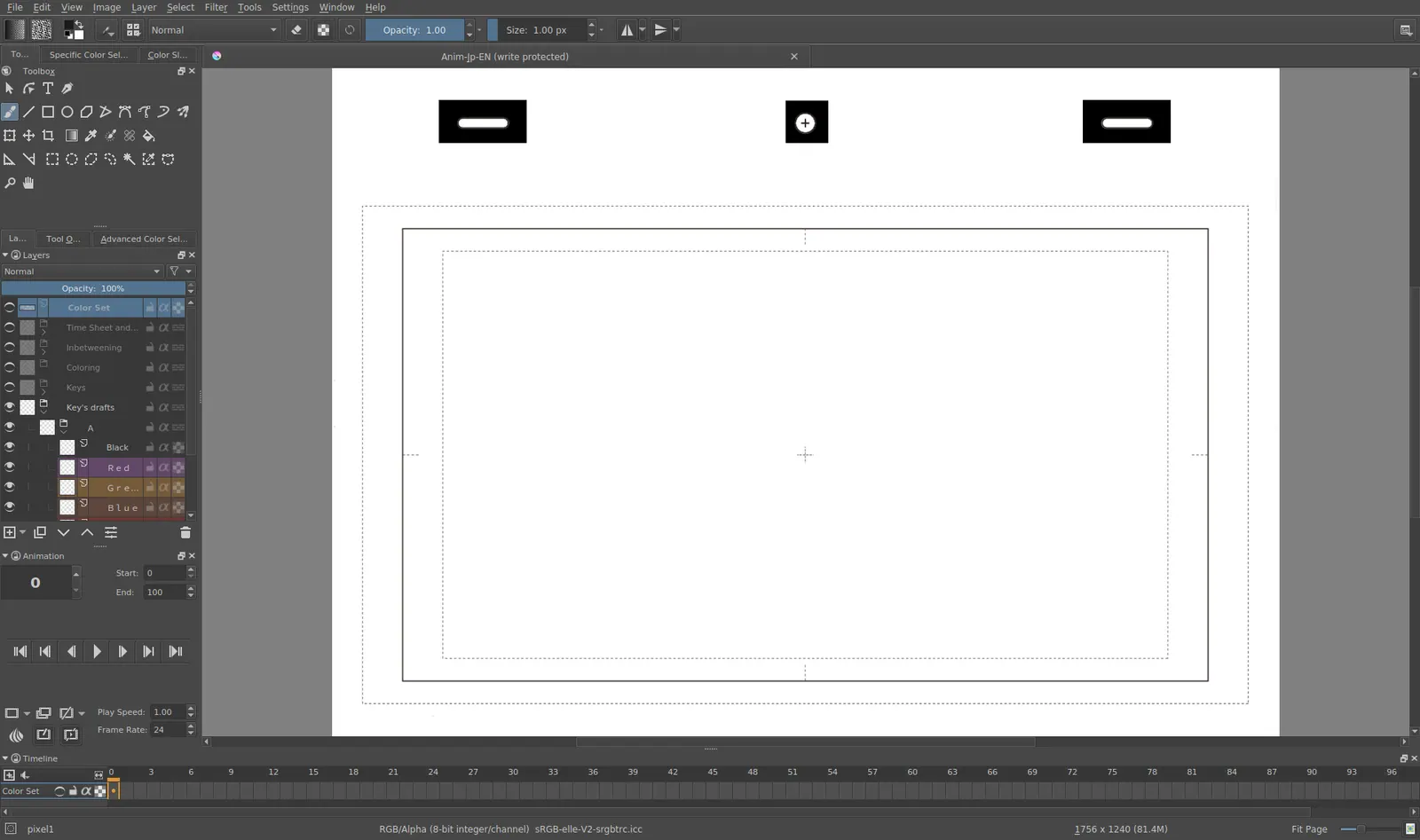
Krita 4.0 animation interface
Tyson Tan · Source · CC BY-SA 4.0
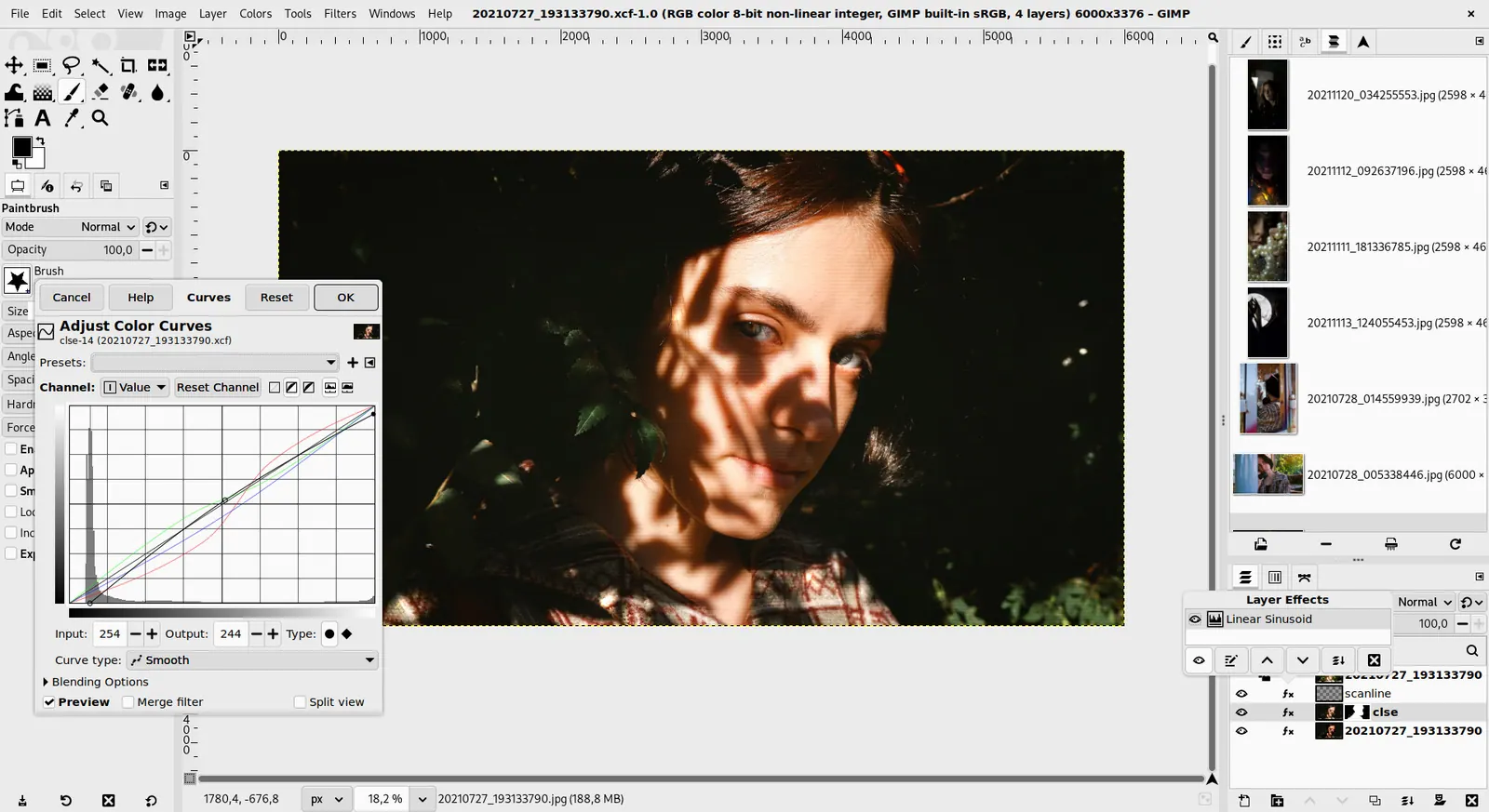
GIMP 3.0 — non-destructive filter workflow
GIMP team / gimp.org · Source · CC BY-SA 4.0
By Ed Tadeo ·
Playing loads YouTube. YouTube will receive your IP address and device information.
Adobe Photoshop today: Paid from $22.99 per month, annual plan billed monthly (Photoshop single app) (Adobe Photoshop pricing, checked 2026-10-23).
Photoshop is subscription-only. Adobe's page lists the single app at $22.99 a month on an annual plan billed monthly, or $263.88 a year prepaid, and Creative Cloud Pro at $69.99 a month (a new-subscriber offer covers the first 3 months). The single-app plan includes 25 monthly generative credits, and the premium AI video and audio allowance, 4,000 credits, is only in Creative Cloud Pro. Teams pay $37.99 per licence per month. If you edit photos occasionally, that adds up to a recurring cost for a tool you open rarely.
Compared with Adobe Photoshop: Free and open source with no paid tier. It handles layers, masks and retouching, but you lose Photoshop's AI tools and polished Adobe file workflow.
Price: Free (Free; source tarballs offered, donation link only, no paid tier. Store packages are third-party and not from the GIMP team) (GIMP pricing, checked 2026-10-22).
Platforms and license: Linux, macOS, Windows. Open source (license not named on gimp.org/downloads) (open source).
Best for: General photo editing for free.
Worth knowing: Raster image editor for photo retouching and compositing.
Compared with Adobe Photoshop: Free GPL painting app with optional donations. Better for drawing and illustration than Photoshop retouching, and you give up Photoshop's photo-specific tools.
Price: Free (Free and open source; optional donations, no paid tier) (Krita pricing, checked 2026-10-22).
Platforms and license: Windows, macOS, Linux, Android. GPL (open source).
Best for: Digital painting and illustration.
Compared with Adobe Photoshop: Runs in the browser and is free, with the homepage stating premium features are free too. It reads Photoshop files, but lacks Adobe's depth and offline desktop speed.
Price: Free (Free in the browser; the homepage says premium features are free and mentions no paid plan or ad-free option) (Photopea pricing, checked 2026-10-23).
Platforms and license: Web. Proprietary.
Best for: Quick edits in a browser tab.
Worth knowing: Browser-based editor that reads PSD files. Runs with no download.
Compared with Adobe Photoshop: Free GPLv3 RAW developer. It replaces the Lightroom side of an Adobe photo plan, not pixel-level compositing like Photoshop layers.
Price: Free (Free and open source under GPLv3; no paid tier on the site) (darktable pricing, checked 2026-10-22).
Platforms and license: Linux, macOS, Windows. GPL-3.0 (open source).
Project activity: 13.3k GitHub stars · latest release release-5.6.2 (Oct 4, 2026) · last commit Oct 27, 2026
Best for: RAW photo processing.
Worth knowing: Photo workflow with a library and culling views, closest to PhotoMechanic's ingest and sort role. Platforms are from the install and download links; the homepage did not list them explicitly.
Compared with Adobe Photoshop: Free for individuals on Mac and Windows per affinity.studio. A closer Photoshop feel than GIMP with layers and non-destructive editing, though it needs a Canva-linked download and has no Linux version.
Price: Free (Free for individuals per affinity.studio; an iPad version is listed as coming soon; optional AI tools need a Canva premium plan) (Affinity Photo pricing, checked 2026-10-23).
Platforms and license: Windows, macOS. Proprietary.
Best for: A polished layered editor.
Worth knowing: affinity.studio states Affinity is free for individuals, Mac and Windows downloads, with a Canva premium plan only needed for optional AI tools.
Compared with Adobe Photoshop: PhotoCraft is a free, open source Rust photo editor under MIT or Apache-2.0 for macOS, Windows, Linux and the web. It lists layers, masks, adjustment layers and PSD support, but its repository calls it early alpha and not yet a Photoshop replacement for professional daily work. Its authors say it is a clean-room design unaffiliated with Adobe.
Price: Free (Free and open source; the README calls it early alpha and not yet a Photoshop replacement for daily professional work) (PhotoCraft pricing, checked 2026-10-28).
Platforms and license: macOS, Windows, Linux, FreeBSD, Web. MIT OR Apache-2.0 (your choice) (open source).
Project activity: 73.9k GitHub stars · latest release v0.16.0 (Oct 25, 2026) · last commit Oct 27, 2026
Best for: Trying an open source Photoshop-style editor (alpha).
Worth knowing: GitHub README read 2026-10-28: Rust, described by its authors as a clean-room reimplementation of Photoshop; layers, masks, adjustment layers, layer styles, type, brush engine, PSD/TIFF/OpenRaster/XCF support; part of the ArtCraft family, stated to be independent of and not affiliated with Adobe. Coverage questions how AI-assisted clean-room claims hold up.
Compared with Adobe Photoshop: One-time $49.99 on the Mac App Store, against Photoshop's $22.99 a month, with an optional $12.99 monthly subscription that adds the Warp Tool. Mac and iPad only, so Windows users are left out.
Price: Paid from $49.99 per one-time, Mac only, App Store (subscription via Apple Creator Studio is $12.99/month or $129/year) (Pixelmator Pro pricing, checked 2026-10-25).
Compared with Adobe Photoshop: Browser-based design tool with a free plan, built around templates and layouts rather than layers and masks. Good for social graphics and quick edits; not a replacement for pixel-level retouching in Photoshop.
Price: Free (Free plan available; see the pricing page for its current limits) (Canva pricing, checked 2026-10-22).
Docs-only for GIMP, Krita, Photopea, darktable, Affinity Photo, PhotoCraft: we did not install or run them, so feature claims come from vendor pages and we did not test import from Adobe Photoshop. Vendor prices and free limits change; confirm on the linked pricing page before you buy or migrate.
Kevin Fan is a SaaS founder. He runs Free Instead Of, which tracks free and open-source alternatives to paid software and checks each price and free-plan limit against the vendor's own pages.
Based on official pricing and product pages checked between 2026-10-22 and 2026-10-28: Adobe Photoshop, GIMP, Krita, Photopea, darktable, Affinity Photo, PhotoCraft, Pixelmator Pro, Canva. Prices, free limits and licenses are the figures shown on those pages on those dates. No tool on this page was installed or run. No accounts were created.