Best Free Photo Enhancers 2026: 7 Options Compared
Best free Photo Enhancers compared: Upscayl, Upscale.media, Fotor, Pixlr and 3 more, with free-plan limits, platforms and prices from official pages checked October 23, 2026.
•3 min read•Photo Editing & AI Images
Try one now
Quick comparison
| Tool | Price | Platforms | Best for | Tested |
|---|---|---|---|---|
| Upscayl | Free (Free and open-source desktop app; Upscayl Cloud is a separate product whose terms were not captured) | Windows, macOS, Linux | Enlarging and sharpening locally | Docs only |
| Upscale.media | Free (3 free credits and 3 free downloads each month; one image per day without signing up); paid from $7.99 per one-time, 60 credits | Web | Occasional one-off enhancements | Docs only |
| Fotor | Free (Free plan edits unlimited images and exports without watermarks per the FAQ; free AI credits are limited) | Web, Windows, macOS, iOS, Android | One-click fixes in the browser | Docs only |
| Pixlr | Free (Free tier is ad-supported with limited AI credits per search coverage) | Web | Quick web touch-ups | Docs only |
| Snapseed | Free (Free to download; the App Store listing says no ads) | iOS, Android | Mobile photo fixes | Docs only |
| Photopea | Free (Free in the browser; the homepage says premium features are free and mentions no paid plan or ad-free option) | Web | Manual correction in a browser | Docs only |
| GIMP | Free (Free; source tarballs offered, donation link only, no paid tier. Store packages are third-party and not from the GIMP team) | Linux, macOS, Windows | Careful manual enhancement | Docs only |
Independent comparison. Paid placements are labelled separately; editorial links earn no affiliate commissions. Learn more.
See the tools in action
Images from the linked documentation. Versions and features may differ from current plans.
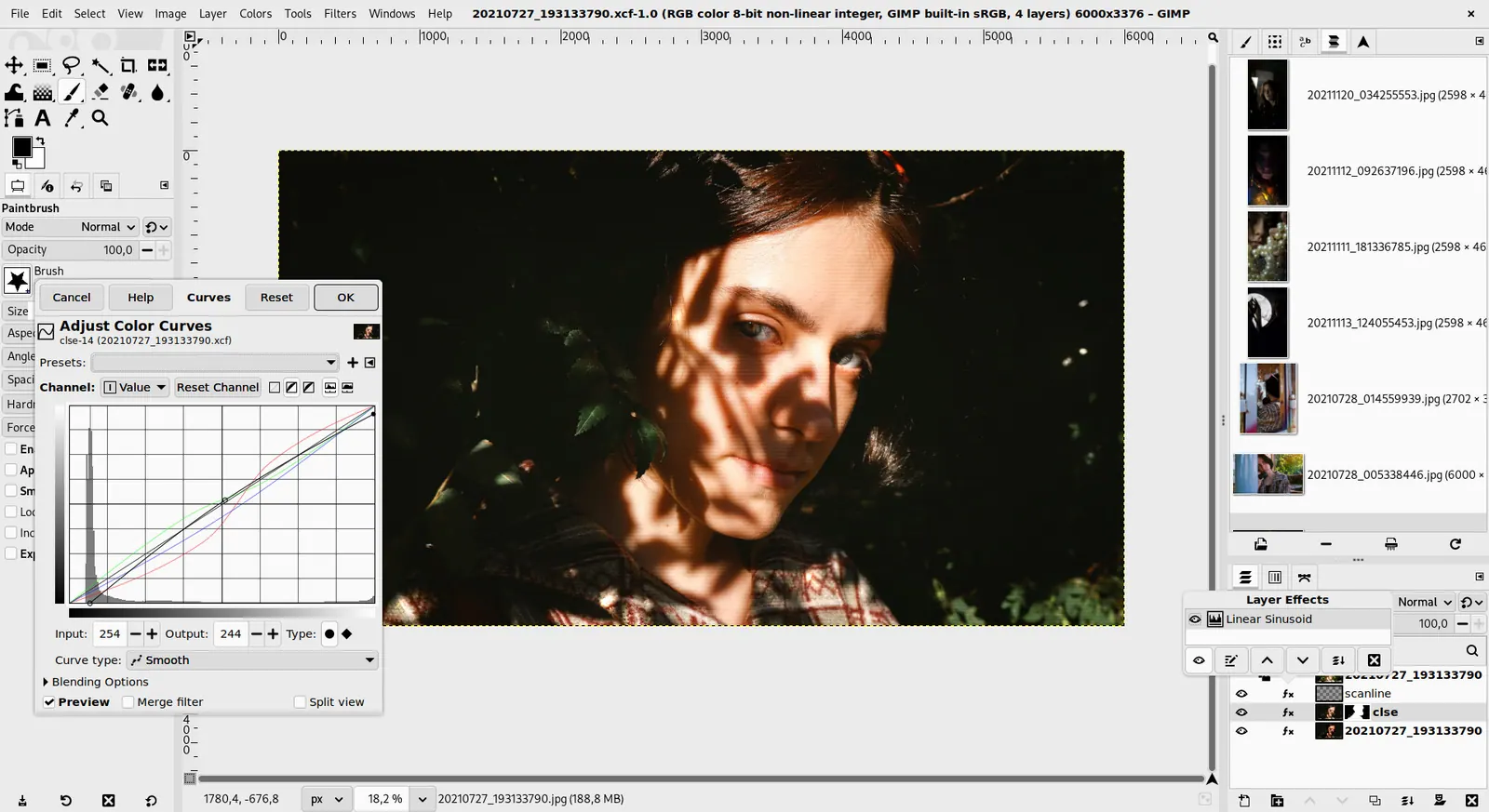
GIMP 3.0 — non-destructive filter workflow
GIMP team / gimp.org · Source · CC BY-SA 4.0
Good fit if
- You need to enlarge a small photo (Upscayl is the pick)
- You fix a phone photo quickly (Snapseed is the pick)
- You enhance one image online (Fotor is the pick)
- You prefer to control every adjustment (GIMP is the pick)
Not ideal if
- You need paid-tier features, uptime guarantees or support that these free plans leave out
Photo enhancement covers three different jobs: sharpening and enlarging with AI, correcting exposure and color, and cleaning noise. Pick the tool by the job. For enlarging and recovering detail, Upscayl is a free open-source desktop app that runs locally, while Upscale.media gives you 3 free credits and 3 free downloads each month online. For quick color and light fixes on a phone, Snapseed is a free app for iOS and Android with a no-ads listing. For all-in-one web editing, Fotor says free users can export without watermarks, and Pixlr has an ad-supported free tier with limited AI credits. Photopea and GIMP give manual control with curves, levels and sharpening if you prefer to correct images yourself. Be realistic about AI results. Enhancers invent detail, so a face can look smoother than the person, and text can get distorted. Always compare at 100 percent and keep the original. Also check what the free plan exports: some tools show a preview at full quality but save at reduced size. The trade-off is automation against fidelity: one-click enhancers are fast and sometimes over-processed, while manual tools take longer but let you stop at natural. Seven options follow.
Upscayl
Free open-source desktop app that enlarges and sharpens photos locally with no credits. Needs a decent graphics card for speed; Cloud is a separate product.
Price: Free (Free and open-source desktop app; Upscayl Cloud is a separate product whose terms were not captured) (Upscayl pricing, checked 2026-10-23).
Platforms and license: Windows, macOS, Linux. AGPL-3.0 (open source).
Project activity: 51.2k GitHub stars · latest release v2.15.0 (Dec 25, 2024) · last commit Oct 5, 2026
Best for: Enlarging and sharpening locally.
Upscale.media
Free web upscaling with 3 credits and 3 downloads a month, plus one image a day without signup. Paid credits start at $7.99 for 60.
Price: Free (3 free credits and 3 free downloads each month; one image per day without signing up); paid from $7.99 per one-time, 60 credits (Upscale.media pricing, checked 2026-10-23).
Platforms and license: Web. Proprietary.
Best for: Occasional one-off enhancements.
Worth knowing: Lowest paid price is the 60-credit package; larger packs cost less per credit.
Fotor
Free plan with unlimited editing and exports without watermarks per the FAQ, on web and apps. AI credits on the free plan are limited.
Price: Free (Free plan edits unlimited images and exports without watermarks per the FAQ; free AI credits are limited) (Fotor pricing, checked 2026-10-23).
Platforms and license: Web, Windows, macOS, iOS, Android. Proprietary.
Best for: One-click fixes in the browser.
Pixlr
Browser editor with an ad-supported free tier and limited AI credits per search coverage. Good for quick touch-ups.
Price: Free (Free tier is ad-supported with limited AI credits per search coverage) (Pixlr pricing, checked 2026-10-23).
Platforms and license: Web. Proprietary.
Best for: Quick web touch-ups.
Snapseed
Free phone app for iOS and Android; the App Store listing says no ads. Selective adjustments and healing, but no desktop version.
Price: Free (Free to download; the App Store listing says no ads) (Snapseed pricing, checked 2026-10-23).
Platforms and license: iOS, Android. Proprietary.
Best for: Mobile photo fixes.
Photopea
Free browser editor with curves, levels and sharpening. Manual work, but no AI limits or watermark per the homepage.
Price: Free (Free in the browser; the homepage says premium features are free and mentions no paid plan or ad-free option) (Photopea pricing, checked 2026-10-23).
Platforms and license: Web. Proprietary.
Best for: Manual correction in a browser.
Worth knowing: Browser-based editor that reads PSD files. Runs with no download.
Compare: Photopea alternatives
GIMP
Free desktop editor with full tone and color tools plus denoise plug-ins. More effort than an AI enhancer, with complete control.
Price: Free (Free; source tarballs offered, donation link only, no paid tier. Store packages are third-party and not from the GIMP team) (GIMP pricing, checked 2026-10-22).
Platforms and license: Linux, macOS, Windows. Open source (license not named on gimp.org/downloads) (open source).
Best for: Careful manual enhancement.
Worth knowing: Raster image editor for photo retouching and compositing.
Which one to pick
- You need to enlarge a small photo: Upscayl
- You fix a phone photo quickly: Snapseed
- You enhance one image online: Fotor
- You prefer to control every adjustment: GIMP
Limits of this review
Docs-only for Upscayl, Upscale.media, Fotor, Pixlr, Snapseed, Photopea, GIMP: we did not install or run them, so feature claims come from vendor pages. Vendor prices and free limits change; confirm on the linked pricing page before you commit.
Related guides
More in Photo Editing & AI Images
All Photo Editing & AI Images alternatives →Sources
Kevin Fan
Kevin Fan is a SaaS founder. He runs Free Instead Of, which tracks free and open-source alternatives to paid software and checks each price and free-plan limit against the vendor's own pages.
Methodology
Based on official pricing, license and product pages checked between 2026-10-22 and 2026-10-23: Upscayl, Upscale.media, Fotor, Pixlr, Snapseed, Photopea, GIMP. Prices, free limits and licenses are the figures shown on those pages on those dates. No tool on this page was installed or run. No accounts were created.