CapCut Alternative for PC: 5 Desktop Video Editors (2026)
CapCut alternative for PC: compare Kdenlive, Shotcut, DaVinci Resolve, OpenShot and Clipchamp on Windows by free limits, hardware needs and paid upgrades.
•5 min read•Video Editing & AI Video

Verdict:Kdenlive and Shotcut are the free desktop editors to try first, Clipchamp is the simplest free option on Windows, and DaVinci Resolve is the step up if you need colour grading. None matches CapCut's templates and one-click captions.
Quick comparison
| Tool | Price | Platforms | Best for | Tested |
|---|---|---|---|---|
| Kdenlive | Free (GPL-3.0) | Windows, macOS, Linux | PC creators who want a stable free multi-track editor and have 8 GB of RAM for HD | Docs only |
| Shotcut | Free (GPLv3), usable commercially | Windows, macOS, Linux | Windows users with a modest PC who can use Preview Scaling and proxies | Docs only |
| DaVinci Resolve | Free version; Studio on sale at $236 (was $295) on October 28, 2026 | Windows, macOS, Linux | Creators who want colour grading and a pro toolset on a capable PC | Docs only |
| OpenShot | Free (GPL v3 or later); optional paid Microsoft Store copy | Windows, macOS, Linux | Beginners who want a simple free editor and accept a plainer interface | Docs only |
| Clipchamp | Free to 1080p with no watermark; premium comes with Microsoft 365 Personal or Family | Web, Windows | Beginners who want a simple editor from a Microsoft account with no install fuss | Docs only |
Independent comparison. Paid placements are labelled separately; editorial links earn no affiliate commissions. Learn more.
See the tools in action
Images from the linked documentation. Versions and features may differ from current plans.
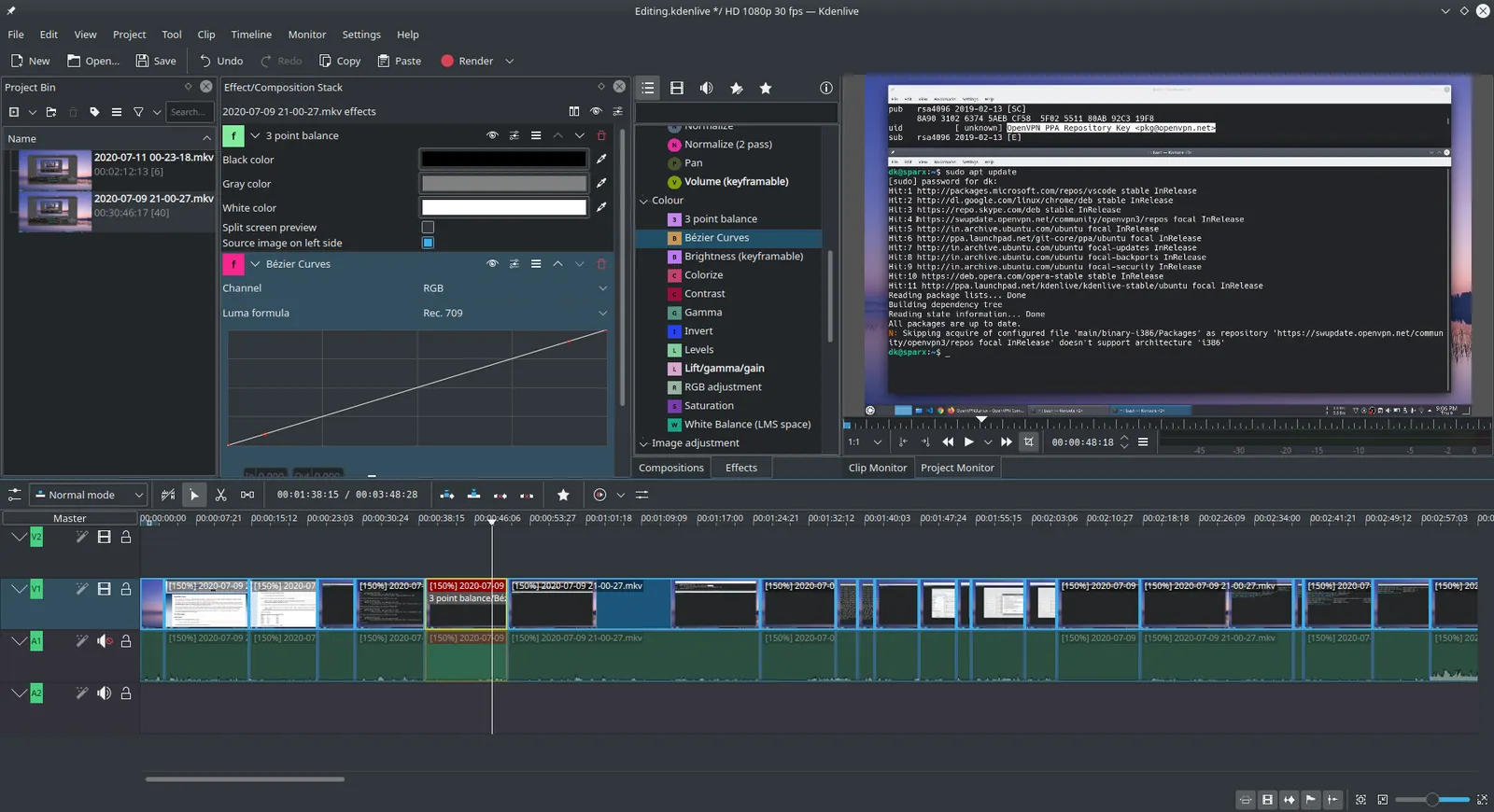
Kdenlive 20.04.1
Ddeepeshkumar · Source · CC BY-SA 4.0
Good fit if
- You edit on a Windows PC and want a desktop editor with no subscription
- CapCut's paywall prompts put you off
- You edit YouTube videos or longer clips more than template-based short clips
Not ideal if
- You depend on CapCut's trending templates, effects and one-click AI captions
- You need to edit on a phone as your main device
- Your PC has less than 8 GB of RAM and you edit HD or 4K video
If you want a CapCut alternative for Windows, start with Kdenlive or Shotcut: both are free, open-source desktop editors. Clipchamp is the simplest free option on Windows, and DaVinci Resolve is the step up when you need colour grading. None of them copies CapCut's template library or one-click captions. For the full field, read our guide to all CapCut alternatives.
What matters when you move off CapCut on a PC
- Free limits. Watermarks, export resolution and sign-in rules.
- Hardware. What the editor asks of your CPU and RAM.
- Windows support. A real Windows build, not a port.
- The conveniences you lose. Templates, auto captions and background removal.
- The paid step. What it costs if the free tier stops being enough.
According to CapCut's pricing page, the Free plan covers free templates and basic editing tools, and Pro costs $19.99 a month or $179.99 a year with 1,200 monthly AI credits and all premium templates. The page gives no export limits, and it says final pricing depends on sign-in.
In a July 2025 Hacker News thread, commenters tied the OpenCut project to CapCut's pricing changes and the loss of free access. Others pointed to its auto captions, templates, background removal and cloud sync as the reason to stay. That is the trade: you leave for price or control, and you give up convenience.
Kdenlive
Kdenlive is an open-source multi-track video editor. According to its installation docs, it needs at least one 2 GHz core and 4 GB of RAM for SD video, 4 cores and 8 GB for HD, and 8 cores and 16 GB for 4K. It needs OpenGL 2.0 and 64-bit Windows 10 (1809) or newer, and it also runs on macOS and Linux. Its GitHub repository lists GPL-3.0.
Several Hacker News commenters above recommended Kdenlive, with one saying they had a better experience with it than with Shotcut or OpenShot and another calling it more stable than Resolve on Ubuntu. The docs note that timeline playback relies on the CPU, so a weak processor will drag.
Who should not pick it: someone who wants template-driven edits in minutes. Kdenlive is a conventional timeline editor.
Shotcut
Shotcut is a free, open-source editor. According to its FAQ, it is GPLv3 and usable commercially, runs on 64-bit Windows 10 (build 1809) through 11, and needs Direct3D 11 on Windows. It lists the same hardware tiers as Kdenlive: 4 GB of RAM for SD, 8 GB for HD and 16 GB for 4K.
Its useful note for a weak PC is that on the lower end of the requirements, you should use Preview Scaling and Proxy to cut preview lag. Hacker News commenters found Shotcut and OpenShot somewhat unpolished, with one reporting crashes, so save often.
Who should not pick it: anyone with under 4 GB of RAM or an old GPU without Direct3D 11.
DaVinci Resolve
DaVinci Resolve is Blackmagic's editor with colour grading built in. According to its product page, the free version works with 8-bit video up to 60 fps and Ultra HD 3840 x 2160. Studio supports 10-bit up to 120 fps and resolutions beyond 4K and was on sale at $236 (down from $295) when checked on October 28, 2026. It runs on Windows, Mac and Linux.
Blackmagic lists no minimum hardware figures on that page. In the Hacker News thread, commenters praised its colour work but found it too complex for basic editing, and one said it required a compatible GPU and sometimes failed to start without one.
Who should not pick it: a casual short-form editor. The interface asks more of you than CapCut does.
OpenShot
OpenShot is a free, open-source editor. According to its download page, you can get it from the Microsoft Store (Windows 10 and 11) or as a free EXE installer. The Store copy is labelled paid, and purchases help fund development. The licence is GPL v3 or later, and the project says it is "funded by users, not licenses."
OpenShot's download page lists no RAM requirement, so use Kdenlive or Shotcut's figures as a guide only.
Who should not pick it: a creator who needs advanced effects or colour tools.
Clipchamp
Clipchamp is Microsoft's browser-based editor with a Windows app. According to its pricing page, free exports reach 1080p with no watermark, and you sign in with a personal Microsoft account. Premium features, including 4K export, come with Microsoft 365 Personal and Family, and no separate price is listed.
It is the simplest of the five to start with. The cost is that it needs a Microsoft account, and a premium tier is needed for 4K.
Who should not pick it: someone who wants to edit offline without a Microsoft account.
When a paid tool is the better answer
Pay if the free tools cost you time. DaVinci Resolve Studio was on sale at $236 (down from $295) when checked on October 28, 2026 on Blackmagic's page. It adds 10-bit video up to 120 fps and resolutions beyond 4K, so it matters mainly for colour work and high frame rates. Blackmagic's Studio 20 features PDF lists an activation key, licence dongle or Blackmagic Cloud licensing, and its Cloud help page describes rental licences, but its product page does not say how long a purchased key covers new versions, so check the store terms before buying.
Clipchamp Premium is the other route, bundled with Microsoft 365 Personal or Family. It adds 4K export. Stay free if your videos are 1080p social clips.
Comparison
| Editor | Windows | Free limits | HD guidance | Open source |
|---|---|---|---|---|
| Kdenlive | Windows 10 (1809)+ | No cost | 4 cores, 8 GB | Yes (GPL-3.0) |
| Shotcut | Windows 10 (1809) to 11 | No cost | 4 cores, 8 GB | Yes (GPLv3) |
| DaVinci Resolve | Yes | 8-bit, 60 fps, Ultra HD | Not stated | No |
| OpenShot | Yes (Store copy: Windows 10 and 11) | No cost (EXE) | Not stated | Yes (GPL v3+) |
| Clipchamp | Windows app and web | 1080p, no watermark | Not stated | No |
How to choose
You make YouTube videos and want free. Try Kdenlive first, then Shotcut. Our open-source video editor guide covers the rest.
You want something simple and already have a Microsoft account. Start with Clipchamp, and see our Clipchamp alternatives if you outgrow it.
You grade colour or shoot at high frame rates. Use DaVinci Resolve, and read CapCut vs DaVinci Resolve before you commit. For more free picks, see best free video editor.
Limits of this review
No editor was installed or run. CapCut's export limits and its Windows system requirements are not covered because CapCut's pricing page gives neither. DaVinci Resolve's hardware requirements are not stated on Blackmagic's product page, and the page does not say how long a purchased Studio key covers new versions. Clipchamp's premium price is not listed on its pricing page.
FAQ
What is the best CapCut alternative for PC?
For most Windows users, Kdenlive or Shotcut. Both are free open-source editors and publish the same hardware guidance: a 2 GHz core and 4 GB of RAM for SD, 4 cores and 8 GB for HD, and 8 cores and 16 GB for 4K. Neither has CapCut's template library.
Is there a CapCut alternative with no watermark?
Yes. Kdenlive, Shotcut and OpenShot are free open-source editors under GPL licences, and Clipchamp's pricing page says free exports reach 1080p without a watermark. DaVinci Resolve's free version also works up to Ultra HD 3840x2160 at 60 fps, per Blackmagic's product page.
Is DaVinci Resolve a good CapCut alternative for PC?
It is the most capable free option, with the free version handling 8-bit video up to 60 fps and Ultra HD. Hacker News commenters in July 2025 called it too complex for basic edits, and one said it needed a compatible GPU. Blackmagic's page lists Windows, Mac and Linux.
Do these editors have CapCut's auto captions and templates?
Not as one-click features that the vendors advertise. Commenters in a July 2025 Hacker News thread pointed to auto captions, templates, background removal and cloud sync as CapCut's main extras. Expect to add subtitles by hand or with a separate tool.
How much does CapCut cost?
According to CapCut's pricing page, the Free plan includes free templates and basic editing tools. Pro is $19.99 a month or $179.99 a year, with 1,200 monthly AI credits and all premium templates. The page says pricing is for reference and final pricing depends on sign-in.
Which CapCut alternative runs on a low-end PC?
Shotcut's FAQ says that on the lower end of its CPU and RAM requirements you should use Preview Scaling and Proxy to reduce preview lag. It lists 4 GB of RAM for SD video and 8 GB for HD. Kdenlive publishes the same figures.
Related guides
More in Video Editing & AI Video
All Video Editing & AI Video alternatives →Sources
- DaVinci Resolve Studio 20 features and licensing (Blackmagic)
- Blackmagic Cloud: DaVinci Resolve Studio rental licences
- CapCut pricing
- Kdenlive installation and requirements
- Kdenlive on GitHub
- Shotcut FAQ
- OpenShot download
- DaVinci Resolve (Blackmagic Design)
- Clipchamp pricing
- Hacker News: OpenCut, the open-source CapCut alternative
Kevin Fan
Kevin Fan is a SaaS founder. He runs Free Instead Of, which tracks free and open-source alternatives to paid software and checks each price and free-plan limit against the vendor's own pages.
Methodology
CapCut's pricing page, the Kdenlive installation docs, Shotcut's FAQ, OpenShot's download page, Blackmagic's DaVinci Resolve page and Clipchamp's pricing page were read on 2026-10-27, and Blackmagic's Studio price and licence pages were rechecked on 2026-10-28. A Hacker News thread on OpenCut (July 2025) was read for user pain points, along with the Kapwing, Movavi and ecomposer roundups. Reddit threads were not used.