Best Free Screen Recorders 2026: 8 Options Compared
Best free Screen Recorders compared: OBS Studio, Cap, Screenity, Loom and 4 more, with free-plan limits, platforms and prices from official pages checked October 23, 2026.
•4 min read•Screen Recording & Streaming
Quick comparison
| Tool | Price | Platforms | Best for | Tested |
|---|---|---|---|---|
| OBS Studio | Free (open source, with no paid tier listed on its site) | Windows, macOS, Linux | Long tutorials and gameplay | Docs only |
| Cap | Free (local recordings with no time limit; shareable cloud links up to 5 minutes); paid from $8.16 per user/month, billed annually ($12 billed monthly, Cap Pro) | macOS, Windows, Self-hosted | Open-source Loom alternative | Docs only |
| Screenity | Free (the Chrome extension, which its FAQ says stays free); paid from $10 per month (paid editor, with up to 1 hour per recording; $120 billed yearly) | Chrome | Recording from inside Chrome | Docs only |
| Loom | Free (Starter plan for up to 10 users with up to 25 recordings per person and a 5-minute screen recording limit); paid from $18 per user/month (Business, at the page's default view) | Web, Desktop app, Mobile app | Short async updates | Docs only |
| Bandicam | Free (Free version: each recording limited to 5 minutes; edited-video exports carry a watermark; no scheduled recording over 5 minutes) | Windows | Windows game capture trials | Docs only |
| Zight | Free (Share plan with 5 video requests a month, 5-minute recordings, up to 720p, 1 GB of storage and 1 user); paid from $9.95 per user/month, billed annually (Create) | Web, Desktop app | Quick shared clips | Docs only |
| ShareX | Free | Windows | Windows users who want one tool | Docs only |
| Vidyard | Free (5 videos a month, up to 30 minutes each) | Web | Sales videos and longer clips | Docs only |
Independent comparison. Paid placements are labelled separately; editorial links earn no affiliate commissions. Learn more.
See the tools in action
Images from the linked documentation. Versions and features may differ from current plans.
Good fit if
- You record long tutorials or games (OBS Studio is the pick)
- You want a Loom-style link without the cost (Cap is the pick)
- You only record in the browser (Screenity is the pick)
- You send quick updates to colleagues (Loom is the pick)
Not ideal if
- You need paid-tier features, uptime guarantees or support that these free plans leave out
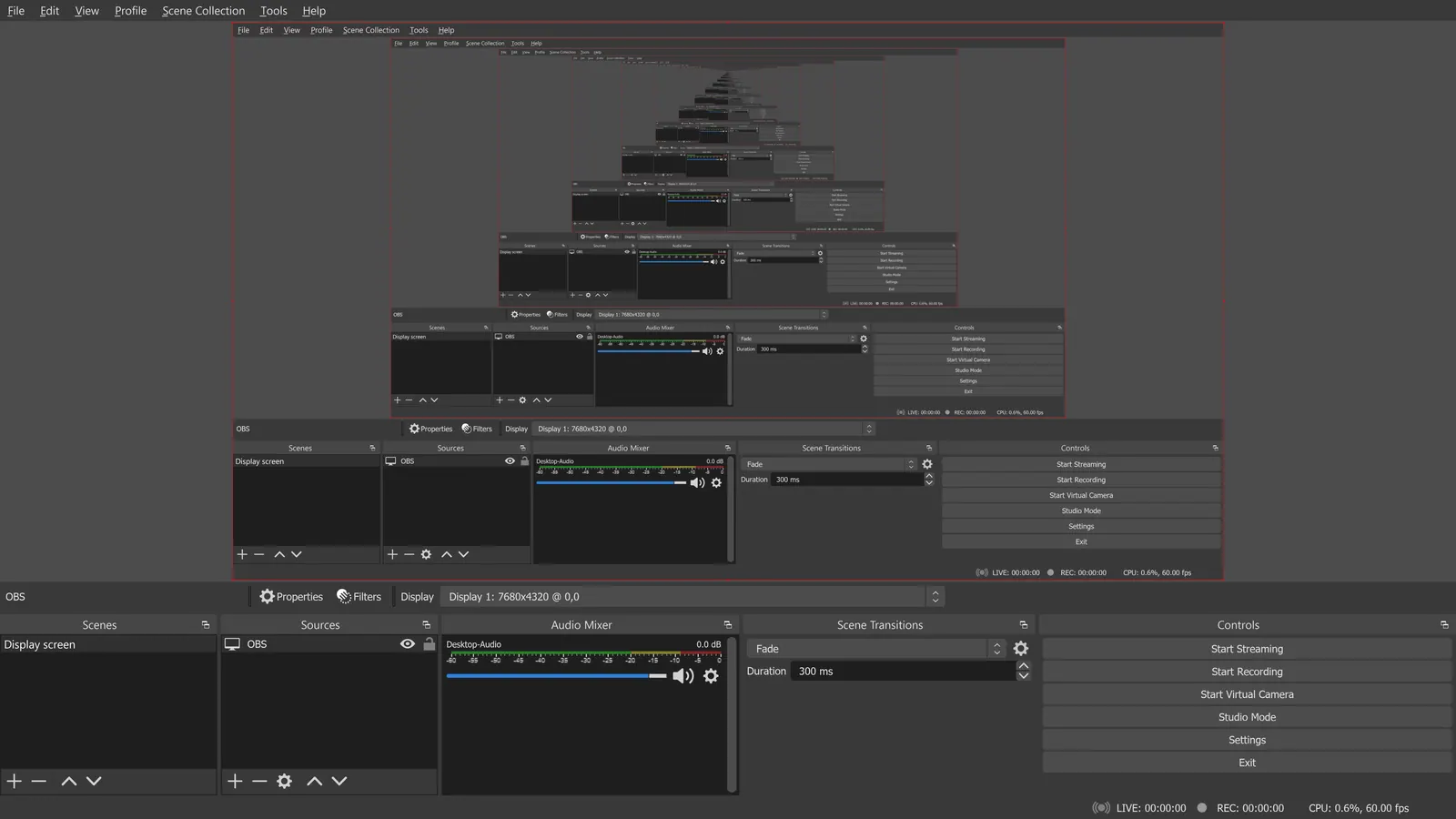
Free screen recorders differ mainly in what they cap. OBS Studio caps nothing: no watermark, no time limit, but you assemble scenes and audio sources yourself. Cap and Screenity are simpler. Cap records locally with no time limit, while its shareable cloud links stop at 5 minutes on the free plan. Screenity is a Chrome extension that stays free. Loom, Zight and Vidyard are built for sharing a link instead of keeping a file, so they limit recordings: Loom's Starter plan allows a 5-minute screen recording, Zight's free plan also stops at 5 minutes, and Vidyard allows 5 videos a month at up to 30 minutes each. Bandicam limits each free recording to 5 minutes and adds a watermark to edited exports. ShareX is a Windows option that records the screen and GIFs alongside screenshots. The choice comes down to whether you want a file or a link. For tutorials and long sessions, record locally with OBS or Cap. For a quick bug report to a colleague, a Loom-style link is faster than uploading a file. Always test your audio before a long recording, and record a short clip first to check the sound levels.
OBS Studio
GPL-2.0-or-later recorder with no time limit and no watermark, for Windows, macOS and Linux. It records locally only and has no remote guest recording, so you set up scenes yourself.
Price: Free (open source, with no paid tier listed on its site) (OBS Studio pricing, checked 2026-10-22).
Platforms and license: Windows, macOS, Linux. GPL-2.0-or-later (open source).
Project activity: 78.4k GitHub stars · latest release 33.0.0 (Oct 23, 2026) · last commit Oct 27, 2026
Best for: Long tutorials and gameplay.
Worth knowing: OBS records on your machine; it has no remote guest recording.
Compare: OBS Studio alternatives
Cap
AGPL-3.0 recorder for macOS and Windows with unlimited local recordings; cloud share links last up to 5 minutes on the free plan. Cap Pro is $8.16 a month billed annually.
Price: Free (local recordings with no time limit; shareable cloud links up to 5 minutes); paid from $8.16 per user/month, billed annually ($12 billed monthly, Cap Pro) (Cap pricing, checked 2026-10-22).
Platforms and license: macOS, Windows, Self-hosted. AGPL-3.0 (open source).
Project activity: 23.9k GitHub stars · latest release cap-v0.6.1 (Oct 20, 2026) · last commit Oct 27, 2026
Best for: Open-source Loom alternative.
Screenity
GPL-3.0 Chrome extension the FAQ says stays free. Records tab, window or screen from the browser; a paid editor is $10 a month.
Price: Free (the Chrome extension, which its FAQ says stays free); paid from $10 per month (paid editor, with up to 1 hour per recording; $120 billed yearly) (Screenity pricing, checked 2026-10-22).
Platforms and license: Chrome. GPL-3.0 (open source).
Project activity: 18.8k GitHub stars · latest release v4.7.2 (Oct 25, 2026) · last commit Oct 25, 2026
Best for: Recording from inside Chrome.
Loom
Starter plan covers up to 10 users with 25 recordings per person and a 5-minute screen recording limit. Business is $18 per user a month. Link sharing is the strength.
Price: Free (Starter plan for up to 10 users with up to 25 recordings per person and a 5-minute screen recording limit); paid from $18 per user/month (Business, at the page's default view) (Loom pricing, checked 2026-10-22).
Platforms and license: Web, Desktop app, Mobile app. Proprietary.
Best for: Short async updates.
Compare: Loom alternatives
Bandicam
Windows recorder whose free version limits each recording to 5 minutes and watermarks edited exports. The page gave no USD price for the full version.
Price: Free (Free version: each recording limited to 5 minutes; edited-video exports carry a watermark; no scheduled recording over 5 minutes) (Bandicam pricing, checked 2026-10-22).
Platforms and license: Windows. Proprietary.
Best for: Windows game capture trials.
Compare: Bandicam alternatives
Zight
Free Share plan: 5 video requests a month, 5-minute recordings at up to 720p, and 1 GB of storage. Create is $9.95 per user a month billed annually.
Price: Free (Share plan with 5 video requests a month, 5-minute recordings, up to 720p, 1 GB of storage and 1 user); paid from $9.95 per user/month, billed annually (Create) (Zight pricing, checked 2026-10-22).
Platforms and license: Web, Desktop app. Proprietary.
Best for: Quick shared clips.
ShareX
GPL-3.0 Windows tool that records the screen and GIFs along with screenshots, needs no account, and has no recording cap in its README. Best if you already use it for screenshots.
Price: Free (ShareX pricing, checked 2026-10-23).
Platforms and license: Windows. GPL-3.0 (open source).
Project activity: 40.5k GitHub stars · latest release v21.0.0 (Jul 3, 2026) · last commit Oct 27, 2026
Best for: Windows users who want one tool.
Vidyard
Free plan allows 5 videos a month, up to 30 minutes each. Longer than Loom's free limit; check the pricing page for current paid plans.
Price: Free (5 videos a month, up to 30 minutes each) (Vidyard pricing, checked 2026-10-22).
Platforms and license: Web. Proprietary.
Best for: Sales videos and longer clips.
Which one to pick
- You record long tutorials or games: OBS Studio
- You want a Loom-style link without the cost: Cap
- You only record in the browser: Screenity
- You send quick updates to colleagues: Loom
Limits of this review
Docs-only for OBS Studio, Cap, Screenity, Loom, Bandicam, Zight, ShareX, Vidyard: we did not install or run them, so feature claims come from vendor pages. Vendor prices and free limits change; confirm on the linked pricing page before you commit.
Related guides
More in Screen Recording & Streaming
All Screen Recording & Streaming alternatives →Sources
Kevin Fan
Kevin Fan is a SaaS founder. He runs Free Instead Of, which tracks free and open-source alternatives to paid software and checks each price and free-plan limit against the vendor's own pages.
Methodology
Based on official pricing, license and product pages checked between 2026-10-22 and 2026-10-23: OBS Studio, Cap, Screenity, Loom, Bandicam, Zight, ShareX, Vidyard. Prices, free limits and licenses are the figures shown on those pages on those dates. No tool on this page was installed or run. No accounts were created.