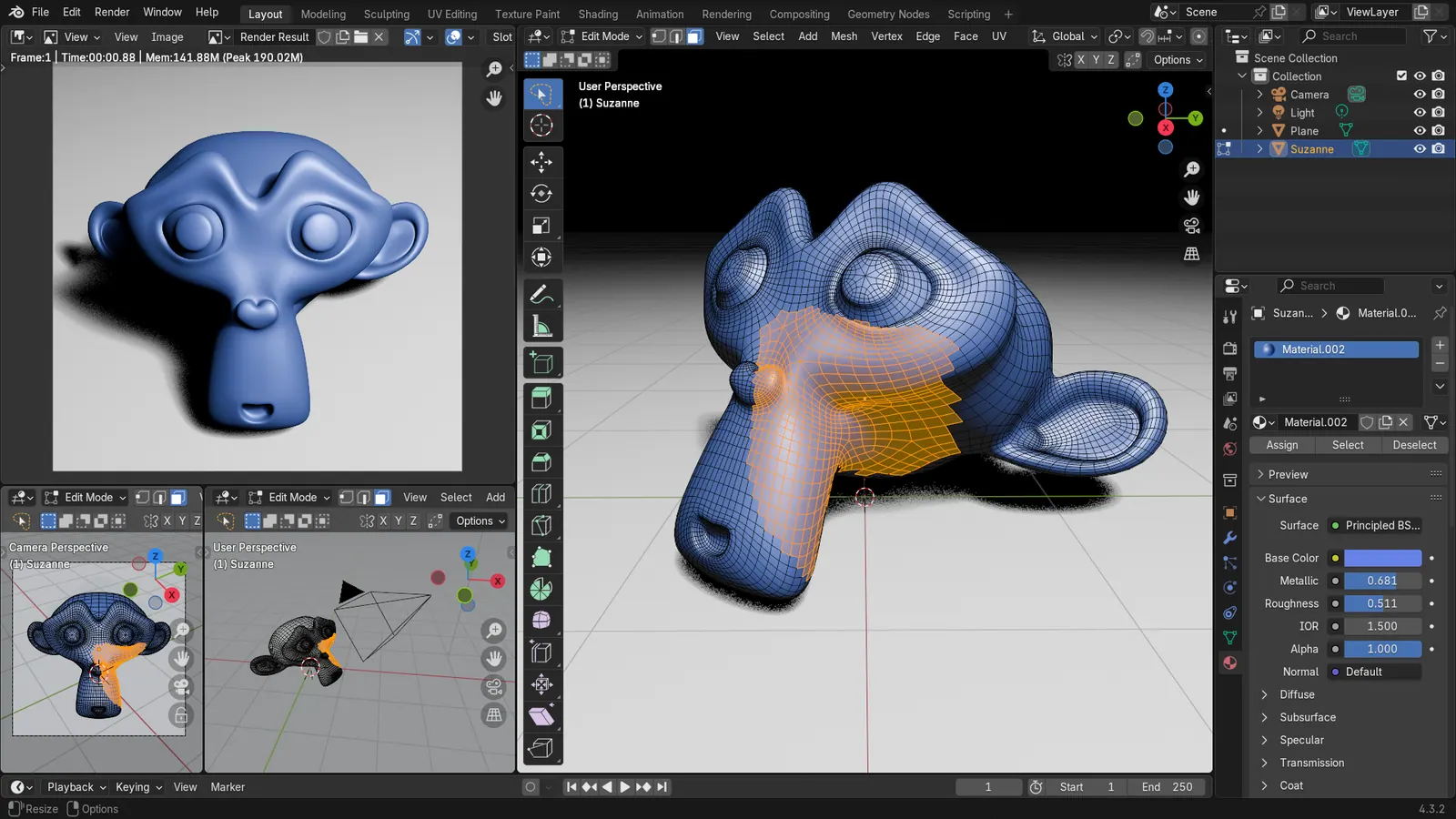
Blender 5.2 LTS - Showcase Reel
By Blender ·
Playing loads YouTube. YouTube will receive your IP address and device information.
Best free 3D Modeling Software compared: Blender, FreeCAD, Tinkercad, OpenSCAD and 4 more, with free-plan limits, platforms and prices from official pages checked October 24, 2026.
•4 min read•3D & CAD
| Tool | Price | Platforms | Best for | Tested |
|---|---|---|---|---|
| Blender | Free (Free for any purpose, including commercial work) | Windows, macOS, Linux | Characters, props and general mesh modeling | Docs only |
| FreeCAD | Free (Free, no sign-up) | Windows, macOS, Linux | Mechanical parts you will print or machine | Docs only |
| Tinkercad | Free (Free, browser-based 3D design) | Web | Beginners and quick printable shapes | Docs only |
| OpenSCAD | Free (Free software; no paid tier) | Windows, macOS, Linux | Programmers who want parametric parts | Docs only |
| Wings 3D | Free (Free and open source) | Windows, macOS, Linux | Low-poly and subdivision modeling | Docs only |
| Blockbench | Free (Free to use for any type of project, per the site) | Web, Desktop | Low-poly game and voxel-style assets | Docs only |
| Onshape | Free (Free plan for non-commercial use; all documents are public); paid from $1500 per user/year, Standard, billed annually | Web | Hobby CAD with no install | Docs only |
| Spline | Free (Free plan with limited personal files and watermarked web exports, no AI credits; the page gives no numeric file limit); paid from $12 per seat/month, Hobby, billed yearly ($15 billed monthly) | Web, macOS, Windows | Interactive 3D for websites | Docs only |
Independent comparison. Paid placements are labelled separately; editorial links earn no affiliate commissions. Learn more.
Images from the linked documentation. Versions and features may differ from current plans.
By Blender ·
Playing loads YouTube. YouTube will receive your IP address and device information.
Free 3D modeling software splits into three families, and picking the wrong family costs more time than any price tag. Mesh and artistic tools such as Blender, Wings 3D and Blockbench let you push vertices around for characters, props and game assets. Parametric and solid tools such as FreeCAD, Onshape and Tinkercad build parts from dimensions and sketches, which suits things you will print or machine. Script-based tools such as OpenSCAD describe a model in code, which is slow to start and unbeatable when a part needs to be resized by changing one number. Decide what the finished model is for before you download anything: a printable bracket and a game character need different tools, and a tool built for one is painful for the other. Most of the options here cost nothing at all and carry no export limits, but two of the free plans have conditions: Onshape's free plan makes every document public, and Spline's free plan adds a watermark to web exports. If you only want a first model in an hour, start with Tinkercad in the browser. If you expect to still be modeling in a year, Blender or FreeCAD will not outgrow you. Each pick below states the limit that matters and what kind of model it is best at.
3D creation suite that is free for any purpose, including commercial work, under GPL-3.0. Covers organic and hard-surface mesh modeling; the learning curve is the cost, and it is overkill for a single printable bracket.
Price: Free (Free for any purpose, including commercial work) (Blender pricing, checked 2026-10-22).
Platforms and license: Windows, macOS, Linux. GPL-3.0-or-later (open source).
Best for: Characters, props and general mesh modeling.
Worth knowing: Texture painting and baking are built in, with node-based shading; no layer stack with smart materials like Painter.
Compare: Blender alternatives
Free, no sign-up, LGPL-2.1 licensed parametric 3D modeler. Models are built from dimensioned sketches, so it suits mechanical parts, but the vendor notes 2D drafting is not its strength.
Price: Free (Free, no sign-up) (FreeCAD pricing, checked 2026-10-22).
Platforms and license: Windows, macOS, Linux. LGPL-2.1 (open source).
Project activity: 34.9k GitHub stars · latest release 1.1.4 (Sep 28, 2026) · last commit Oct 27, 2026
Best for: Mechanical parts you will print or machine.
Worth knowing: Mainly parametric 3D; 2D drafting is not its strength.
Free browser-based 3D design from Autodesk, the gentlest way to build a first model out of simple shapes. Limited for complex curved surfaces compared with Blender.
Price: Free (Free, browser-based 3D design) (Tinkercad pricing, checked 2026-10-23).
Platforms and license: Web. Proprietary.
Best for: Beginners and quick printable shapes.
Compare: Tinkercad alternatives
Free GPL-2.0 solid modeler where you write code instead of dragging shapes. There is no drag-to-sketch interface, which is the trade-off for fully parametric parts.
Price: Free (Free software; no paid tier) (OpenSCAD pricing, checked 2026-10-23).
Platforms and license: Windows, macOS, Linux. GPL-2.0 (open source).
Project activity: 10.5k GitHub stars · latest release openscad-2021.01 (Feb 7, 2021) · last commit Oct 27, 2026
Best for: Programmers who want parametric parts.
Worth knowing: Script-based solid modeler: you describe parts in code, there is no drag-to-sketch interface. License from an archived copy of openscad.org; other listings say GPL-2.0-or-later.
Free BSD-licensed subdivision modeler. It does modeling only, with no sculpting, rendering or animation suite like Blender's, which keeps it small and quick to learn.
Price: Free (Free and open source) (Wings 3D pricing, checked 2026-10-23).
Platforms and license: Windows, macOS, Linux. BSD (open source).
Project activity: 671 GitHub stars · last commit Oct 27, 2026
Best for: Low-poly and subdivision modeling.
Free GPL-3.0 editor for low-poly and pixel-style models, with a web app and downloads. Built for blocky game-style assets rather than precision engineering.
Price: Free (Free to use for any type of project, per the site) (Blockbench pricing, checked 2026-10-24).
Platforms and license: Web, Desktop. GPL-3.0 (open source).
Project activity: 6.1k GitHub stars · latest release v5.2.2 (Oct 8, 2026) · last commit Oct 27, 2026
Best for: Low-poly game and voxel-style assets.
Worth knowing: Low-poly and pixel-style model editor; the site offers a web app and downloads.
Cloud parametric CAD with a free plan for non-commercial use. The catch: every document you create on the free plan is public.
Price: Free (Free plan for non-commercial use; all documents are public); paid from $1500 per user/year, Standard, billed annually (Onshape pricing, checked 2026-10-22).
Platforms and license: Web. Proprietary.
Best for: Hobby CAD with no install.
Worth knowing: Cloud 3D parametric CAD, not a DWG drafting tool.
Compare: Onshape alternatives
Browser-based 3D design for interactive web scenes. The free plan has limited personal files and watermarked web exports, and the pricing page gives no numeric file limit.
Price: Free (Free plan with limited personal files and watermarked web exports, no AI credits; the page gives no numeric file limit); paid from $12 per seat/month, Hobby, billed yearly ($15 billed monthly) (Spline pricing, checked 2026-10-23).
Platforms and license: Web, macOS, Windows. Proprietary.
Best for: Interactive 3D for websites.
Compare: Spline alternatives
Docs-only for Blender, FreeCAD, Tinkercad, OpenSCAD, Wings 3D, Blockbench, Onshape, Spline: we did not install or run them, so feature claims come from vendor pages. Vendor prices and free limits change; confirm on the linked pricing page before you commit.
Kevin Fan is a SaaS founder. He runs Free Instead Of, which tracks free and open-source alternatives to paid software and checks each price and free-plan limit against the vendor's own pages.
Based on official pricing, license and product pages checked between 2026-10-22 and 2026-10-24: Blender, FreeCAD, Tinkercad, OpenSCAD, Wings 3D, Blockbench, Onshape, Spline. Prices, free limits and licenses are the figures shown on those pages on those dates. No tool on this page was installed or run. No accounts were created.