LibreOffice 25.8: New features
By LibreOffice - The Document Foundation ·
Playing loads YouTube. YouTube will receive your IP address and device information.
Best open-source Word Processors compared: LibreOffice, ONLYOFFICE, Apache OpenOffice, AbiWord and 2 more, with licenses, platforms and prices from official pages checked October 23, 2026.
•3 min read•Office, Docs & Presentations
| Tool | Price | Platforms | Best for | Tested |
|---|---|---|---|---|
| LibreOffice | Free (download and use at no cost per its site) | Windows, macOS, Linux | Most people replacing Word | Docs only |
| ONLYOFFICE | Free (Startup cloud plan with up to 3 admins, unlimited users and guests, 12 rooms and 2 GB of storage); paid from $20 per admin/month (Business cloud plan; only admins are paid) | Web, Self-hosted, Windows, macOS, Linux, iOS, Android | Teams that need Word-like layout and shared editing | Docs only |
| Apache OpenOffice | Free (Free; developed by volunteers, donations accepted) | Windows, macOS, Linux | Users who already know OpenOffice | Docs only |
| AbiWord | Free (Free and open source) | Linux, Windows | Old or low-spec computers | Docs only |
| Calligra Suite | Free (Free KDE software) | Linux, Windows | KDE users who want layout tools | Docs only |
| novelWriter | Free (Free and open source; donation link only) | Linux, Windows, macOS (pip install) | Long fiction and notes | Docs only |
Independent comparison. Paid placements are labelled separately; editorial links earn no affiliate commissions. Learn more.
Images from the linked documentation. Versions and features may differ from current plans.
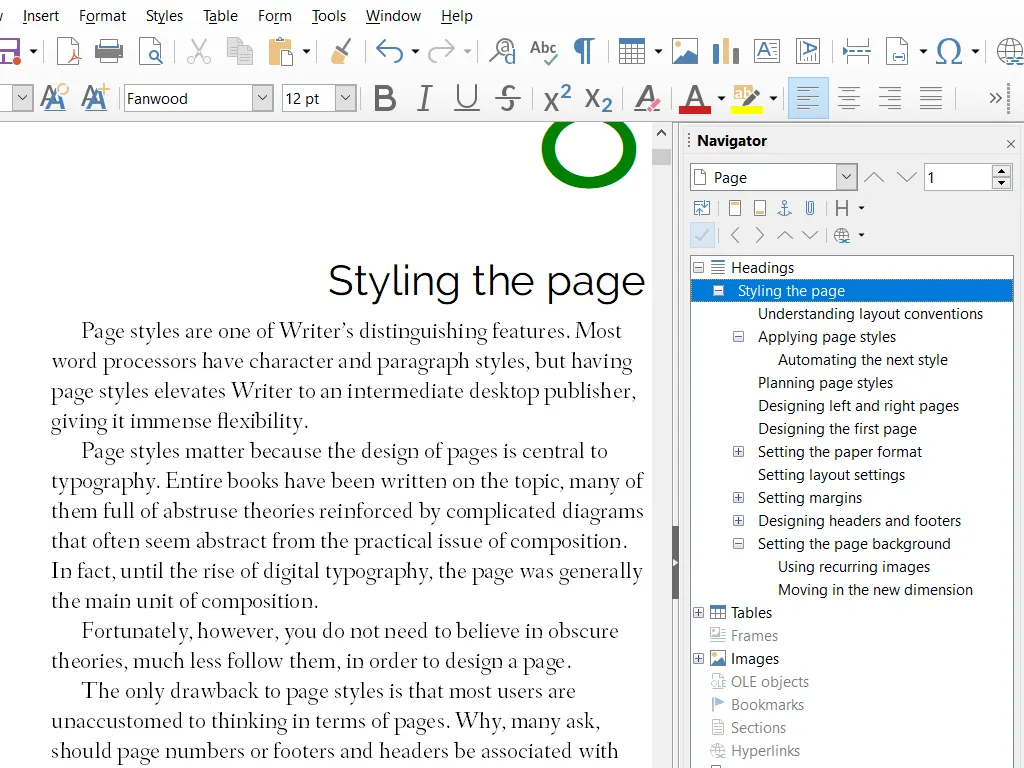
LibreOffice Writer — official interface example
The Document Foundation · Source · CC BY-SA 3.0
By LibreOffice - The Document Foundation ·
Playing loads YouTube. YouTube will receive your IP address and device information.
Most people who search for an open-source word processor want one thing: open and save .docx files without paying Microsoft. LibreOffice Writer is the answer for the large majority, because it is the most actively developed and has the best file compatibility of the free options. ONLYOFFICE is the alternative if your documents must look identical in Word, since its interface copies Microsoft's ribbon and it can also be installed as a shared editing server. The remaining entries are narrower. Apache OpenOffice is the older sibling of LibreOffice and still gets releases, but updates are slower. AbiWord is small and quick on old hardware, Calligra Words is the KDE option with desktop-publishing features, and novelWriter is not a general word processor at all but a plain-text tool for long fiction. The trade-off is layout fidelity. Open-source editors handle ordinary letters and reports well, but complex Word documents with tracked changes, nested tables, or fancy fields can reflow, so open a few of your real files before you commit. If you collaborate with people who live in Word, test a round trip of comments and tracked changes first, because that is where differences show up.
MPL-2.0 desktop suite whose Writer reads and writes .docx, ODT and PDF. It is the default recommendation, though it has no built-in cloud storage and complex Word layouts can shift.
Price: Free (download and use at no cost per its site) (LibreOffice pricing, checked 2026-10-22).
Platforms and license: Windows, macOS, Linux. MPL-2.0 (open source) (license source).
Best for: Most people replacing Word.
Worth knowing: Desktop suite of Writer, Calc, Impress, Draw, Base and Math; it has no built-in cloud storage or email.
AGPL-3.0 Docs server with desktop apps, and an interface close to Word's ribbon. The free cloud Startup plan has 3 admins and 2 GB, so heavier teams self-host or pay from $20 per admin per month.
Price: Free (Startup cloud plan with up to 3 admins, unlimited users and guests, 12 rooms and 2 GB of storage); paid from $20 per admin/month (Business cloud plan; only admins are paid) (ONLYOFFICE pricing, checked 2026-10-22).
Platforms and license: Web, Self-hosted, Windows, macOS, Linux, iOS, Android. AGPL-3.0 (Docs server) (open source) (license source).
Project activity: 7.1k GitHub stars · latest release v10.0.0 (Oct 12, 2026) · last commit Oct 26, 2026
Best for: Teams that need Word-like layout and shared editing.
Apache License 2.0 and free, with release 4.1.17 listed on the download page. It is a fine offline writer, but its development is volunteer-run and you should compare update pace with LibreOffice before choosing it.
Price: Free (Free; developed by volunteers, donations accepted) (Apache OpenOffice pricing, checked 2026-10-23).
Platforms and license: Windows, macOS, Linux. Apache License 2.0 (open source) (license source).
Best for: Users who already know OpenOffice.
GPL-2.0 and lightweight. The source mirror on GitHub lists no releases, so check how you will install and update it; it suits plain documents better than complex layouts.
Price: Free (Free and open source) (AbiWord pricing, checked 2026-10-23).
Platforms and license: Linux, Windows. GPL-2.0 (open source) (license source).
Project activity: 179 GitHub stars · No commits since Feb 8, 2024
Best for: Old or low-spec computers.
Calligra Words is the word processor in KDE's Calligra suite, mostly LGPL and GPL, with desktop-publishing features. Calligra 4.0 came out in August 2024; expect a smaller user base than LibreOffice.
Price: Free (Free KDE software) (Calligra Suite pricing, checked 2026-10-23).
Platforms and license: Linux, Windows. LGPL 2+ and GPL (mostly) (open source) (license source).
Project activity: 210 GitHub stars · last commit Oct 26, 2026
Best for: KDE users who want layout tools.
GPL-3.0 plain-text editor for novels, built from small linked documents. It is a writing tool rather than a Word replacement, and macOS users install it as a Python package.
Price: Free (Free and open source; donation link only) (novelWriter pricing, checked 2026-10-23).
Platforms and license: Linux, Windows, macOS (pip install). GPL-3.0 (open source) (license source).
Project activity: 3.2k GitHub stars · latest release v26.2.2 (Oct 11, 2026) · last commit Oct 26, 2026
Best for: Long fiction and notes.
Worth knowing: Plain-text, markdown-like editor for novels, built from many small documents with cross-references. The site says macOS DMG releases ended in 2026.1; macOS users install the Python package.
Docs-only for LibreOffice, ONLYOFFICE, Apache OpenOffice, AbiWord, Calligra Suite, novelWriter: we did not install or run them, so feature claims come from vendor pages. Vendor prices and free limits change; confirm on the linked pricing page before you commit.
Kevin Fan is a SaaS founder. He runs Free Instead Of, which tracks free and open-source alternatives to paid software and checks each price and free-plan limit against the vendor's own pages.
Based on official pricing, license and product pages checked between 2026-10-22 and 2026-10-23: LibreOffice, ONLYOFFICE, Apache OpenOffice, AbiWord, Calligra Suite, novelWriter. Prices, free limits and licenses are the figures shown on those pages on those dates. No tool on this page was installed or run. No accounts were created.