LibreOffice 25.8: New features
By LibreOffice - The Document Foundation ·
Playing loads YouTube. YouTube will receive your IP address and device information.
Microsoft Excel alternatives: LibreOffice, Google Sheets, ONLYOFFICE, WPS Office and 1 more. Prices and licenses checked October 23, 2026.
•3 min read•Office, Docs & Presentations

Verdict:Leave Excel when the subscription is what bothers you, because most workbooks do not use more than a fraction of it. The Excel page we tried to read timed out, so we cite Microsoft's free Excel for the web, which needs a Microsoft account and stores files in OneDrive with 5 GB free. That alone replaces Excel for many people, but if you want to leave Microsoft altogether, LibreOffice Calc is the free desktop route, and it reads .xlsx files. Google Sheets is easier when several people edit one file; it handles ordinary formulas and charts, but not heavy VBA. ONLYOFFICE keeps Microsoft file formats front and center and has a free cloud plan with 12 rooms and 2 GB. WPS Office copies Excel's layout, so the learning cost is lowest, and its free plan gives 1 GB of cloud space. Zoho Sheet is the plain browser option. The trade-off is macros and add-ins. If your workbooks depend on VBA, Power Query or a finance add-in, none of these will run them unchanged, so test your three most important files before switching. For simple budgets and lists, almost any free option works; for modelling with macros, keep Excel.
| Tool | Price | Platforms | Best for | Tested |
|---|---|---|---|---|
| LibreOffice | Free (download and use at no cost per its site) | Windows, macOS, Linux | A free desktop replacement for most workbooks | Docs only |
| Google Sheets | Free (Free with a personal Google Account; some Gemini features need a Workspace plan) | Web, Mobile apps | Shared sheets with real-time editing | Docs only |
| ONLYOFFICE | Free (Startup cloud plan with up to 3 admins, unlimited users and guests, 12 rooms and 2 GB of storage); paid from $20 per admin/month (Business cloud plan; only admins are paid) | Web, Self-hosted, Windows, macOS, Linux, iOS, Android | Staying compatible with .xlsx files | Docs only |
| WPS Office | Free (Free WPS Standard: 1 user, 1 GB cloud storage, limited AI tools) | Windows, macOS, Linux, Android, iOS, Web browser | The Excel look-alike with a free tier | Docs only |
| Zoho Sheet | Free (Page says spreadsheets can be created for free) | Web, Windows, macOS, Android, iOS, Chromebook | A free hosted alternative | Docs only |
| Airtable | Free; paid from $20 per user/month, billed annually (Team) | Web browser | Spreadsheet-database and no-code app builder | Docs only |
Independent comparison. Paid placements are labelled separately; editorial links earn no affiliate commissions. Learn more.
Images from the linked documentation. Versions and features may differ from current plans.
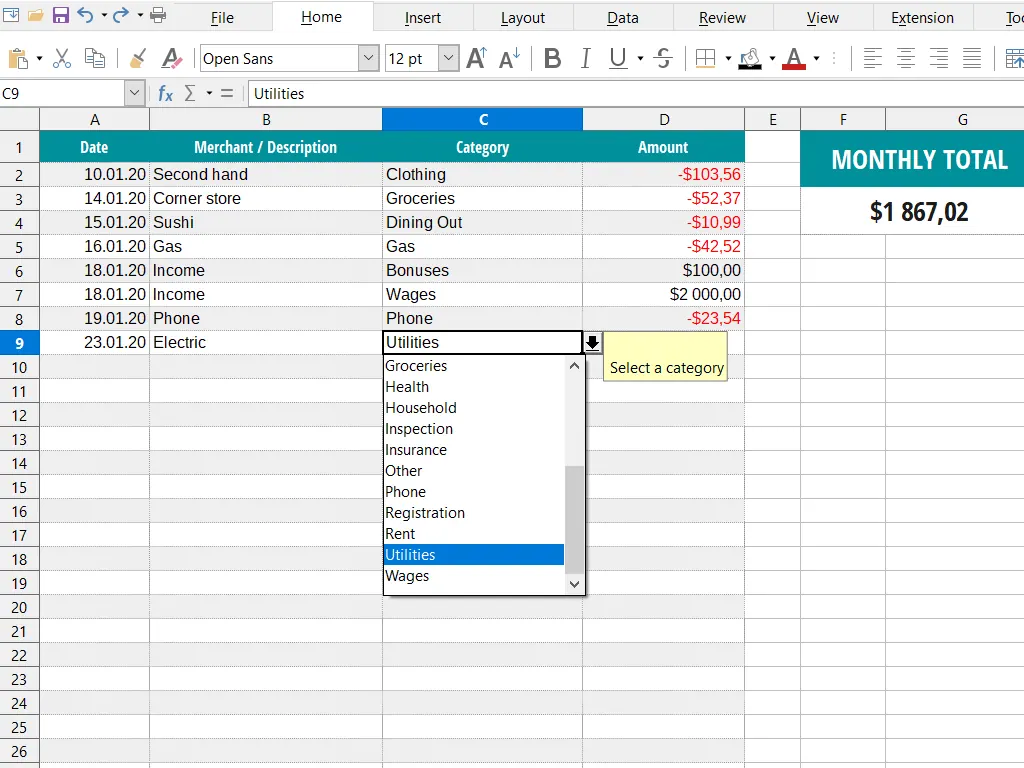
LibreOffice Calc — official interface example
The Document Foundation · Source · CC BY-SA 3.0
By LibreOffice - The Document Foundation ·
Playing loads YouTube. YouTube will receive your IP address and device information.
Microsoft Excel today: Free (Excel for the web is free with a Microsoft account and 5 GB of OneDrive; files must be saved in OneDrive) (Microsoft Excel pricing, checked 2026-10-23).
Microsoft 365 Personal is $9.99 per month or $99.99 per year, Family (1 to 6 people) is $12.99 or $129.99, and Office Home 2024 is a $179.99 one-time purchase for one PC or Mac. Excel desktop is included in all three. Copilot in Excel requires AutoSave, so the file must live in OneDrive, and it does not work on unsaved files.
Compared with Microsoft Excel: Free MPL-2.0 suite whose Calc opens and saves .xlsx files on Windows, macOS and Linux. You lose Excel's newest functions and Power Query tooling, and you gain a desktop spreadsheet with no subscription.
Price: Free (download and use at no cost per its site) (LibreOffice pricing, checked 2026-10-22).
Platforms and license: Windows, macOS, Linux. MPL-2.0 (open source).
Best for: A free desktop replacement for most workbooks.
Worth knowing: Desktop suite of Writer, Calc, Impress, Draw, Base and Math; it has no built-in cloud storage or email.
Compared with Microsoft Excel: Free with a Google Account, edited in the browser or on phones, and shared with live co-editing. Large files with heavy macros are where Excel still wins; Sheets suits collaboration over modelling.
Price: Free (Free with a personal Google Account; some Gemini features need a Workspace plan) (Google Sheets pricing, checked 2026-10-23).
Platforms and license: Web, Mobile apps. Proprietary.
Best for: Shared sheets with real-time editing.
Compared with Microsoft Excel: AGPL-3.0 editors with a free Startup cloud plan of 12 rooms and 2 GB of storage, built around Microsoft Office formats. Closer to Excel's file compatibility than most, though it is not a full macro replacement.
Price: Free (Startup cloud plan with up to 3 admins, unlimited users and guests, 12 rooms and 2 GB of storage); paid from $20 per admin/month (Business cloud plan; only admins are paid) (ONLYOFFICE pricing, checked 2026-10-22).
Platforms and license: Web, Self-hosted, Windows, macOS, Linux, iOS, Android. AGPL-3.0 (Docs server) (open source).
Project activity: 7.1k GitHub stars · latest release v10.0.0 (Oct 12, 2026) · last commit Oct 26, 2026
Best for: Staying compatible with .xlsx files.
Compared with Microsoft Excel: Free WPS Standard for 1 user with 1 GB cloud and limited AI tools, on Windows, macOS, Linux and mobile. The layout follows Excel closely, so it feels familiar; paid plan prices were not shown.
Price: Free (Free WPS Standard: 1 user, 1 GB cloud storage, limited AI tools) (WPS Office pricing, checked 2026-10-23).
Platforms and license: Windows, macOS, Linux, Android, iOS, Web browser. Proprietary.
Best for: The Excel look-alike with a free tier.
Compared with Microsoft Excel: Free browser spreadsheet with Windows, macOS, Android and iOS apps. A hosted service like Excel for the web, but without a Microsoft account; no paid tiers were visible on the page.
Price: Free (Page says spreadsheets can be created for free) (Zoho Sheet pricing, checked 2026-10-23).
Platforms and license: Web, Windows, macOS, Android, iOS, Chromebook. Proprietary.
Best for: A free hosted alternative.
Compared with Microsoft Excel: Team costs $20 per user per month billed annually, and a free plan exists. It organises data as linked records and views rather than a worksheet grid, so existing formulas, pivot tables and macros do not carry over.
Price: Free; paid from $20 per user/month, billed annually (Team) (Airtable pricing, checked 2026-10-23).
Docs-only for LibreOffice, Google Sheets, ONLYOFFICE, WPS Office, Zoho Sheet: we did not install or run them, so feature claims come from vendor pages and we did not test import from Microsoft Excel. Vendor prices and free limits change; confirm on the linked pricing page before you buy or migrate.
Kevin Fan is a SaaS founder. He runs Free Instead Of, which tracks free and open-source alternatives to paid software and checks each price and free-plan limit against the vendor's own pages.
Based on official pricing and product pages checked between 2026-10-22 and 2026-10-23: Microsoft Excel, LibreOffice, Google Sheets, ONLYOFFICE, WPS Office, Zoho Sheet, Airtable. Prices, free limits and licenses are the figures shown on those pages on those dates. No tool on this page was installed or run. No accounts were created.