LibreOffice 25.8: New features
By LibreOffice - The Document Foundation ·
Playing loads YouTube. YouTube will receive your IP address and device information.
Microsoft Word alternatives: LibreOffice, Google Docs, ONLYOFFICE, WPS Office and 1 more. Prices and licenses checked October 23, 2026.
•3 min read•Office, Docs & Presentations

Verdict:Word is already half free: Microsoft offers Word for the web with a Microsoft account, and files must live in OneDrive, which comes with 5 GB on a free account. So the reason to leave is rarely price alone. It is usually the desktop licence, the OneDrive requirement, or wanting a tool that does not tie documents to Microsoft. If you write alone and want files on your own disk, LibreOffice is the plain answer: free, MPL-2.0, and its Writer opens .docx without an account. If your work is shared drafts with comments, Google Docs removes the file-passing problem, as long as everyone has a Google Account. ONLYOFFICE is the one to try when layout fidelity matters, such as contracts or reports that arrive from Word users, and you can self-host the Docs server. WPS Office is the closest in feel to Word and covers phones, but check what the paid tier adds before relying on its AI features. Zoho Writer suits a small team that wants a free web editor. The trade-off to accept is compatibility: every alternative opens Word files, but heavily formatted documents with tracked changes, macros or complex tables can shift. Test two or three of your real files before you uninstall anything.
| Tool | Price | Platforms | Best for | Tested |
|---|---|---|---|---|
| LibreOffice | Free (download and use at no cost per its site) | Windows, macOS, Linux | Offline writing with no subscription | Docs only |
| Google Docs | Free (Free for anyone with a Google Account; storage comes from the Google account quota) | Web, iOS, Android | Real-time collaboration in a browser | Docs only |
| ONLYOFFICE | Free (Startup cloud plan with up to 3 admins, unlimited users and guests, 12 rooms and 2 GB of storage); paid from $20 per admin/month (Business cloud plan; only admins are paid) | Web, Self-hosted, Windows, macOS, Linux, iOS, Android | DOCX-faithful editing you can self-host | Docs only |
| WPS Office | Free (Free WPS Standard: 1 user, 1 GB cloud storage, limited AI tools) | Windows, macOS, Linux, Android, iOS, Web browser | Word-like interface on every device | Docs only |
| Zoho Writer | Free (Free for individuals and organizations with no document limit; DOCX import up to 50 MB) | Web browser, Android, iOS | Free browser writing for small teams | Docs only |
Independent comparison. Paid placements are labelled separately; editorial links earn no affiliate commissions. Learn more.
Images from the linked documentation. Versions and features may differ from current plans.
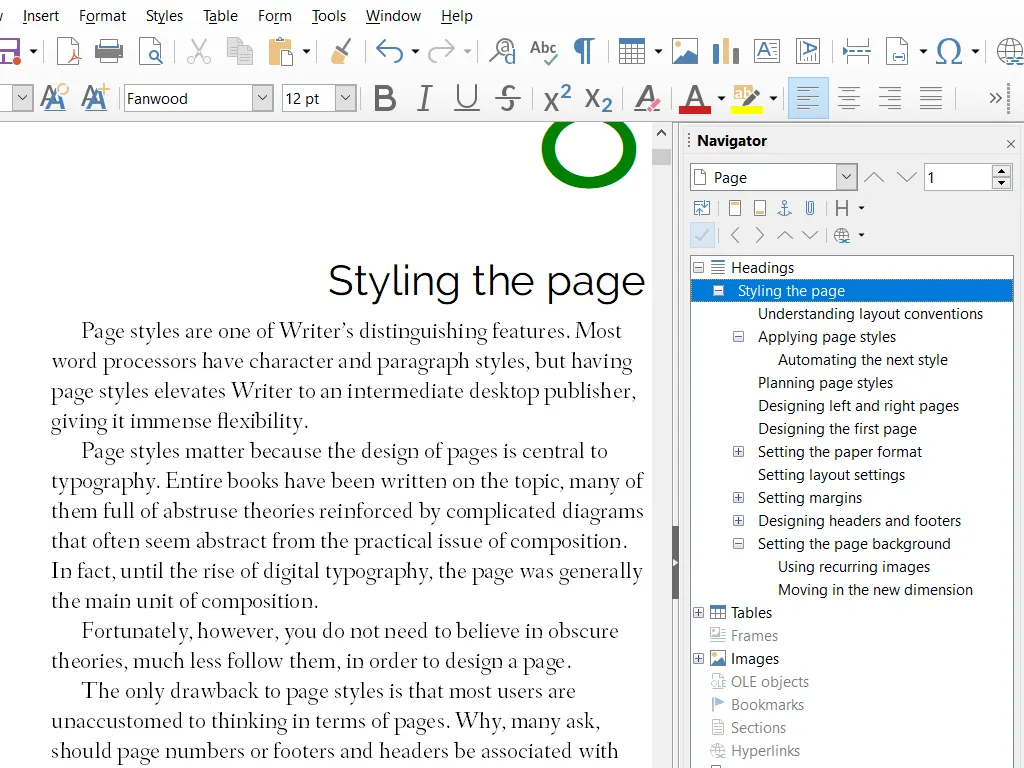
LibreOffice Writer — official interface example
The Document Foundation · Source · CC BY-SA 3.0
By LibreOffice - The Document Foundation ·
Playing loads YouTube. YouTube will receive your IP address and device information.
Microsoft Word today: Free (Word for the web is free with a Microsoft account; files must be saved in OneDrive, which includes 5 GB on a free account) (Microsoft Word pricing, checked 2026-10-23).
Desktop Word is sold through Microsoft 365: Personal is $9.99 per month or $99.99 per year for one person, and Family is $12.99 per month or $129.99 per year. Subscriptions renew automatically at the regular price. The one-time Office Home 2024 costs $179.99 for one PC or Mac and has no upgrade path, so a future major release means paying full price again. The free Word for the web requires files to be saved in and shared from OneDrive, which includes 5 GB on a free account.
Compared with Microsoft Word: Free to download and use, MPL-2.0 licensed, with a Writer module that opens Word files. You give up Microsoft's cloud co-authoring and polish on complex layouts, but pay nothing and keep documents local.
Price: Free (download and use at no cost per its site) (LibreOffice pricing, checked 2026-10-22).
Platforms and license: Windows, macOS, Linux. MPL-2.0 (open source).
Best for: Offline writing with no subscription.
Worth knowing: Desktop suite of Writer, Calc, Impress, Draw, Base and Math; it has no built-in cloud storage or email.
Compared with Microsoft Word: Free with a Google Account, edited in the browser with live co-authoring. Compared with Word you lose advanced layout and some desktop features, but sharing and comments need no OneDrive or install.
Price: Free (Free for anyone with a Google Account; storage comes from the Google account quota) (Google Docs pricing, checked 2026-10-23).
Platforms and license: Web, iOS, Android. Proprietary.
Best for: Real-time collaboration in a browser.
Compared with Microsoft Word: Its editors keep closer fidelity to DOCX than most free tools, and the Docs server is AGPL-3.0. Unlike Word's desktop app, the free cloud tier is limited to 12 rooms and 2 GB of storage.
Price: Free (Startup cloud plan with up to 3 admins, unlimited users and guests, 12 rooms and 2 GB of storage); paid from $20 per admin/month (Business cloud plan; only admins are paid) (ONLYOFFICE pricing, checked 2026-10-22).
Platforms and license: Web, Self-hosted, Windows, macOS, Linux, iOS, Android. AGPL-3.0 (Docs server) (open source).
Project activity: 7.1k GitHub stars · latest release v10.0.0 (Oct 12, 2026) · last commit Oct 26, 2026
Best for: DOCX-faithful editing you can self-host.
Compared with Microsoft Word: A free WPS Standard plan with 1 GB of cloud storage and limited AI tools, and apps for Windows, Mac, Linux, Android and iOS. Familiar Word-like layout, though you should check its site for paid prices.
Price: Free (Free WPS Standard: 1 user, 1 GB cloud storage, limited AI tools) (WPS Office pricing, checked 2026-10-23).
Platforms and license: Windows, macOS, Linux, Android, iOS, Web browser. Proprietary.
Best for: Word-like interface on every device.
Compared with Microsoft Word: Free with no document limit and a 50 MB DOCX import cap. You lose Word's offline desktop depth, but gain browser-based writing with no per-seat charge for individuals and small organizations.
Price: Free (Free for individuals and organizations with no document limit; DOCX import up to 50 MB) (Zoho Writer pricing, checked 2026-10-23).
Platforms and license: Web browser, Android, iOS. Proprietary.
Best for: Free browser writing for small teams.
Docs-only for LibreOffice, Google Docs, ONLYOFFICE, WPS Office, Zoho Writer: we did not install or run them, so feature claims come from vendor pages and we did not test import from Microsoft Word. Vendor prices and free limits change; confirm on the linked pricing page before you buy or migrate.
Kevin Fan is a SaaS founder. He runs Free Instead Of, which tracks free and open-source alternatives to paid software and checks each price and free-plan limit against the vendor's own pages.
Based on official pricing and product pages checked between 2026-10-22 and 2026-10-23: Microsoft Word, LibreOffice, Google Docs, ONLYOFFICE, WPS Office, Zoho Writer. Prices, free limits and licenses are the figures shown on those pages on those dates. No tool on this page was installed or run. No accounts were created.