LibreOffice 25.8: New features
By LibreOffice - The Document Foundation ·
Playing loads YouTube. YouTube will receive your IP address and device information.
Microsoft PowerPoint alternatives: Google Slides, LibreOffice, ONLYOFFICE, Canva and 2 more. Prices and licenses checked October 24, 2026.
•3 min read•Office, Docs & Presentations

Verdict:PowerPoint is worth leaving when you are paying for Microsoft 365 mainly to make a few decks, or when the people you work with live in a browser. Google Slides is the closest everyday replacement: free, shared by link, and fine for anything short of heavy animation. LibreOffice Impress is the choice if you want an installed app with no account; it opens .pptx files, but test the file before an important meeting because transitions and fonts sometimes shift. ONLYOFFICE handles Microsoft formats better than most and can be self-hosted at no charge, which suits a team that wants control of the documents. If the deck is about looks rather than structure, Canva's free templates get you there faster, and Pitch is better for a startup that wants shared decks with a pricing ladder that starts at zero. Developers who give talks with code should look at Slidev: slides are Markdown, so they sit in Git, though nobody without Node.js will want to edit them. The honest trade-off is compatibility. A deck built in PowerPoint with custom animations, embedded fonts and macros will not survive a trip through any of these intact, so convert early rather than the night before. If clients send you .pptx files you must edit precisely, keep PowerPoint or use ONLYOFFICE. For everything else, the free options are enough.
| Tool | Price | Platforms | Best for | Tested |
|---|---|---|---|---|
| Google Slides | Free (Free for anyone with a Google account (storage counts against the account quota)) | Web, iOS, Android | Free browser-based collaboration | Docs only |
| LibreOffice | Free (download and use at no cost per its site) | Windows, macOS, Linux | Offline desktop app, no cost | Docs only |
| ONLYOFFICE | Free (Startup cloud plan with up to 3 admins, unlimited users and guests, 12 rooms and 2 GB of storage); paid from $20 per admin/month (Business cloud plan; only admins are paid) | Web, Self-hosted, Windows, macOS, Linux, iOS, Android | Best Office-format compatibility | Docs only |
| Canva | Free (Free plan available; see the pricing page for its current limits) | Web, Windows, macOS, iOS, Android | Design-led decks and social slides | Docs only |
| Slidev | Free (Free and open source; slides are written in Markdown and run on Node.js) | Web, Windows, macOS, Linux | Developers and technical talks | Docs only |
| Pitch | Free (Free plan: unlimited presentations, 100 one-time AI credits); paid from EUR 10 per month, billed yearly (Plus) | Web, macOS, Windows, iOS, Android | Startup pitch decks | Docs only |
| Gamma | Free (Free plan with a one-time allotment of 400 AI credits (Gamma help center)); paid from $8 per user/month, billed annually (Plus; $10 billed monthly) | Web | Presentation | Docs only |
| Prezi | Free (Free plan: presentations carry a Prezi watermark, up to 14 slides; PDF and PowerPoint export are on paid plans) | Web | Presentations | Docs only |
Independent comparison. Paid placements are labelled separately; editorial links earn no affiliate commissions. Learn more.
Images from the linked documentation. Versions and features may differ from current plans.
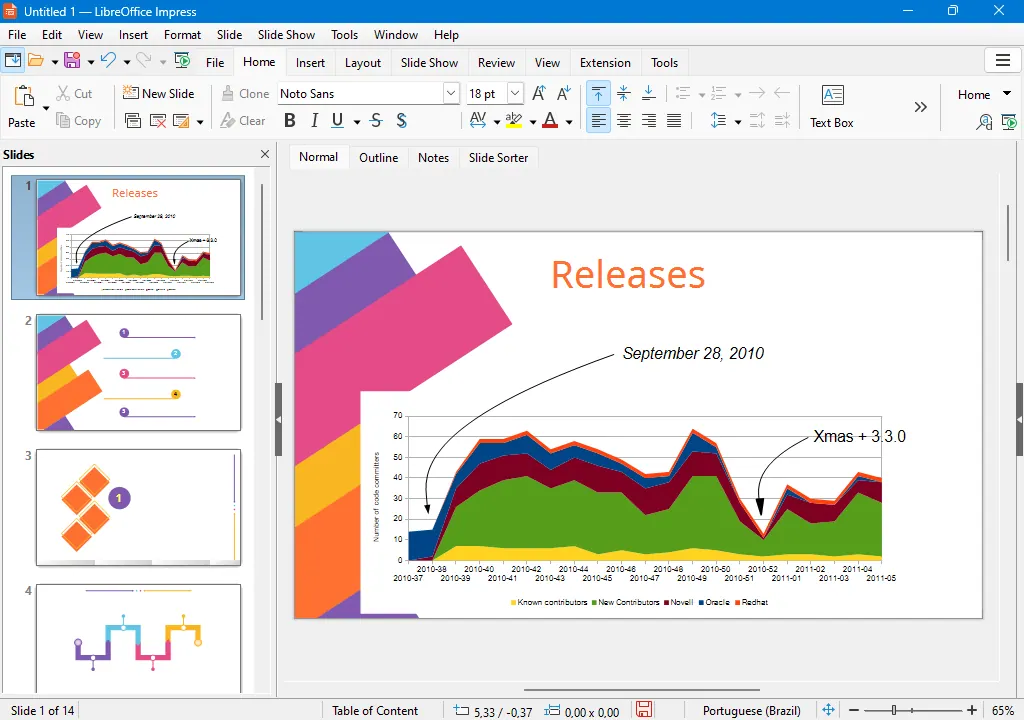
LibreOffice Impress — official interface example
The Document Foundation · Source · CC BY-SA 3.0
By LibreOffice - The Document Foundation ·
Playing loads YouTube. YouTube will receive your IP address and device information.
Microsoft PowerPoint today: Free (Free web version with a Microsoft account (reported by third-party reviews; the official page was not readable)) (Microsoft PowerPoint pricing, checked 2026-10-23).
Microsoft's listed ways to buy the Office desktop apps are subscriptions, Microsoft 365 Personal at $9.99 per month or $99.99 per year and Family at $12.99 or $129.99 for 1 to 6 people, or Office Home 2024 as a $179.99 one-time purchase for a single PC or Mac. There is no cheaper desktop tier, and anyone leaving the subscription also leaves the Copilot features, which require AutoSave and OneDrive storage.
Compared with Microsoft PowerPoint: Free with a Google account, runs in the browser and shares by link with live co-editing. You give up PowerPoint's advanced animation and offline polish, but gain easy collaboration and no licence cost.
Price: Free (Free for anyone with a Google account (storage counts against the account quota)) (Google Slides pricing, checked 2026-10-23).
Platforms and license: Web, iOS, Android. Proprietary.
Best for: Free browser-based collaboration.
Compared with Microsoft PowerPoint: Impress is part of LibreOffice, a free MPL-2.0 suite for Windows, macOS and Linux. It opens .pptx files, but complex animations and fonts can shift, and its templates are plainer than PowerPoint's.
Price: Free (download and use at no cost per its site) (LibreOffice pricing, checked 2026-10-22).
Platforms and license: Windows, macOS, Linux. MPL-2.0 (open source).
Best for: Offline desktop app, no cost.
Worth knowing: Desktop suite of Writer, Calc, Impress, Draw, Base and Math; it has no built-in cloud storage or email.
Compared with Microsoft PowerPoint: Presentation editor with strong .pptx fidelity, free as a self-hosted AGPL-3.0 server and in desktop apps. The cloud plan is paid, from $20 per admin a month; PowerPoint's design tools are richer.
Price: Free (Startup cloud plan with up to 3 admins, unlimited users and guests, 12 rooms and 2 GB of storage); paid from $20 per admin/month (Business cloud plan; only admins are paid) (ONLYOFFICE pricing, checked 2026-10-22).
Platforms and license: Web, Self-hosted, Windows, macOS, Linux, iOS, Android. AGPL-3.0 (Docs server) (open source).
Project activity: 7.1k GitHub stars · latest release v10.0.0 (Oct 12, 2026) · last commit Oct 26, 2026
Best for: Best Office-format compatibility.
Compared with Microsoft PowerPoint: Free plan with a large template library and a drag-and-drop editor, built for designers more than slide structure. Exports are visual, but long data-heavy decks are clumsier than in PowerPoint.
Price: Free (Free plan available; see the pricing page for its current limits) (Canva pricing, checked 2026-10-22).
Platforms and license: Web, Windows, macOS, iOS, Android. Proprietary.
Best for: Design-led decks and social slides.
Compared with Microsoft PowerPoint: MIT-licensed, Markdown-based slides for developers, free. It needs Node.js and has no visual editor, so you lose PowerPoint's ease for non-technical teammates and gain version-controlled slides with live code.
Price: Free (Free and open source; slides are written in Markdown and run on Node.js) (Slidev pricing, checked 2026-10-23).
Platforms and license: Web, Windows, macOS, Linux. MIT (open source).
Project activity: 49.2k GitHub stars · latest release v53.0.0 (Sep 16, 2026) · last commit Oct 23, 2026
Best for: Developers and technical talks.
Worth knowing: Developer-oriented: slides are written in Markdown and served from a local dev server, so it needs Node.js.
Compared with Microsoft PowerPoint: Free plan with unlimited presentations and 100 one-time AI credits; Plus is EUR 10 a month paid yearly. Collaboration is better than PowerPoint's, but enterprise features and offline use are thinner.
Price: Free (Free plan: unlimited presentations, 100 one-time AI credits); paid from EUR 10 per month, billed yearly (Plus) (Pitch pricing, checked 2026-10-23).
Platforms and license: Web, macOS, Windows, iOS, Android. Proprietary.
Best for: Startup pitch decks.
Compared with Microsoft PowerPoint: Generates slides with AI. The free plan includes a one-time allotment of 400 AI credits; Plus is $8 per user per month billed annually, a little under Microsoft 365 Personal at $9.99 monthly.
Price: Free (Free plan with a one-time allotment of 400 AI credits (Gamma help center)); paid from $8 per user/month, billed annually (Plus; $10 billed monthly) (Gamma pricing, checked 2026-10-23).
Compared with Microsoft PowerPoint: Free plan caps presentations at 14 slides with a Prezi watermark, and PDF or PowerPoint export needs a paid plan. Suits non-linear, zoom-style talks rather than conventional slide decks.
Price: Free (Free plan: presentations carry a Prezi watermark, up to 14 slides; PDF and PowerPoint export are on paid plans) (Prezi pricing, checked 2026-10-24).
Docs-only for Google Slides, LibreOffice, ONLYOFFICE, Canva, Slidev, Pitch: we did not install or run them, so feature claims come from vendor pages and we did not test import from Microsoft PowerPoint. Vendor prices and free limits change; confirm on the linked pricing page before you buy or migrate.
Kevin Fan is a SaaS founder. He runs Free Instead Of, which tracks free and open-source alternatives to paid software and checks each price and free-plan limit against the vendor's own pages.
Based on official pricing and product pages checked between 2026-10-22 and 2026-10-24: Microsoft PowerPoint, Google Slides, LibreOffice, ONLYOFFICE, Canva, Slidev, Pitch, Gamma, Prezi. Prices, free limits and licenses are the figures shown on those pages on those dates. No tool on this page was installed or run. No accounts were created.