Flex and Grid layouts in Penpot in under 5 minutes
By Penpot ·
Playing loads YouTube. YouTube will receive your IP address and device information.
Best open-source SVG Editors compared: Inkscape, Penpot, Graphite, SVG-Edit and 2 more, with licenses, platforms and prices from official pages checked October 23, 2026.
•3 min read•Graphic Design & Diagramming
| Tool | Price | Platforms | Best for | Tested |
|---|---|---|---|---|
| Inkscape | Free (Free software under GPLv3; the site asks for donations and lists no paid tier) | Linux, macOS, Windows | Logos, icons and complex illustration | Docs only |
| Penpot | Free (Professional plan at $0: up to 8 team members plus unlimited viewers, 10GB storage, 7 days of version history); paid from $7 per per editor/month (Unlimited), capped at $175/month; 14-day free trial | Web | Interface graphics with a team | Docs only |
| Graphite | Free (Forever free and open source per the site; optional donations and memberships; still in alpha) | Web, Windows, macOS, Linux | Procedural vector experiments | Docs only |
| SVG-Edit | Free (Open-source browser SVG editor; no price listed) | Web | Small SVG fixes | Docs only |
| Method Draw | Free (Web-based vector drawing app at editor.method.ac; optional donations) | Web | Simple drawings with minimal interface | Docs only |
| draw.io (diagrams.net) | Free (Free with no sign-up; open files from local storage or your own cloud account) | Web, Windows, macOS, Linux | Diagrams exported as SVG | Docs only |
Independent comparison. Paid placements are labelled separately; editorial links earn no affiliate commissions. Learn more.
Images from the linked documentation. Versions and features may differ from current plans.
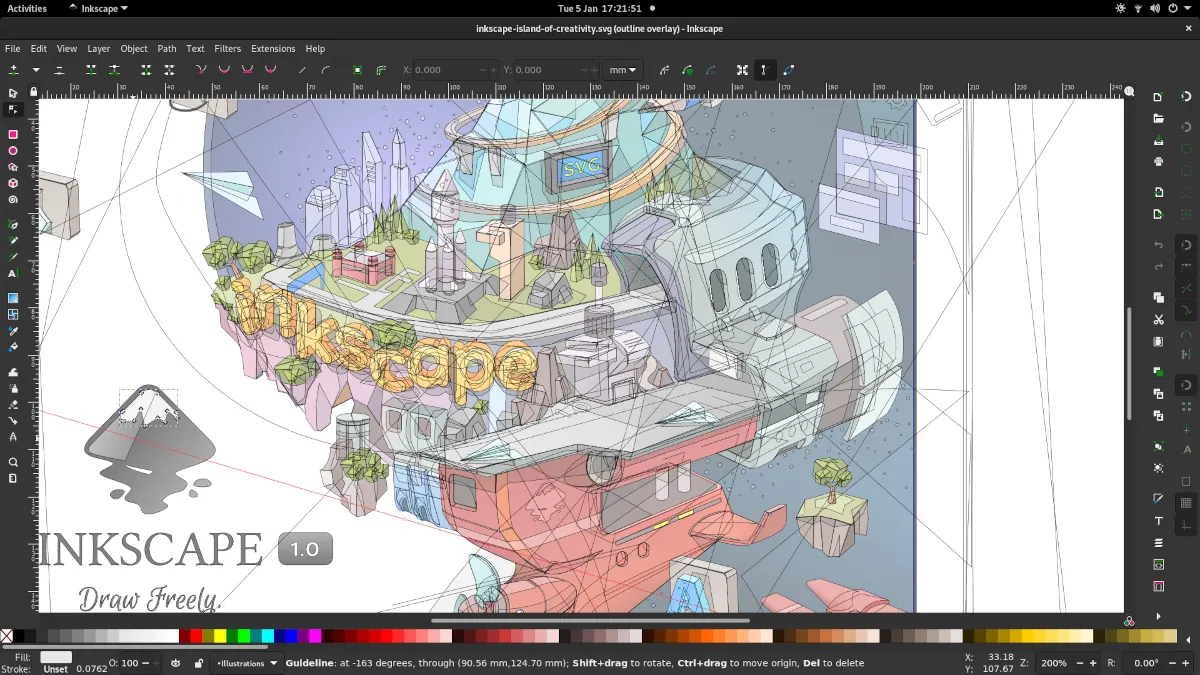
Inkscape 1.1 — outline overlay preview
Moini · Source · CC BY-SA 4.0
By Penpot ·
Playing loads YouTube. YouTube will receive your IP address and device information.
An SVG editor works directly on the text-based vector format used for icons, logos and web graphics. Inkscape is the full desktop answer: GPL-3.0, native SVG, and the deepest feature set. Penpot is a browser design tool built around SVG, with a free plan and an MPL-2.0 licensed codebase you can self-host. Graphite is a newer editor that uses a node graph and is still in alpha. SVG-Edit and Method Draw both run in a browser and are MIT-licensed, which makes them handy for small edits or embedding an editor in your own site. Draw.io exports SVG and is Apache-2.0, but is a diagramming tool, not a drawing one. Choose based on the size of the job. For a logo or a complex illustration, use Inkscape. For a quick fix to a path or colour, a browser editor is faster than opening a large application. For graphics used in a web interface, Penpot keeps assets with the design. The trade-off is clean output: general editors can add metadata or verbose path data, so run a file through an optimizer before shipping it on a website. Method Draw intentionally leaves out layers and some line options to stay simple.
GPL-3.0 desktop SVG editor for Linux, macOS and Windows. The most complete choice, with a steeper interface and no paid tier.
Price: Free (Free software under GPLv3; the site asks for donations and lists no paid tier) (Inkscape pricing, checked 2026-10-22).
Platforms and license: Linux, macOS, Windows. GPL-3.0 (open source) (license source).
Project activity: 4.1k GitHub stars · No commits since Mar 3, 2022
Best for: Logos, icons and complex illustration.
Worth knowing: SVG vector editor. The site links to the GPLv3 guide; the GPLv3 license name is taken from that link.
MPL-2.0 browser design tool; free plan allows up to 8 team members. SVG-based, good for interface assets shared with a team.
Price: Free (Professional plan at $0: up to 8 team members plus unlimited viewers, 10GB storage, 7 days of version history); paid from $7 per per editor/month (Unlimited), capped at $175/month; 14-day free trial (Penpot pricing, checked 2026-10-23).
Platforms and license: Web. MPL-2.0 (open source) (license source).
Project activity: 61.8k GitHub stars · latest release 2.18.5 (Oct 26, 2026) · last commit Oct 27, 2026
Best for: Interface graphics with a team.
Free and open source, MIT or Apache-2.0 at your option, with a web app and desktop builds nearing launch. The site calls it alpha.
Price: Free (Forever free and open source per the site; optional donations and memberships; still in alpha) (Graphite pricing, checked 2026-10-23).
Platforms and license: Web, Windows, macOS, Linux. MIT or Apache-2.0 (your choice) (open source) (license source).
Project activity: 27.7k GitHub stars · last commit Oct 27, 2026
Best for: Procedural vector experiments.
MIT-licensed browser SVG editor that needs no install. Basic, which is the point for small edits.
Price: Free (Open-source browser SVG editor; no price listed) (SVG-Edit pricing, checked 2026-10-23).
Platforms and license: Web. MIT (open source) (license source).
Project activity: 7.9k GitHub stars · latest release v.7.3.3 (Dec 10, 2023) · last commit Aug 5, 2026
Best for: Small SVG fixes.
Worth knowing: Repository lists MIT; LICENSE-MIT.txt read from the repo.
MIT-licensed web vector editor at editor.method.ac, free with optional donations. It omits layers and some line options on purpose, so it stays simple.
Price: Free (Web-based vector drawing app at editor.method.ac; optional donations) (Method Draw pricing, checked 2026-10-23).
Platforms and license: Web. MIT (open source) (license source).
Project activity: 3k GitHub stars · No commits since May 7, 2024
Best for: Simple drawings with minimal interface.
Worth knowing: Deliberately omits layers and some line options.
Apache-2.0, free, no sign-up, exports SVG. A diagramming tool, so it is best for boxes and arrows.
Price: Free (Free with no sign-up; open files from local storage or your own cloud account) (draw.io (diagrams.net) pricing, checked 2026-10-22).
Platforms and license: Web, Windows, macOS, Linux. Apache-2.0 (open source) (license source).
Project activity: 9k GitHub stars · latest release v32.6.1 (Oct 23, 2026) · last commit Oct 23, 2026
Best for: Diagrams exported as SVG.
Compare: draw.io (diagrams.net) alternatives
Docs-only for Inkscape, Penpot, Graphite, SVG-Edit, Method Draw, draw.io (diagrams.net): we did not install or run them, so feature claims come from vendor pages. Vendor prices and free limits change; confirm on the linked pricing page before you commit.
Kevin Fan is a SaaS founder. He runs Free Instead Of, which tracks free and open-source alternatives to paid software and checks each price and free-plan limit against the vendor's own pages.
Based on official pricing, license and product pages checked between 2026-10-22 and 2026-10-23: Inkscape, Penpot, Graphite, SVG-Edit, Method Draw, draw.io (diagrams.net). Prices, free limits and licenses are the figures shown on those pages on those dates. No tool on this page was installed or run. No accounts were created.