Best Free Infographic Makers 2026: 7 Options Compared
Best free Infographic Makers compared: Canva, Adobe Express, Piktochart, Visme and 3 more, with free-plan limits, platforms and prices from official pages checked October 23, 2026.
•3 min read•Graphic Design & Diagramming

Try one now
Quick comparison
| Tool | Price | Platforms | Best for | Tested |
|---|---|---|---|---|
| Canva | Free (Free plan available; see the pricing page for its current limits) | Web, Windows, macOS, iOS, Android | Template-led graphics | Docs only |
| Adobe Express | Free (Free plan: free daily generations for images and text effects, 5 lifetime presentation generations, basic editing tools, 5 GB storage); paid from $9.99 per month, Premium, billed monthly, 30-day free trial | Web, iOS, Android | Social-sized infographics | Docs only |
| Piktochart | Free (2 PNG downloads, 60 AI credits, 1 GB storage, free templates only, up to 4 team members); paid from $10 per member/month, billed yearly | Web | A single graphic or two | Docs only |
| Visme | Free (Free plan: 500 MB storage, 50 slides per project, JPG/PNG/PDF downloads, 10 AI credits per month); paid from $12.25 per person/month, Starter, billed annually ($147 per year) | Web | Frequent graphics with exports | Docs only |
| Infogram | Free (Basic plan: 1 user, 10 projects, 5 pages per project); paid from $19 per month, Pro billed yearly | Web | Data-driven charts | Docs only |
| Inkscape | Free (Free software under GPLv3; the site asks for donations and lists no paid tier) | Linux, macOS, Windows | Custom vector designs | Docs only |
| Google Slides | Free (Free for anyone with a Google account (storage counts against the account quota)) | Web, iOS, Android | Team-built simple infographics | Docs only |
Independent comparison. Paid placements are labelled separately; editorial links earn no affiliate commissions. Learn more.
See the tools in action
Images from the linked documentation. Versions and features may differ from current plans.
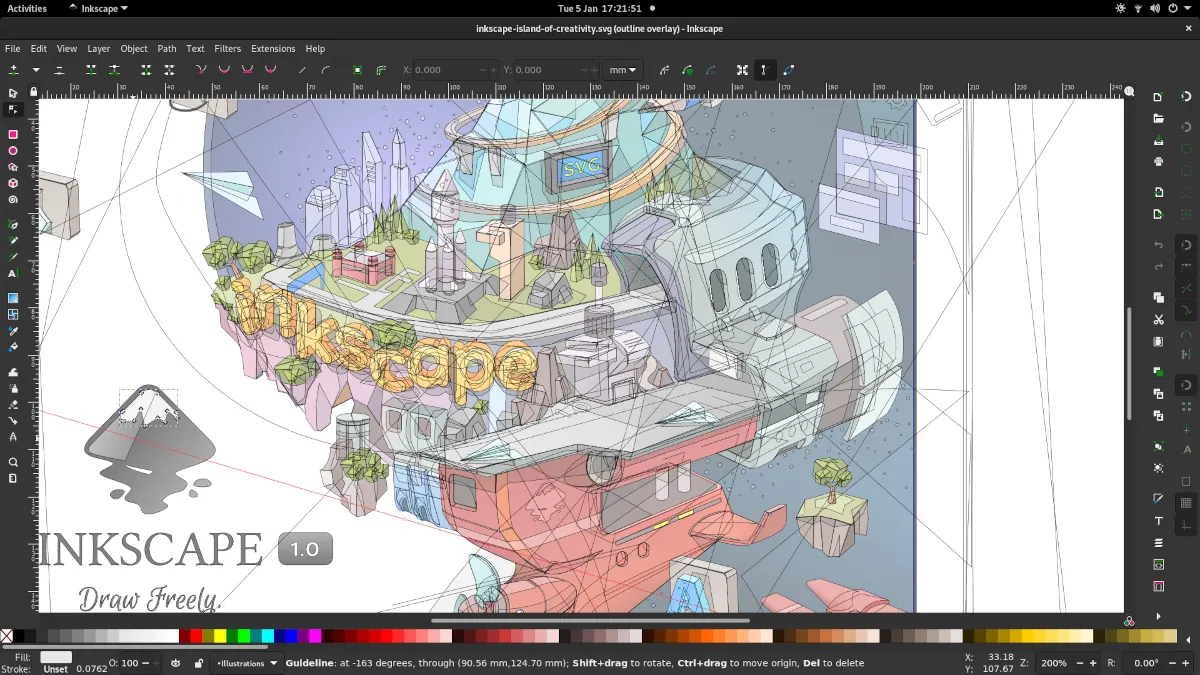
Inkscape 1.1 — outline overlay preview
Moini · Source · CC BY-SA 4.0
Good fit if
- You need a quick graphic with charts (Infogram is the pick)
- You export often and want no download cap (Visme is the pick)
- You make social-sized infographics (Adobe Express is the pick)
- You want no limits and can draw (Inkscape is the pick)
Not ideal if
- You need paid-tier features, uptime guarantees or support that these free plans leave out
An infographic maker is a layout tool with charts and icons attached, and the free plans differ mostly in how much you can take out of them. Piktochart's free plan allows 2 PNG downloads and 60 AI credits, which fits a one-off graphic but not a content calendar. Visme's free plan allows unlimited projects with downloads as JPG, PNG or PDF, 500 MB of storage and 50 pages per project, so it exports more freely. Infogram focuses on charts and caps free users at 10 projects with 5 pages each. Canva and Adobe Express are broader design tools whose free plans cover infographic templates among much else. If you want full control, Inkscape gives you vector illustration and Google Slides is surprisingly workable for tall infographics because everyone already has it. Choose by what you export and how often you make graphics. For a recurring newsletter graphic, watch download caps closely, since free limits often end at the export step rather than the editor. If your data changes, favor a tool with live charts over a static design app. The trade-off is polish against freedom: web tools give you templates in minutes, while Inkscape gives you no limits but no templates. Seven options follow.
Canva
Large template library with a free plan; check the pricing page for current limits. Broad design app, not specialised in charts, so data-heavy graphics take manual work.
Price: Free (Free plan available; see the pricing page for its current limits) (Canva pricing, checked 2026-10-22).
Platforms and license: Web, Windows, macOS, iOS, Android. Proprietary.
Best for: Template-led graphics.
Compare: Canva alternatives
Adobe Express
Free plan with basic tools, limited assets, 5 GB storage and 10 days of version history, no card needed. Premium is $9.99 a month.
Price: Free (Free plan: free daily generations for images and text effects, 5 lifetime presentation generations, basic editing tools, 5 GB storage); paid from $9.99 per month, Premium, billed monthly, 30-day free trial (Adobe Express pricing, checked 2026-10-23).
Platforms and license: Web, iOS, Android. Proprietary SaaS.
Best for: Social-sized infographics.
Piktochart
Free plan allows 2 PNG downloads, 60 AI credits, 1 GB storage and free templates only. Pro is $10 per member per month billed yearly.
Price: Free (2 PNG downloads, 60 AI credits, 1 GB storage, free templates only, up to 4 team members); paid from $10 per member/month, billed yearly (Piktochart pricing, checked 2026-10-23).
Platforms and license: Web. Proprietary.
Best for: A single graphic or two.
Visme
Free Basic plan has unlimited projects, 500 MB storage and downloads as JPG, PNG or PDF. Starter costs $12.25 a month per person billed yearly.
Price: Free (Free plan: 500 MB storage, 50 slides per project, JPG/PNG/PDF downloads, 10 AI credits per month); paid from $12.25 per person/month, Starter, billed annually ($147 per year) (Visme pricing, checked 2026-10-23).
Platforms and license: Web. Proprietary SaaS.
Best for: Frequent graphics with exports.
Infogram
Charts-first tool; the free plan allows 10 projects with 5 pages each for one user. Pro is $19 a month billed yearly.
Price: Free (Basic plan: 1 user, 10 projects, 5 pages per project); paid from $19 per month, Pro billed yearly (Infogram pricing, checked 2026-10-23).
Platforms and license: Web. Proprietary.
Best for: Data-driven charts.
Worth knowing: Charts and data visuals are the focus; free plan limits are tight for ongoing use.
Inkscape
Free GPLv3 vector editor for hand-built infographics with no export limits. No templates, so you design everything yourself.
Price: Free (Free software under GPLv3; the site asks for donations and lists no paid tier) (Inkscape pricing, checked 2026-10-22).
Platforms and license: Linux, macOS, Windows. GPL-3.0 (open source).
Project activity: 4.1k GitHub stars · No commits since Mar 3, 2022
Best for: Custom vector designs.
Worth knowing: SVG vector editor. The site links to the GPLv3 guide; the GPLv3 license name is taken from that link.
Google Slides
Free with a Google account and collaborative. Not a dedicated infographic tool, but custom page sizes and shared editing work for simple ones.
Price: Free (Free for anyone with a Google account (storage counts against the account quota)) (Google Slides pricing, checked 2026-10-23).
Platforms and license: Web, iOS, Android. Proprietary.
Best for: Team-built simple infographics.
Compare: Google Slides alternatives
Which one to pick
- You need a quick graphic with charts: Infogram
- You export often and want no download cap: Visme
- You make social-sized infographics: Adobe Express
- You want no limits and can draw: Inkscape
Limits of this review
Docs-only for Canva, Adobe Express, Piktochart, Visme, Infogram, Inkscape, Google Slides: we did not install or run them, so feature claims come from vendor pages. Vendor prices and free limits change; confirm on the linked pricing page before you commit.
Related guides
More in Graphic Design & Diagramming
- Adobe Illustrator alternatives
- Sketch alternatives
- CorelDRAW alternatives
- Canva vs Adobe Express 2026: Which Is Best for Social Graphics?
Sources
Kevin Fan
Kevin Fan is a SaaS founder. He runs Free Instead Of, which tracks free and open-source alternatives to paid software and checks each price and free-plan limit against the vendor's own pages.
Methodology
Based on official pricing, license and product pages checked between 2026-10-22 and 2026-10-23: Canva, Adobe Express, Piktochart, Visme, Infogram, Inkscape, Google Slides. Prices, free limits and licenses are the figures shown on those pages on those dates. No tool on this page was installed or run. No accounts were created.