ArtCraft Review: Open-Source Apps Modelled on Adobe
ArtCraft's open-source Photoshop-style apps and AI studio, reviewed from its repositories: alpha state, licences, the legitimacy debate and alternatives.
•4 min read•Photo Editing & AI Images
Verdict:ArtCraft is a real, actively released set of open-source apps modelled on Adobe's, but its own README calls PhotoCraft an early alpha that is not yet a Photoshop replacement for daily professional work. Try it for curiosity, and use GIMP, Photopea, Inkscape or DaVinci Resolve for work that matters today.
Quick comparison
| Tool | Price | Platforms | Best for | Tested |
|---|---|---|---|---|
| PhotoCraft (ArtCraft) | Free and open source (MIT or Apache-2.0) | Windows, macOS, Linux, Web | Curious users who want to try an alpha Photoshop-style editor that opens PSD files | Docs only |
| ArtCraft AI studio | Free and open source; optional subscriptions from $8 per month billed yearly | Windows, macOS, Web | People who want an open-source studio for AI image and video generation and compositing | Docs only |
| GIMP | Free; no paid tier | Windows, macOS, Linux | Photo retouching and compositing with a long-established free editor | Docs only |
| Photopea | Free in the browser | Web | Opening and saving PSD files with no install | Docs only |
| DaVinci Resolve | Free version; paid Studio edition | Windows, macOS, Linux | Video editing and grading up to Ultra HD at 60 fps in the free version | Docs only |
Independent comparison. Paid placements are labelled separately; editorial links earn no affiliate commissions. Learn more.
See the tools in action
Images from the linked documentation. Versions and features may differ from current plans.
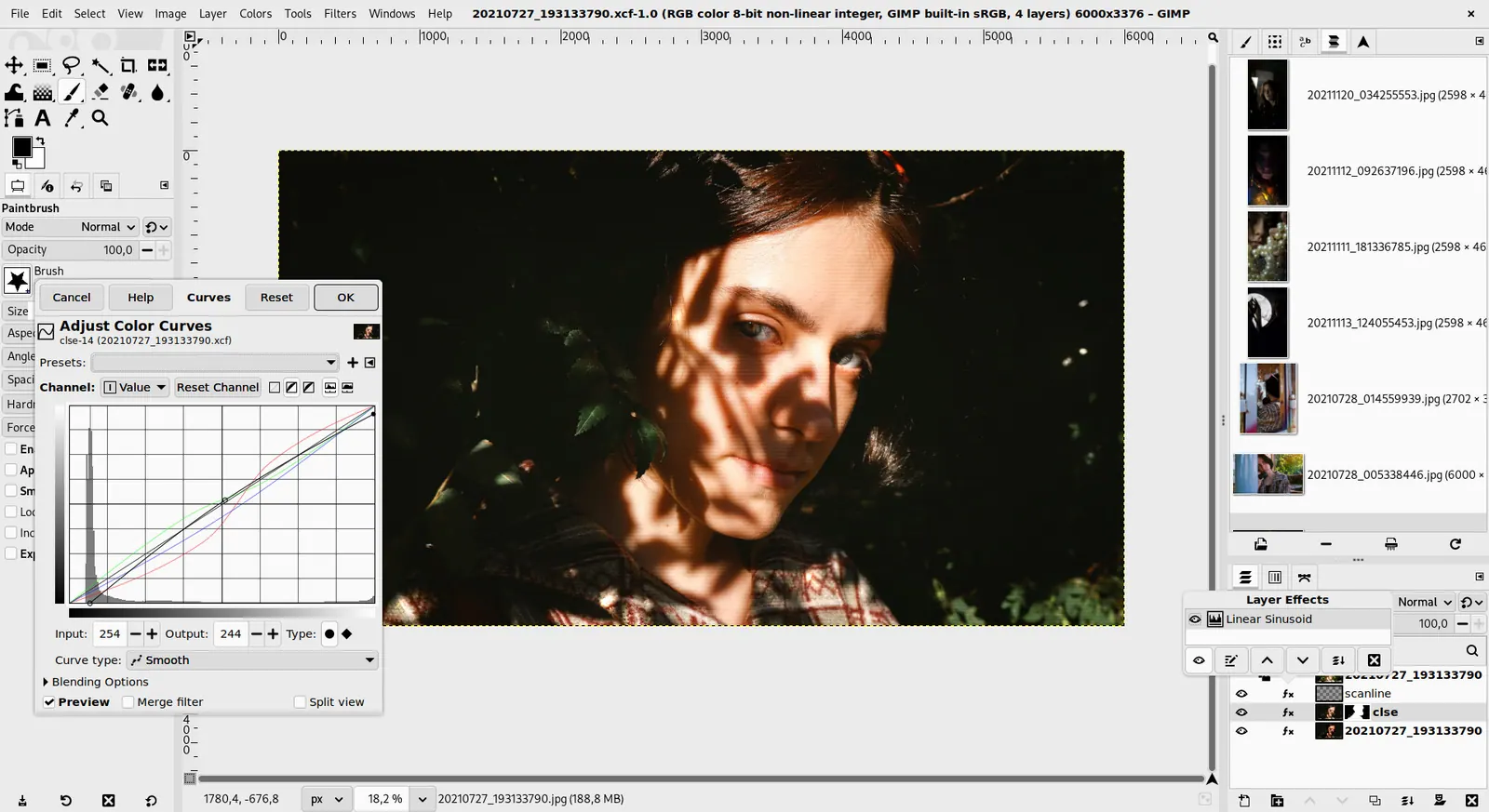
GIMP 3.0 — non-destructive filter workflow
GIMP team / gimp.org · Source · CC BY-SA 4.0
Good fit if
- You want to know what ArtCraft is, how mature it is and how it is licensed
- You are curious about free, open-source tools that read PSD files
- You want to compare it with established free tools before cancelling Adobe
Not ideal if
- You need a finished replacement for Photoshop or Premiere Pro, which ArtCraft's own repositories say it is not yet
- You need a tool backed by a long track record and a large independent review history
- You need legal certainty about similarity to Adobe's interface, because that is debated and unresolved
ArtCraft is an open-source project whose original product is an AI image and video studio. Since late September 2026 it has also published free desktop apps modelled on Adobe's, led by PhotoCraft for Photoshop-style editing. The project's own README calls PhotoCraft an early alpha that is not yet a Photoshop replacement for daily professional work, so use it to explore and keep a proven free tool for deadlines.
What ArtCraft is
According to ArtCraft's site, it is an open-source studio for AI image and video creation. The tools include image-to-location, 2D and 3D compositing, image-to-3D mesh, character posing and background removal, and the site names models such as Seedance 2.5 and Nano Banana 2. The main repository is licensed Apache-2.0 and its latest release listed is v0.41.0, from September 26, 2026.
The site now lists 13 Craft apps: PhotoCraft, VectorCraft, FilmCraft, LightCraft, PdfCraft, EffectCraft, DesignCraft, FigCraft, WordCraft, SoundCraft, DeckCraft, CADCraft and GridCraft. An Italian tech-news summary says the project was announced on Reddit on October 2, 2026, with seven apps that map to Photoshop, Illustrator, Premiere Pro, Lightroom, After Effects, InDesign and Acrobat Pro.
ArtCraft Photoshop: how mature is PhotoCraft?
PhotoCraft's repository describes it as an open-source, clean-room reimplementation of Photoshop written in Rust, with installers for Windows (x64, ARM64 and 32-bit), macOS, Linux and FreeBSD, and a web build. Its releases page shows v0.16.0 on October 25, 2026.
The README status note says it is in early alpha and "not yet a Photoshop replacement for daily professional work", and names AI and generative features, 15 missing tools, typography depth and plug-in compatibility as the biggest gaps. The roadmap, last reviewed October 17, 2026, estimates readiness for real work at about 45%, labels that number an estimate, and counts effort in hours of AI agent time. The other apps are also marked alpha in their repositories, and DesignCraft's roadmap lists a pre-alpha stage.
What users report
A Hacker News thread from October 4, 2026 drew 246 comments. Most people who tried the builds described them as laggy or buggy for real work, a few said they ran fine, and others criticised the code as AI-generated and doubted the pace of progress. Tedium's hands-on piece from October 8 found the apps fast and small, with rough colour pickers, menus and font detection, and said the legal question is unresolved.
These are other people's reports, not tests for this guide.
Licence, clean-room claim and the legitimacy debate
The PhotoCraft README says it is dual-licensed under MIT or Apache-2.0 at your option, while GitHub shows Apache-2.0 on the repositories checked. The ArtCraft name and logos are trademarks outside that licence. The README also states PhotoCraft is not affiliated with, sponsored by or endorsed by Adobe.
On the clean-room claim, the README says PhotoCraft is "implemented from public specs and observed behaviour only", with no proprietary code or assets. Hacker News commenters questioned whether a clean room is possible when AI models are trained on existing code, and some warned about trade dress, meaning the look and feel of an interface. Tedium said a lawyer should weigh in. No source read for this page reported a lawsuit or a statement from Adobe. This is not legal advice.
ArtCraft AI: what it costs
ArtCraft's pricing page says the studio is free and open source and can be used without a subscription by bringing your own compute and third-party subscriptions. Optional plans, billed yearly, are Basic at $8 per month for 1,000 credits, Pro at $28 for 3,750 and Max at $48 for 6,600, with Enterprise custom. Credits are refunded when a generation fails. Whether free users receive credits is not stated.
What to use today
For work with deadlines, established free tools have longer records. The following are covered in more detail in our Photoshop alternatives guide:
- GIMP's download page offers it free for Windows, macOS and Linux with no paid tier.
- Photopea says it fully supports opening and saving PSD files in the browser, which is the quickest way to test your own documents. See Photoshop alternative in browser.
- Inkscape is free and open-source software licensed under the GPL, for vector work.
- DaVinci Resolve has a free version that handles 8-bit video up to Ultra HD at 60 fps, as covered in Premiere Pro alternatives.
If you came here because of Adobe's prices, our Adobe Black Friday guide lists what Adobe's pages show today.
When a paid tool is the better answer
Paying is reasonable when you must exchange native Adobe files with clients, need Photoshop's generative tools, or cannot risk an alpha. ArtCraft's own paid plans are optional credits for the AI studio, not for the open-source Craft apps. If you want a polished free editor, Affinity's site says it is free for individuals on Mac and Windows, and only optional AI tools need a Canva premium plan.
Comparison
| PhotoCraft | GIMP | Photopea | Inkscape | DaVinci Resolve (free) | |
|---|---|---|---|---|---|
| Job | Photoshop-style editing | Photo editing | PSD editing in browser | Vector graphics | Video editing and grading |
| Price | Free | Free | Free | Free | Free version |
| Licence | MIT or Apache-2.0 | Open source | Not open source | GPL | Proprietary |
| Maturity | Early alpha | Established | Established | Established | Established |
| PSD | Open, edit, save | Not checked | Open and save | Not applicable | Not applicable |
How to choose
- You are curious and have time to report bugs. Install PhotoCraft from the GitHub releases and test with copies of your files.
- You have paid work this week. Use GIMP, Photopea or Inkscape, whichever matches the job.
- You want AI generation, not Adobe-style desktop apps. Look at the ArtCraft studio and its pricing page, and compare it with the tools in our Photoshop alternatives list.
Limits of this review
No ArtCraft app was installed, so speed, stability and file fidelity are reported from the project's own documents and other people's accounts, not from testing. Readiness percentages in the roadmap are the project's own estimates. Whether the apps infringe on Adobe's interface or trade dress has not been decided in public, and this page gives no legal opinion. Adobe's response, if any, was not found.
FAQ
What is ArtCraft?
ArtCraft is an open-source project from the storytold organization on GitHub. Its original product is a studio for AI image and video creation. Since late September 2026 it has also published free desktop apps modelled on Adobe tools, such as PhotoCraft and VectorCraft. Its site lists 13 Craft apps, including PhotoCraft, VectorCraft, FilmCraft and PdfCraft.
Is ArtCraft Photoshop good enough to replace Photoshop?
Not yet, by its own account. The PhotoCraft README says it is in early alpha and not yet a Photoshop replacement for daily professional work. Its roadmap estimates readiness for real work at about 45%. It lists gaps in AI features, 15 missing tools, typography depth and plug-in compatibility.
Is ArtCraft AI free?
ArtCraft's pricing page says it is free and open source, and you can use it without a subscription by bringing your own compute and third-party subscriptions. Optional plans start at $8 per month billed yearly for 1,000 credits, then $28 for 3,750 and $48 for 6,600. Whether free users get credits is not stated.
What licence does ArtCraft use?
The PhotoCraft README says it is dual-licensed under MIT or Apache-2.0 at your option, and GitHub shows Apache-2.0 on the repositories checked. The ArtCraft name and logos are trademarks and are excluded from that licence. The main ArtCraft studio repository also shows Apache-2.0.
Is ArtCraft legal and affiliated with Adobe?
The README says PhotoCraft is independent and not affiliated with, sponsored by or endorsed by Adobe, and describes its code as clean-room, written from public specifications and observed behaviour. Commenters on Hacker News questioned that claim, and Tedium said the legal question is unresolved. This page gives no legal opinion.
Can ArtCraft open PSD files?
PhotoCraft's README says it opens, edits and saves layered PSD files, and that re-saving kept the render of 307 of 309 files in a public test set. It also says a re-saved file is not byte-identical to the source. Photopea also says it opens and saves PSD, so test both on your own files.
Related guides
More in Photo Editing & AI Images
- Adobe Creative Cloud alternatives
- Adobe Photoshop alternatives
- Facetune alternatives
- Picsart alternatives
Sources
Kevin Fan
Kevin Fan is a SaaS founder. He runs Free Instead Of, which tracks free and open-source alternatives to paid software and checks each price and free-plan limit against the vendor's own pages.
Methodology
The storytold GitHub organization (ArtCraft's repositories) was read on 2026-10-28 through the GitHub API: licences, releases, READMEs, and the PhotoCraft roadmap. The getartcraft.com home and pricing pages were read the same day. A Hacker News thread from October 2026, a Tedium article and an Italian tech-news summary were read for user reports and the legitimacy debate. Ars Technica's article, the lead for this topic, could not be opened and is not cited. Reddit was not used. No ArtCraft app was installed or run.