Lightroom Alternative One Time Purchase: 6 Picks (2026)
Lightroom alternative one time purchase: ON1, DxO, Luminar and Capture One sold as licences, plus free darktable and RawTherapee. Terms compared.
•6 min read•Photo Editing & AI Images
Verdict:Adobe sells Lightroom only as a subscription, so a one-time purchase means switching tools. ON1 Photo RAW, DxO PhotoLab, Luminar and Capture One Pro all sell licences, but each ties updates or AI features to the version you buy. darktable and RawTherapee cost nothing.
Quick comparison
| Tool | Price | Platforms | Best for | Tested |
|---|---|---|---|---|
| ON1 Photo RAW | Photo RAW 2027 one-time $199.98 regular ($79.99 sale price read on 2026-10-27, promotion ends October 30); MAX one-time $339.98 regular ($129.99 sale); MAX yearly subscription $89.99 | Windows, macOS | Photographers who want a Lightroom-style browse, edit and layers app they own, and accept paying for next year's version | Docs only |
| DxO PhotoLab | Perpetual licence; price not listed on DxO's product page | Windows, macOS | Photographers who want a perpetual licence and will decide version by version whether to upgrade | Docs only |
| Luminar | One-time, regular prices Desktop Only $417, All Platforms $477, Max $546 (Black Friday sale prices read on 2026-10-27: $99, $139, $159); some AI tools included for 365 days | Windows, macOS | Photographers who want quick AI-led edits and are fine with some AI tools renewing yearly | Docs only |
| Capture One Pro | One-time perpetual licence or subscription; no amounts on the pricing page | Desktop | Professionals who want a perpetual licence for a pro raw workflow and don't need the newest updates | Docs only |
| darktable | Free (GPL 3.0) | Linux, Windows, macOS | Photographers who want a free raw editor with a library and are willing to learn a dense interface | Docs only |
| RawTherapee | Free (GPLv3) | Linux, Windows, macOS | Photographers who want detailed raw development controls at no cost | Historical test report |
Independent comparison. Paid placements are labelled separately; editorial links earn no affiliate commissions. Learn more.
Good fit if
- You want to stop paying Adobe monthly and keep editing raw files
- You accept paying again for a major new version, or skipping it
- You are happy to learn a new interface and rebuild your library
Not ideal if
- You need Lightroom's cloud sync across phone, web and desktop
- You want Adobe presets and catalogs to carry over untouched
- You expect a one-time price to cover every future update and AI feature
Adobe does not sell Lightroom as a one-time purchase, so the way out is a different raw editor. The closest paid picks that sell a licence are ON1 Photo RAW, DxO PhotoLab, Luminar and Capture One Pro. The free picks, darktable and RawTherapee, cost nothing. The deciding question is what a single payment actually buys: usually one version, not every future update. For the full field see our page on all Lightroom alternatives.
What matters when you want to pay once
- What the payment covers. A licence for this year's version, or for good.
- Total cost over time. Upgrade fees and AI features that renew.
- The Lightroom job. Raw processing plus a library to browse and sort.
- Platforms. Windows, macOS, Linux.
- Learning curve. A new interface means rebuilding habits.
According to Adobe's Lightroom page, Lightroom is $11.99 a month with 1 TB of storage on an annual commitment billed monthly, and the Photography plan with Photoshop is $19.99. The page lists no perpetual option. One commenter in an October 2026 Hacker News thread suggested Adobe could bring a perpetual option back, but the page offers none today.
Start with the free tools
Free is the zero-cost baseline, and for raw editing it is a serious one. In that same Hacker News thread, darktable was the most-cited free alternative, with RawTherapee and ART mentioned once beside it. The trade-off raised was darktable's learning curve, which its own FAQ also calls steep at first.
The tools in this guide sit in two groups. Free open-source tools cost nothing and you maintain your own workflow. Paid licences cost once, and each has a catch you should price in.
darktable
darktable is a free, open-source raw editor with a built-in library. According to its FAQ, it is released under the GPL 3.0 and keeps its databases (library.db and data.db) on your machine. It mentions XMP sidecar files that sit with your images, saves edits immediately, and has you export a final image with its export module.
It was developed for Linux and ported to Windows and Mac. The FAQ says there is no official release for Intel Macs (the last was 5.6.1), so check your hardware first. On a Mac, expect one extra step: Homebrew disabled its darktable package on 2026-09-01 because it does not pass the macOS Gatekeeper check, and darktable's install page offers an Apple silicon DMG (macOS 13.5 or later) and tells you to open the app from its context menu when macOS says it cannot be opened. Who should not pick it: anyone who wants a gentle start. The FAQ says the initial learning curve can be steep.
RawTherapee
RawTherapee is a free raw converter with detailed development controls. Per the project's site, it is free software under GPLv3 and runs on Linux, macOS and Windows. It is aimed at developing raw files rather than managing a large library, so it fits photographers who already organise files in folders.
RawTherapee, tested
We installed RawTherapee 5.13 (359 MB on disk) and converted a 24-megapixel Sony A7 III raw file, a CC0 sample from raw.pixls.us, to full-size JPEG with its command-line converter on an Apple M1 Max Mac with 32 GB of memory.
| Test | Result |
|---|---|
| One raw file to JPEG (6016 x 4016, quality 92) | 2.0 to 2.7 seconds over three runs |
| Ten raw files in one batch | 17.4 seconds, about 1.7 seconds each |
| Peak memory | 1.37 to 1.48 GB |
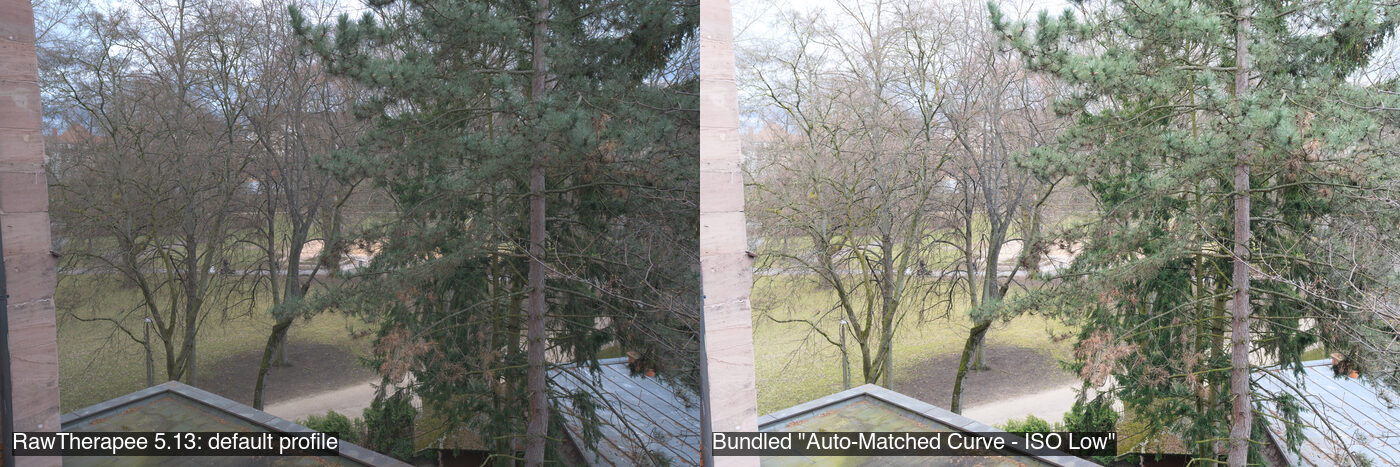
The bundled profiles are the closest thing to Lightroom presets here: the Auto-Matched Curve profile on the right brightens the scene to match the camera's own rendering in one step. Batch conversion through the command line is quick, so RawTherapee suits developing a whole shoot with one profile. It does not catalogue photos, which is the part of Lightroom you would replace with folders.
Who should not pick it: anyone who wants Lightroom's browse, rate and collect workflow in the same window.
ON1 Photo RAW
ON1 Photo RAW is an all-in-one raw editor that browses files where they live, so there is no slow import step. ON1's product page lists Photo RAW 2027 as a one-time purchase for 2 computers at a regular $199.98. On 2026-10-27 it showed a sale price of $79.99 with a promotion that ends October 30. Photo RAW MAX 2027 is a regular $339.98 one-time for 3 computers (sale price $129.99 when read), or $89.99 a year as a subscription.
The licence terms are the point. According to ON1's FAQ, a perpetual licence includes free updates to the version you bought, not major upgrades to future years, while the buy box mentions free updates for 2026 and 2027, so confirm before paying. Cloud sync is listed only with subscriptions. It needs macOS 13 or Windows 11 at minimum, and the page mentions a 30-day money-back guarantee.
Who should not pick it: anyone who needs cloud sync without a subscription.
DxO PhotoLab
DxO PhotoLab is a raw editor sold with a perpetual licence for Windows and macOS. DxO's page labels it "Perpetual license" and offers a free trial, but lists no price, so none is stated here. Check DxO's shop for the current figure.
Owners describe the real cost in a May 2026 DxO forum thread. Upgrade pricing depends on owning one of the two previous versions, some compare frequent upgrades to a subscription, and others say you can skip versions. One user reported support for an older version ending after a macOS update, leading to a paid upgrade.
Who should not pick it: anyone who wants to pay once and never again on an operating system that keeps moving.
Luminar
Luminar is an AI-led photo editor that also runs as a plug-in for Photoshop, Lightroom and Apple Photos. According to Skylum's pricing page, all plans are a one-time payment. The page was running a Black Friday sale on 2026-10-27 with no end date shown: Desktop Only was $99 for 2 desktop devices on macOS and Windows, All Platforms $139, and Max $159. The listed regular prices are $417, $477 and $546.
The catch is in the AI. Restoration, GenErase, GenSwap, GenExpand and the AI Assistant are included for 365 days, then need a Luminar Prime subscription. Core tools such as Sky AI and Light Depth keep working while the licence is active.
Who should not pick it: anyone who wants every AI feature to stay free after year one.
Capture One Pro
Capture One Pro is a professional raw editor sold as a subscription or a one-time licence. Its pricing page lets you switch from a subscription to a perpetual licence at any time, and says that after five years of subscribing the licence costs nothing extra. It lists no amounts, so none is given here.
It describes the perpetual licence as best for photographers who don't depend on the newest updates or hardware support. That is the honest read of the trade-off. Who should not pick it: anyone who wants the newest camera support on a one-time payment.
When a paid tool is the better answer
Pay if the free tools cost you time you value more than the price. A photographer with a deadline and a Windows or Mac machine may prefer ON1 or DxO for a ready workflow, while someone happy to learn can stay free with darktable. Stay free if you shoot as a hobby, use Linux, or dislike buying upgrades.
Affinity is a different case. Its site says it is free for individuals, but it makes no mention of raw processing or catalogs. Treat it as a Photoshop-style companion, not a library. Our Photoshop alternatives page covers that job.
Comparison
| Tool | Licence | Price shown | Platforms | Library |
|---|---|---|---|---|
| ON1 Photo RAW | One-time, version-bound | $199.98 regular ($79.99 sale to Oct 30); MAX $339.98 regular | Windows, macOS | Browses in place |
| DxO PhotoLab | Perpetual | Not shown | Windows, macOS | Not read |
| Luminar | One-time, AI renews after 365 days | $417 to $546 regular ($99 to $159 sale on 2026-10-27) | Windows, macOS | Not read |
| Capture One Pro | Perpetual or subscription | Not shown | Desktop | Not read |
| darktable | Free, GPL 3.0 | Free | Linux, Windows, macOS | Yes |
| RawTherapee | Free, GPLv3 | Free | Linux, Windows, macOS | Not stated |
How to choose
You want to pay nothing. Start with darktable for a library or RawTherapee for development controls. Our free Lightroom alternative guide goes deeper on both.
You want a licence you own and a ready workflow. Compare ON1 and DxO on upgrade terms before price, and read the best Lightroom alternative roundup.
You are a working professional. Capture One Pro is the pro-oriented option; see Lightroom vs Capture One.
Limits of this review
Only RawTherapee was installed and run, from its command-line converter; its editing interface was not reviewed and timings come from one fast Mac, so slower machines will take longer. darktable was not run. The paid tools were not installed or tested. DxO and Capture One dollar prices are left out because their official pages list no amounts. ON1 and Luminar prices were sale prices when read on 2026-10-27 and are labelled as such; the ON1 buy box and FAQ word update terms differently. Capture One's update rules for perpetual licences were not confirmed from a readable official page.
FAQ
Does Adobe sell Lightroom with a one-time purchase?
No. Adobe's Lightroom page lists only subscription plans, such as Lightroom at $11.99 a month and the Photography plan at $19.99 a month on an annual commitment billed monthly. It mentions no perpetual option, so a one-time purchase means moving to a different raw editor.
Is there a free Lightroom alternative with a photo library?
darktable is free under the GPL 3.0 and its FAQ describes a library and database, with XMP sidecar files mentioned alongside images. RawTherapee is also free under GPLv3 and focuses on raw development. Both run on Linux, Windows and macOS, though darktable's FAQ says there is no official release for Intel Macs.
Which Lightroom alternatives sell a perpetual licence?
According to their own pages, ON1 Photo RAW sells a one-time licence, DxO PhotoLab is a perpetual licence, Luminar plans are one-time payments, and Capture One Pro offers a one-time perpetual licence next to its subscription. Each has terms on updates, so read them before you buy.
Do one-time Lightroom alternatives include future updates?
Usually only for the version you buy. ON1's page says a perpetual licence includes free updates to that version but not major upgrades to future years. Capture One's page says its perpetual licence suits photographers who don't depend on the newest updates. Luminar's AI tools are included for 365 days.
Can I import my Lightroom catalog into these tools?
None of the official pages read for this guide describes a Lightroom catalog import for any of the six tools, so treat edits as non-portable. Raw files stay yours, and darktable's FAQ mentions XMP sidecar files that sit next to the originals. Keep your original raw files and export finished images before you switch.
Is Affinity a Lightroom alternative?
Only for pixel editing. Affinity's site says it is free for individuals on Mac and Windows, with AI tools needing a Canva premium plan. It makes no mention of raw processing or photo catalogs, so it replaces Photoshop-style work better than a Lightroom library.
Related guides
More in Photo Editing & AI Images
- Lightroom alternatives
- Photo Mechanic alternatives
- Affinity Photo alternatives
- Photo editors alternatives
Sources
Kevin Fan
Kevin Fan is a SaaS founder. He runs Free Instead Of, which tracks free and open-source alternatives to paid software and checks each price and free-plan limit against the vendor's own pages.
Methodology
RawTherapee 5.13 was installed with Homebrew on an Apple M1 Max Mac (32 GB, macOS 26.5) on 2026-10-27 and used to convert a CC0 Sony A7 III raw file from raw.pixls.us with rawtherapee-cli; timings and peak memory come from /usr/bin/time. darktable could not be installed through Homebrew on that date. Adobe's Lightroom page, ON1's Photo RAW page, DxO's PhotoLab page, Capture One's pricing page, Skylum's pricing page, the darktable FAQ and Affinity's site were read on 2026-10-27. Two Hacker News threads (June 2024 and October 2026) and one DxO forum thread (May 2026) were read for user pain points. Reddit threads were not used.